
 Adam Pichardo
A business auto-response system automatically sends predefined text replies when customers reach out, so no inquiry goes unanswered even when your team is unavailable. Think of it as a front-desk employee who never sleeps: it acknowledges every message, sets expectations, and keeps leads warm until a real person can follow up. For small businesses, the payoff is immediate. You stop losing leads to voicemail, you respond consistently at 2 AM and 2 PM, and your customers feel heard from the first contact.
Getting started requires four things: a platform that supports SMS automation, a dedicated business number, defined triggers, and message templates. Compliance with the FCC’s Telephone Consumer Protection Act (TCPA) is non-negotiable from day one. Here is what every small business owner needs to know to build a system that works.
At a glance, a well-built auto-response system delivers:
- Instant replies to inbound texts, missed calls, and keyword triggers
- 24/7 coverage without adding headcount
- Consistent, on-brand communication across every customer touchpoint
- Automatic lead capture and qualification before a human steps in
- TCPA-compliant opt-out handling built into every message flow
Why small businesses gain the most from automated text responses
Automated text responses level the playing field for small businesses that cannot staff a phone line around the clock. The advantages are concrete: faster response times, fewer lost leads, more organized operations, and 24/7 basic coverage without hiring a night shift.
- Instant engagement: A reply that arrives within seconds keeps a prospect in the conversation. One that arrives the next morning often finds them already talking to a competitor.
- Time savings: Repetitive questions about hours, pricing, and location get answered automatically, freeing your team for work that actually requires a human.
- Lead capture: When someone texts a keyword or submits a form, an immediate reply acknowledges their interest and tells them what happens next, which is exactly when conversion rates are highest.
- Consistent communication: Every customer gets the same clear, professional message regardless of who is on shift or what time it is.
- Scalability: The system handles ten messages or ten thousand with equal reliability. You do not need to hire before you grow.
For a deeper look at how automated text replies drive growth, the connection between response speed and revenue is well documented across service industries.

Common types of automated business auto-response messages
Not every auto-reply serves the same purpose. Matching the message type to the trigger is what separates a useful system from one that confuses customers.
- After-hours replies: Sent when a message arrives outside business hours. The goal is to confirm receipt, set a clear return time, and provide an urgent contact path if needed. Example trigger: any inbound text between 6 PM and 8 AM.
- Lead capture and qualification: Fires when someone texts a keyword like “QUOTE” or submits a web form. The reply acknowledges interest and asks a qualifying question or directs the lead to a booking link.
- Appointment confirmations: Sent automatically after a booking is made. Reduces no-shows by confirming the date, time, and location, and often includes a reminder 24 hours before.
- Order and service status updates: Triggered by payment confirmation or a status change in your system. Keeps customers informed without requiring a manual follow-up call.
- Support triage: Acknowledges a support request, provides a ticket or reference number, and routes the customer to a FAQ link or a specific team member.
- Missed-call text-back: Fires when a call goes unanswered. The customer receives a text within seconds asking how you can help, recovering a lead that would otherwise go to voicemail.
Pro Tip: Map each trigger to exactly one template. “Blind” automation, where a single generic reply fires for every scenario, confuses customers and reduces engagement. Specificity is what makes automation feel human.
How to set up a business auto-response system step by step
This process works across most SMS automation platforms. You do not need a developer, but you do need to move through each step in order.
-
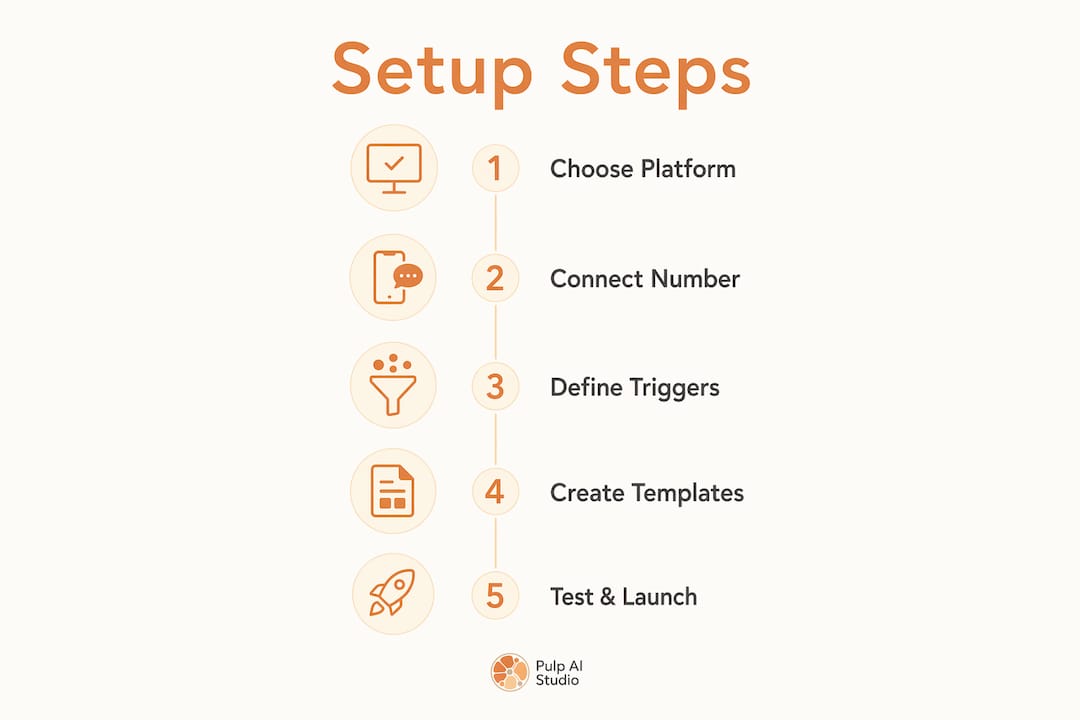
Choose a platform that supports SMS automation. Look for trigger variety, template customization, compliance tools, and CRM integration. Sakari, Grasshopper, and DialMyCalls are three platforms commonly used by small businesses, each with different strengths in scheduling, routing, and message personalization. Most do not require a special phone number to get started.
-
Connect or obtain a dedicated business SMS number. You can port your existing business line or provision a new 10-digit local number. Avoid using a personal cell number for business automation. Carrier registration requires your business name, address, EIN, a website with a visible opt-in policy, and sample messages that include opt-out language.
-
Define your triggers. Common options include: new inbound message, after-hours message, missed call, keyword received (such as “HOURS,” “QUOTE,” or “BOOK”), form submission, and appointment status change. Most platforms let you run multiple triggers simultaneously so different scenarios get different responses.
-
Write your message templates using the A.C.T. framework. Research shows that the most effective auto-reply formula follows three lines: Acknowledge receipt, Clarify what happens next with a specific timeline, and Transition to the next step. Every template should include your business name, the reason for the automated reply, and a clear next action.
-
Set compliance safeguards. Under the TCPA, businesses must obtain prior express written consent before sending marketing texts. Every message in a promotional flow must include an opt-out instruction such as “Reply STOP to unsubscribe.” Your system must honor opt-outs promptly, and the FCC requires callers to process revocation requests within 10 business days of receipt.
-
Test with a real phone. Send texts from a personal mobile to your business number and check timing, formatting, and duplicate messages. Dashboard previews miss real-world issues. Confirm that each trigger fires once, that the message displays correctly on both iOS and Android, and that no two identical replies land in the same conversation.
-
Set a cooldown window. Configure your system to send the same automated reply no more than once every 2–3 hours per conversation. Without this guardrail, a customer who sends multiple messages in a row receives multiple identical replies, which reads as spam.
-
Monitor and update on a schedule. A quarterly review works for most businesses. Check that hours, links, and response time estimates are still accurate. Update templates before busy seasons or whenever your service offering changes.
Best practices for creating effective auto-responses
The difference between an auto-reply that builds trust and one that annoys customers usually comes down to tone, timing, and structure.
- Sound human. Automated replies should feel like a bridge until a live person is available, not a wall. Use your brand’s natural voice, avoid corporate filler, and write the way you would actually speak to a customer.
- Apply the A.C.T. framework consistently. Acknowledge the message, Clarify what happens next with a specific timeframe (“We’ll reply by 9 AM tomorrow”), and Transition to a clear next step. Vague phrases like “We’ll get back to you soon” erode trust rather than build it.
- Segment by trigger. A lead capture reply and an after-hours reply serve different purposes. Writing one generic message for both scenarios creates confusion and misses the moment.
- Start simple, then scale. Launch with one after-hours reply and one receipt acknowledgment. Monitor engagement for a few weeks before adding keyword flows, branching logic, or appointment sequences.
- Include opt-out language in every promotional message. “Reply STOP to unsubscribe” is not optional. It is a legal requirement under the TCPA and a trust signal for customers who want to know they are in control.
- Respect quiet hours. Do not send automated replies late at night. Most platforms let you schedule a delivery window; use it.
Pro Tip: Set a cooldown of 2–3 hours between identical auto-replies per conversation. Without it, a customer who sends three messages in a row gets three identical replies, and that feels like spam regardless of how good the message is.
Auto-response message examples for small business scenarios
These templates follow the A.C.T. framework and are ready to customize. Replace bracketed fields with your actual details.
-
After-hours reply: “Hi [First Name], thanks for reaching out to [Business Name]. We’re currently closed but will reply by [Time] tomorrow. For urgent help, call [Phone Number] or reply HELP. Reply STOP to opt out.”
-
Lead capture (keyword trigger “QUOTE”): “Thanks for your interest in [Business Name]! We received your request and will send a custom quote within [Timeframe]. To speed things up, reply with your zip code. Reply STOP to opt out.”
-
Appointment confirmation: “Your appointment with [Business Name] is confirmed for [Date] at [Time] at [Address]. Reply YES to confirm or RESCHEDULE to change it. Questions? Call [Phone Number].”
-
Missed-call text-back: “Hi, this is [Business Name]. We just missed your call and don’t want to leave you hanging. How can we help? Reply 1 for Pricing, 2 to Book, or 3 for Support.”
-
Order or service status update: “Good news, [First Name]! Your [Service/Order] is [Status]. Estimated completion: [Date/Time]. Questions? Reply here or call [Phone Number].”
Pro Tip: Always include your business name in the first line of every auto-reply. Customers who receive a text from an unfamiliar number need to know immediately who is contacting them. This is both a best practice and a compliance expectation under TCPA guidelines.
For businesses in regulated industries, the approach to automated medical answering adds an additional layer of compliance requirements worth reviewing before deployment.
Which platforms help you set up automated text responses?
Choosing the right platform shapes how quickly you can launch and how much you can customize over time. The right fit depends on your budget, technical comfort level, and the complexity of your workflows.

Sakari is built for business SMS and supports multiple trigger types, template personalization, and compliance management. It integrates with CRM tools and is frequently recommended for small businesses that need reliable scheduling and keyword-based routing without a steep learning curve.
Grasshopper focuses on virtual phone systems for small businesses and includes auto-reply features alongside call forwarding and voicemail transcription. It suits businesses that want a single platform for both voice and text without managing separate tools.
DialMyCalls handles both SMS and voice broadcasts, making it a practical option for businesses that send appointment reminders or service alerts at volume. Its compliance tools include opt-out management and contact list segmentation.
Across all three, look for these capabilities before committing:
- Trigger variety (keyword, after-hours, missed call, form submission)
- Template customization with personalization fields
- Built-in opt-out recognition and STOP keyword processing
- CRM or calendar integration
- Trial period or free tier for testing before you scale
For a broader look at AI engagement strategies that pair well with SMS automation, service businesses in 2026 are increasingly combining auto-reply systems with AI conversation handling to extend coverage beyond simple templates.
A Plan Run for You, Not Another Tool to Run
Most owners did not lose the lead because a tool was missing. They lost it because nobody had time to run the tool. So we run it for you: a hosted CRM with the AI already wired in, set up and managed for your shop, live in about two weeks, and priced in the same range as the do-it-yourself AI receptionist plans, at one flat monthly price. The pieces most shops start with:
- Voice AI receptionist. Answers, qualifies, and books onto your calendar day or night, connected to the CRM or field software you already use, and hands the call to a person when it needs one. See the after-hours answering service.
- Speed to lead. A new form fill, ad lead, or missed call gets a text back right away, while the customer is still shopping. More on why the first few minutes decide the job.
- Database reactivation. The old leads and past customers already sitting in your system get a conversational text campaign that books the ones who are ready now. Related: why leads go quiet and how to restart them.
- AI social replies. Facebook and Instagram comments and DMs get answered and routed instead of sitting unread until Monday. The AI chatbot guide covers how those replies work.
Your contacts, your conversation history, and your phone number stay yours to export or port out if you leave. For shops that want the whole system on hardware they own, prompts, logs, and models included, we also do custom builds (about 30 days, since there is hardware to set up). Most shops start managed and grow into a rig, not the other way around.
FAQ
How do I set up an autoresponder for my business?
Choose an SMS platform that supports trigger-based automation, connect a dedicated business number, define your triggers (after-hours, keyword, missed call), write templates using the A.C.T. framework, and test with a real phone before going live.
What is the difference between an auto-reply and an out-of-office message?
An out-of-office reply sends one message per sender to indicate unavailability, while a functional autoresponder uses triggers and conditions to support ongoing workflows, routing, and multi-step communication.
What is the best autoresponder setup for a small business?
Start with one after-hours reply and one receipt acknowledgment, apply the A.C.T. framework to both, and add a 2–3 hour cooldown window. Expand to keyword flows and appointment sequences once you have confirmed the basics work reliably.
Does my auto-response system need to include opt-out instructions?
Yes. Under the TCPA, any promotional or marketing text must include a clear opt-out method such as “Reply STOP to unsubscribe,” and your system must honor that request within 10 business days of receipt.
Key Takeaways
A business auto-response system built on the A.C.T. framework, proper triggers, and TCPA-compliant opt-out handling is the fastest way for small businesses to improve lead capture and customer response time without adding headcount.
| Point | Details |
|---|---|
| Start with two templates | Launch with one after-hours reply and one receipt acknowledgment before adding complexity. |
| Use the A.C.T. framework | Every message should Acknowledge, Clarify with a specific timeframe, and Transition to a next step. |
| Set a cooldown window | Send the same automated reply no more than once every 2–3 hours per conversation to avoid spam perception. |
| Comply with TCPA | Include opt-out language in every promotional message and honor revocation requests within 10 business days. |
| Test with a real phone | Send texts from a personal mobile to catch timing, formatting, and duplicate message issues before going live. |
If you want a system that goes beyond templates and actually handles the conversation, we set it up and run it for you on the managed plan described above. When a call goes unanswered, the caller gets an SMS within 30 seconds, the AI manages the exchange, and you get an instant alert on your phone. The managed setup is live in about two weeks, and your contacts, conversation history, and number stay yours to take with you. See how the missed-call text-back system works, or explore options for automated lead follow-up that pair with your existing setup.