
 Adam Pichardo
Speed to lead is the elapsed time between a lead’s first contact and your first substantive reply. Aim for under five minutes on demo and pricing requests, and under 60 seconds wherever your channel allows it. If you do nothing else this week, run through these three steps:
- Enable instant acknowledgment. Set up an auto-reply (SMS, chat, or email) that fires within 30 seconds of any inbound request, 24 hours a day.
- Route high-intent leads to a named owner. Demo requests and callback forms should land in one person’s queue, not a shared inbox.
- Add an after-hours auto-reply. More than 35% of web leads arrive outside business hours; if no one answers, an AI reply keeps the conversation alive until your team is back.
The rest of this guide explains why those three steps matter, what the research says about conversion decay, and how to build the full system around them.
Key Takeaways
Responding to high-intent leads within five minutes produces multiple times higher conversion than a next-day reply, and most B2B teams currently average closer to 47 hours.
| Point | Details |
|---|---|
| Five-minute rule is the floor | Aim for under 5 minutes on demo and pricing requests; sub-60 seconds is the elite target for phone and SMS. |
| Most teams miss the window | Industry median response sits near 47 hours; fewer than 1% of B2B companies contact leads within five minutes. |
| After-hours leads are the biggest gap | Over 35% of web leads arrive outside business hours. An AI auto-reply within 30 seconds captures what competitors miss. |
| Track P90, not just median | P90 response time exposes your worst-case performance and is the metric most directly tied to lost deals. |
| Pulp AI Studio delivers in two weeks | A scoped missed-call text-back and after-hours AI auto-reply system, client-owned, live in 14 days with optional managed tuning. |
What does “speed to lead” actually measure?
The clock starts at the moment a lead takes a deliberate action: a form submission timestamp, an inbound call, a chat session start, or a demo/pricing request. That event is your start event. Everything before it (page views, ad clicks, email opens) is pre-lead behavior and does not count.
What qualifies as a substantive reply? A human or AI response that moves the conversation forward: asking a qualifying question, confirming a meeting, or providing a direct answer to the lead’s stated need. Auto-acknowledgments (“Thanks, we’ll be in touch!”) do not count toward your speed-to-lead metric. They are useful for setting expectations, but they are not a substantive reply.
Channel differences matter here:
- Phone and SMS: The clock starts at the inbound call timestamp or the moment an SMS is received. Expectations are highest here; leads who call expect a near-immediate response.
- Live chat: Session start is the trigger. Sub-30-second response is the norm for chat.
- Web forms and email: Form submission timestamp. High-intent forms (demo, pricing, callback) carry the same urgency as a phone call.
- Social DMs: Message receipt timestamp. Response expectations on social are rising fast, especially for high-intent messages.
A few edge cases to exclude from your measurement: multi-step forms where the lead abandons mid-flow (no submission, no clock), duplicate submissions from the same contact within a short window (count only the first), webhook delays between your form and CRM (flag these as system latency, not rep latency), and timezone-adjusted after-hours submissions (track separately so they don’t inflate your median unfairly).
Why speed to lead is your highest-leverage revenue variable
The evidence here is unusually consistent across a decade of research. The original Lead Response Management study published in Harvard Business Review found that contacting leads within five minutes dramatically increased the probability of qualification. Modern re-analyses treat that finding as directionally solid for contact probability, while adding that conversation quality at contact matters just as much.
What the 2026 data adds is scale and specificity. Aggregated 2026 statistics show steep conversion decay: contacting leads within five minutes delivers multiple times higher qualification and conversion rates versus next-day replies. Sub-60-second outreach concentrates the largest connect-rate gains, though the marginal benefit of shaving additional seconds inside the five-minute window is small.
Stat to know: A Workato study of 114 B2B organizations found that fewer than 1% contacted an inbound lead within five minutes, and only 31% ever attempted to call an inbound lead. The gap between what converts and what most teams actually do is enormous.
The decay curve is exponential, not linear. Lead value drops steeply in the first few minutes, then more gradually across hours, and a broad compilation of 2026 studies confirms this exponential pattern. By the time a rep follows up 24 hours later, the lead has often already spoken with a competitor, lost urgency, or simply moved on.
Why does this happen? When a lead submits a form or places a call, their intent is at its peak. They are mentally engaged with the problem they want solved. Every minute that passes without a response gives that intent time to cool. A fast reply catches them while they are still in buying mode. A slow one interrupts them hours later when they have mentally filed the inquiry under “maybe later.”
Industry benchmarks put the average B2B first response at roughly 47 hours. That number is not a benchmark to aspire to; it is the gap your team can exploit.
What response time benchmarks should your team actually target?
Benchmarks need to be tiered by intent, not applied uniformly. A lead who requests a demo is not the same as someone downloading a whitepaper, and treating them identically wastes resources on low-intent contacts while under-serving the ones most likely to close.
| Lead Intent Tier | Channel | Elite Target | Acceptable Target | After-Hours Tolerance |
|---|---|---|---|---|
| Demo / pricing / callback | Phone, SMS, chat | Under 60 seconds | Under 5 minutes | AI auto-reply within 30 seconds; human follow-up next business hour |
| High-intent form (contact us, quote request) | Web form, email | Under 5 minutes | Under 1 hour | AI auto-reply within 30 seconds; human follow-up within 2 hours of open |
| Mid-intent form (newsletter, gated content) | Under 1 hour | Under 4 hours | Next business day acceptable | |
| Low-intent (whitepaper download, blog subscription) | Same day | Next business day | Next business day |
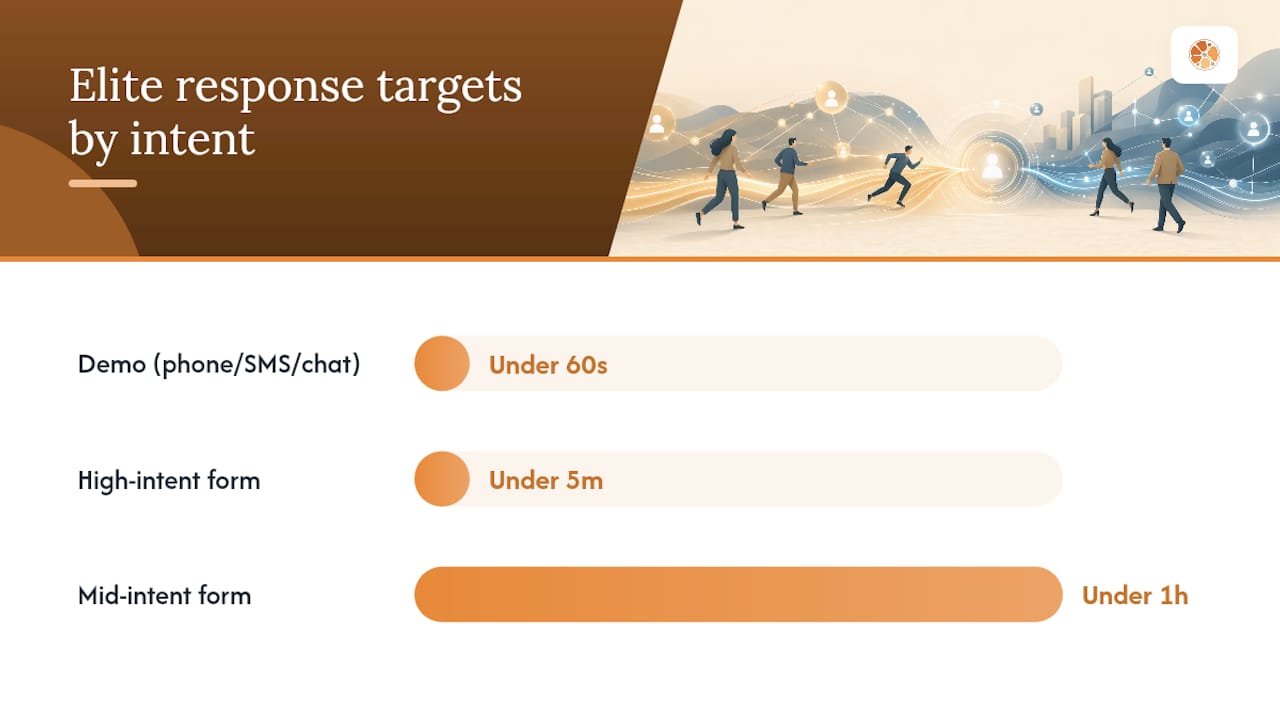
Track both median response time and P90 response time for each tier. The median tells you how your average lead is treated. The P90 tells you how your worst 10% are treated, and that number is often where deals are quietly dying. 2026 benchmark analyses recommend measuring time-to-qualified-context (TTQC) alongside raw response minutes, because a fast but context-poor touch buys smaller conversion gains than a slightly slower, well-qualified handoff.
For after-hours leads, the standard is not “respond at 2 AM.” The standard is “acknowledge within 30 seconds and follow up within the first hour of the next business window.” An AI auto-reply that fires immediately and captures qualifying context overnight is worth more than a human reply that arrives 14 hours later with no context.
How to improve your lead response time: a 5-step playbook
Step 1: Triage and intent scoring at capture
Simplify your forms. Every extra field you add reduces submission rates and adds nothing to speed. Capture the minimum needed to route correctly: name, contact method, and one intent signal (what they want, when they want it, or their company size). Add a hidden field or dropdown that flags intent tier automatically so your router knows where to send the lead before a human ever sees it.
Step 2: Build routing rules with named ownership
Shared inboxes kill response time. Every high-intent lead tier needs a named owner, a backup, and an escalation rule if neither responds within your SLA window. Route by geography when your team covers multiple regions, by specialist when the inquiry requires product knowledge, and by availability when your primary owner is offline. The rule is simple: if no one is named, no one feels responsible.
Step 3: Deploy an immediate engagement layer
This is where most teams recover the most time fastest. An auto-acknowledgment is not enough. What you want is a substantive AI or human handoff within the first minute. For phone leads, a missed-call text-back fires an SMS within 30 seconds and opens a conversation the AI can handle until a rep takes over. For web forms, a chat trigger or SMS confirmation that asks one qualifying question starts the qualification clock immediately. For after-hours SMS automation, the AI handles the full intake and routes a summary to the rep at the start of the next shift.
Pro Tip: Don’t treat the auto-reply as a placeholder. Train it to ask one qualifying question (“What’s the best time to reach you?” or “Which service are you most interested in?”) so the rep who picks up the conversation already has context.
Step 4: Enrich leads before the first human touch
A fast reply that opens with “So, what can I help you with?” wastes the lead’s time and signals that your team did not read the form. Before the rep’s first call or message, the system should surface: what the lead requested, which page or campaign they came from, their company size if available, and any prior interactions in your CRM. This is the time-to-qualified-context metric in practice. The goal is not just speed; it is a fast, informed first touch.
Step 5: Cover after-hours with automation or distributed shifts
After-hours submissions represent a significant share of total web leads, often 35% or more. Three options cover this gap: an AI auto-reply system that handles intake and qualification overnight, a distributed shift model where a rep covers evening hours on rotation, or a managed service that monitors and responds on your behalf. For most small and mid-size teams, the AI auto-reply is the most cost-effective starting point. It functions like a front-desk employee who never sleeps, capturing lead context and keeping conversations warm until your team is available.
Sample first-24-hours playbook for a high-intent campaign launch:
- Hour 0: Campaign goes live; confirm all form webhooks are firing to CRM in real time.
- Hour 0–1: Verify auto-reply is active on all channels; confirm named owners are notified.
- Hour 1–4: First rep review of all high-intent submissions; P90 alert fires if any lead goes uncontacted past five minutes.
- Hour 4–8: Mid-day check on never-responded rate; escalate any uncontacted leads to backup owner.
- Hour 8–24: After-hours AI handles all new submissions; rep receives overnight summary at shift start.
What tools and integrations does a fast lead response system need?
You do not need to name a vendor to build a solid architecture. You need to understand the components and evaluate solutions against them.
Core components every system needs:
- Capture webhook: Fires within seconds of form submission to your CRM or router. Latency here is system latency, not rep latency, and it must be sub-five-second.
- Enrichment service: Appends company, role, and prior-interaction data before routing.
- Intelligent router: Assigns leads by intent tier, geography, and rep availability. Must support named ownership and backup escalation.
- Real-time notification layer: SMS or push alert to the assigned rep within 60 seconds of lead arrival.
- Multi-channel outbound: The system must be able to initiate SMS, voice, chat, or email depending on the lead’s preferred channel.
- CRM sync: Every interaction logged automatically; no manual entry required.
- SLA enforcement engine: Monitors time-in-queue and triggers escalation or auto-reassignment when a threshold is breached.
Vendor-selection checklist:
- API latency under five seconds from form submission to CRM record creation
- Real-time routing with configurable intent tiers and named ownership
- Multi-channel outbound (SMS, voice, chat, email) from a single platform
- DNC and TCPA compliance checks built into the outbound layer
- Transparent ownership model: do you own the system, or are you renting a subscription?
Operational tradeoffs by capability tier:
- Entry tier (in-house build): Lowest upfront cost, highest internal time investment. Works if you have a developer and a CRM with webhook support. Risk: no SLA enforcement, no after-hours coverage without additional tooling.
- Scale tier (scoped custom deployment): A developer builds and delivers a system configured to your routing rules, channels, and CRM. You own it outright. Faster to deploy than an in-house build, and the rig stays yours. Best fit for teams that want a production-grade system they control.
- Mission-critical tier (managed plan): Adds ongoing monitoring, tuning, and SLA reporting on top of the scoped build. Appropriate when after-hours coverage and continuous improvement are non-negotiable. For setting up a business auto-response system from scratch, a scoped build with an optional managed plan covers both the deployment and the ongoing governance.
Which KPIs actually tell you if your lead response is working?
Raw timestamps are a start, not a finish. The metrics that link speed to revenue outcomes are the ones worth tracking.
Primary metrics:
- Median response time: The midpoint of your response distribution. Useful for trend-spotting but easy to game by improving only the fastest responses.
- P90 response time: The time by which 90% of leads have received a reply. This is the metric that exposes your worst-case performance and drives coaching conversations.
- Time-to-qualified-context (TTQC): How long until the rep has enough information to run a real qualifying conversation. Tracks enrichment quality, not just speed.
- Contact rate: The percentage of leads that receive a substantive reply within your SLA window.
- Connect-to-qualified-conversation rate: Of the leads you contacted, how many turned into a real qualifying conversation? This separates fast-but-shallow touches from fast-and-effective ones.
- Never-responded rate: The share of leads that received no reply at all. This is the number that AI-driven systems reduce most directly.
Secondary metrics:
- Lead-to-opportunity conversion rate, segmented by response window (under 5 minutes, 5–60 minutes, 1–24 hours, over 24 hours)
- Close rate by response window
- Pipeline velocity (average days from lead to close)
- After-hours capture share (what percentage of after-hours leads received a reply within 30 minutes)
Dashboard structure:
| Metric | Display Format | Alert Threshold | Review Cadence |
|---|---|---|---|
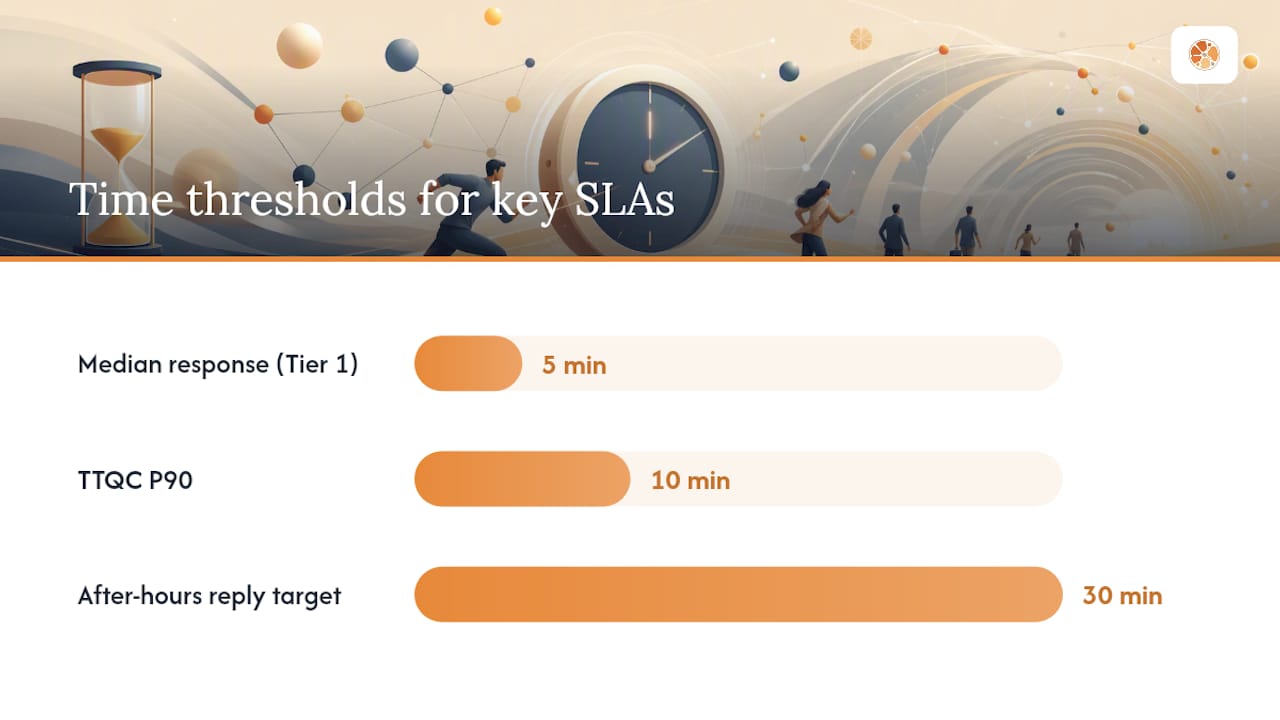
| Median response time (by tier) | Line chart, weekly trend | Tier 1 exceeds 5 minutes | Weekly |
| P90 response time (by rep) | Bar chart, per-rep | Any rep P90 exceeds 15 minutes | Weekly |
| Never-responded rate | Single number, red/green | Above 5% | Daily |
| Contact rate within SLA | Gauge, by intent tier | Below 80% for Tier 1 | Daily |
| TTQC | Histogram | P90 exceeds 10 minutes | Weekly |
Weekly SLA reviews should be owned by a named person, not a committee. Automated alerts for P90 breaches should fire to that owner’s phone, not just to a shared Slack channel. The difference between a metric on a dashboard and a metric that drives behavior is whether someone’s name is attached to it.
A two-week scoped build: what deployment actually looks like
The following is a representative implementation timeline for a missed-call text-back and after-hours AI auto-reply system, based on the scoped build model.
Project timeline:
- Days 1–2 (Scoping): Map inbound channels (phone numbers, web forms, chat widgets), define intent tiers, confirm CRM and webhook access, document DNC and TCPA compliance requirements, agree on routing rules and named owners per tier.
- Days 3–10 (Build): Configure capture webhooks, build the AI conversation layer (trained on the business’s services, hours, and FAQs), set up missed-call text-back with 30-second trigger, integrate CRM sync and lead alert notifications, configure SLA enforcement rules.
- Days 11–13 (Test and integration): End-to-end testing across all channels, confirm webhook latency is under five seconds, validate DNC list checks, run after-hours simulation, confirm rep notification delivery.
- Day 14 (Go-live and tuning): System goes live; monitor P90 and never-responded rate in real time for the first 48 hours; adjust routing rules based on actual lead volume and distribution.
What to expect from the client side:
- Access to phone/SMS routing (forwarding rules or number porting)
- CRM credentials and field mapping for lead records
- A list of FAQs and service descriptions for AI training
- Named owners per intent tier and their backup contacts
- Confirmation of DNC list and TCPA compliance posture
Results a build like this typically targets: A meaningful reduction in never-responded rate (from double-digit percentages to under 5%), contact rate inside five minutes rising above 80% for Tier 1 leads, and measurable conversion lift on high-intent forms where after-hours leads previously went unanswered.
The client owns the system outright after go-live. An optional managed plan covers ongoing monitoring, conversation tuning, and SLA reporting. The developer who scoped the build is the same person who maintains it.
What I’ve learned building these systems
Three lessons come up in every scoped build, and they are worth stating plainly.
Context capture beats microseconds. Teams that obsess over shaving seconds off their median response time while sending generic “We’ll be in touch” replies are optimizing the wrong variable. The builds that move conversion metrics are the ones that capture a qualifying question at intake, so the rep’s first real conversation starts with context, not cold discovery. Speed matters; speed with context matters more.
Name the owner or the SLA will not hold. Every system I have built that routes to a shared inbox or a team alias eventually develops a never-responded problem. The fix is not a better tool; it is assigning a named person to each intent tier with a backup and an escalation rule. The technology enforces the rule, but the rule has to exist first.
Instrument P90 alerts before you go live. Median response time is a lagging indicator that hides outliers. P90 alerts fire when your worst-case performance crosses a threshold, which is exactly when a lead is most likely to have already called a competitor. Setting up the alert before launch, not after the first missed SLA, is the difference between a system that improves and one that just reports.
Client buy-in on all three of these is non-negotiable. A system that routes correctly but whose owners ignore the alerts will underperform a simpler system whose owners actually respond.
What Pulp AI Studio builds for teams that can’t afford to miss a lead
Most teams that read this guide already know what they need to do. The gap is in the build: getting a missed-call text-back, an after-hours AI auto-reply, and a CRM-connected alert system live without a six-month software contract or an internal dev sprint.
Pulp AI Studio closes that gap with a scoped, two-week build that you own outright. When a call goes unanswered, the caller gets an SMS reply within 30 seconds. The AI handles the conversation, captures qualifying context, and sends an instant alert to the owner’s phone. You own the rig: your numbers, your data, your codebase.
Every build includes missed-call text-back, 30-second AI auto-reply, CRM integration, DNC compliance checks, and go-live support. An optional managed plan adds ongoing monitoring and conversation tuning. The person who scopes the project is the person who writes the code and stays accountable after launch.
If your team is losing after-hours leads to voicemail, the missed-call text-back and AI auto-reply system is the fastest path to fixing it. For a full picture of what the after-hours build includes, the after-hours answering service page has the full scope.
Sources
- The Short Life of Online Sales Leads
- Speed to Lead Explained: Definition and 4 Ways to Improve It — Workato
- Why Is Speed to Lead Important? 2026 Data & ROI Impact | GreetNow Blog
- 80+ Lead Response Time Statistics (2026, Verified)
FAQ
What does speed to lead mean?
Speed to lead is the elapsed time between a lead’s first contact (form submission, inbound call, chat start) and your first substantive reply. It is the primary operational metric for inbound lead conversion speed.
How important is speed to lead for conversion rates?
Contacting leads within five minutes produces significantly higher qualification rates than next-day replies, according to the original HBR Lead Response Management study and multiple 2026 benchmark analyses. The decay in lead value is exponential, not gradual.
What is a realistic speed-to-lead target for a small business?
For demo and pricing requests, target under five minutes during business hours and an AI auto-reply within 30 seconds after hours. For lower-intent forms, under one hour is acceptable. The key is tiering your SLA by intent rather than applying a single standard across all leads.
Can an AI system genuinely improve lead response time?
Yes. A missed-call text-back system fires an SMS within 30 seconds of a missed call, and an after-hours AI auto-reply handles intake and qualification overnight. These systems reduce never-responded rates and keep leads warm until a human rep is available, which is the core gap most small businesses face.