
 Adam Pichardo
AI lead qualification compresses the enrich-score-route cycle from hours to under 90 seconds, and the fastest path to proving that in your business is a scoped two-week pilot before you commit to a full rollout.
- Core outcome: An AI agent captures a new lead, enriches it with firmographic and behavioral data, scores it against your ideal customer profile, and either books a calendar slot automatically or routes it to a rep — all before a human has opened their inbox.
- Top metric to watch: Speed-to-lead and qualified meetings per week. Classic HBR research shows response delays sharply reduce conversion probability, making sub-90-second response the single most defensible KPI to set for any pilot.
- Immediate next step: Run a scoped two-week build with Pulp AI Studio or a 30-day SaaS trial. Either way, define your ICP and three qualifying questions before you start.
Key Takeaways
AI lead qualification compresses the enrich-score-route cycle to under 90 seconds and is best validated with a scoped two-week pilot before full rollout.
| Point | Details |
|---|---|
| Speed-to-lead is the anchor KPI | Responding within five minutes makes leads up to 400% more likely to qualify than waiting ten minutes longer. |
| Four signals drive scoring | Firmographic, demographic, behavioral, and intent data each carry different weights for inbound vs. outbound motions. |
| Calibration drift is the top risk | Review scoring thresholds weekly in the first month using closed-won/closed-lost labels to prevent model decay. |
| Pilot before you scale | Start with 3–4 qualifying questions, a 30–60 day time-boxed scope, and written success metrics before expanding. |
| Pulp AI Studio | Builds a custom AI qualification and booking system in two weeks at a fixed fee, with full client ownership and an optional managed plan. |
What is AI lead qualification, and how does it work?
AI lead qualification is the automated process of capturing an inbound lead, enriching it with third-party and behavioral data, scoring it against predefined criteria, and routing or booking it — without a human touching the record first.
The process flows in five stages:
- Capture — A web form, SMS, chat widget, or missed call triggers the system.
- Enrich — The agent pulls firmographic data (company size, industry, location) and demographic data (title, seniority) from connected sources.
- Score — Rules or a machine learning model assign a numeric score based on how closely the lead matches your ICP.
- Route/Book — High-scoring leads get an automatic calendar invite via Google Calendar or Outlook; mid-tier leads go to a rep queue; low-scoring leads receive a nurture sequence.
- Feedback loop — Closed-won and closed-lost outcomes retrain or retune the scoring weights over time.
Agent capabilities you should expect from any modern system:
- Real-time data enrichment at the moment of capture
- Dynamic follow-up questions via chat, SMS, or email
- Automatic CRM record creation and field population (HubSpot, Salesforce)
- Calendar booking or meeting-link delivery without rep involvement
- Sentiment detection and escalation to a human when needed
| Integration type | Example platforms |
|---|---|
| CRM | HubSpot, Salesforce |
| Calendar | Google Calendar, Outlook |
| Messaging | SMS, web chat, WhatsApp |
How AI lead qualification scores, routes, and hands off leads
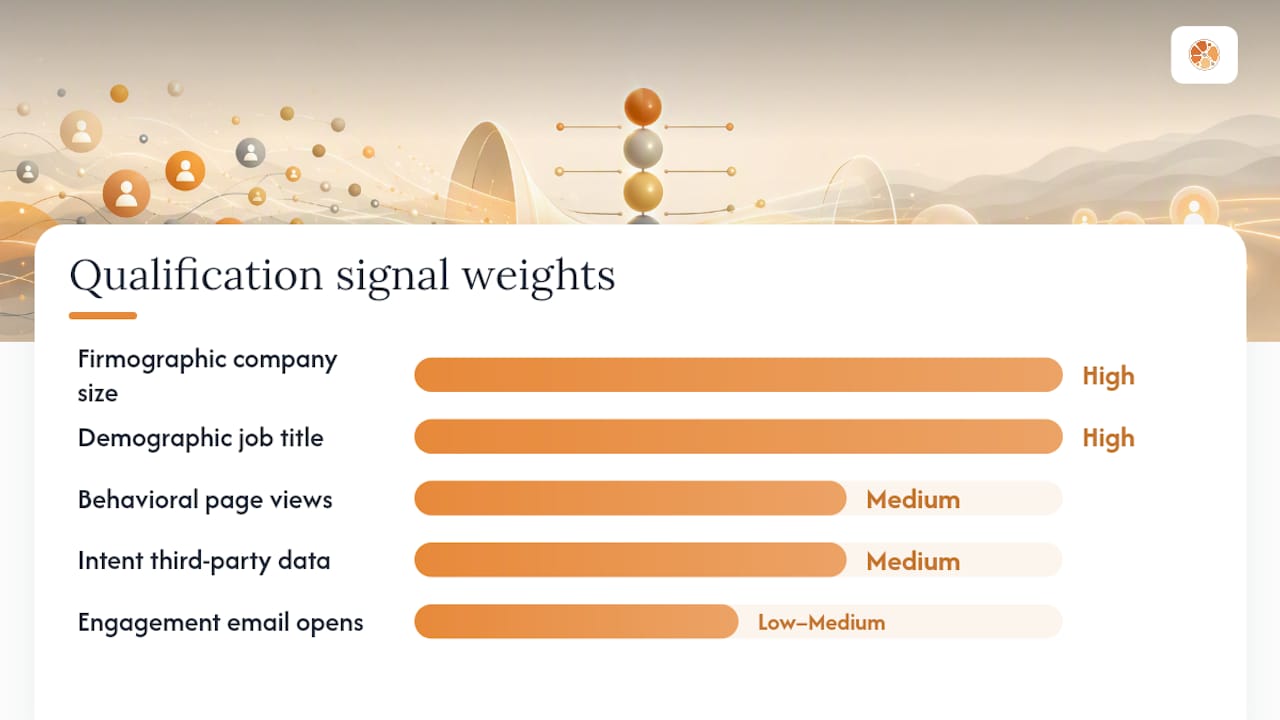
The system combines firmographic, demographic, behavioral, and intent signals into a real-time score the moment a lead enters the pipeline. Each signal type carries a different weight depending on whether the motion is inbound or outbound.
Signal categories and their typical weight:
| Signal type | Example sources | Typical weight |
|---|---|---|
| Firmographic | Company size, industry, revenue band | High |
| Demographic | Job title, seniority, department | High |
| Behavioral | Page views, content downloads, time on site | Medium |
| Intent | Third-party intent data, search topic clusters | Medium |
| Engagement | Email opens, reply rate, SMS response | Low–Medium |
Scoring frameworks like BANT (Budget, Authority, Need, Timeline), CHAMP (Challenges, Authority, Money, Prioritization), and MEDDIC (Metrics, Economic Buyer, Decision Criteria, Decision Process, Identify Pain, Champion) all translate cleanly into weighted scoring rules. BANT works well for transactional SMB sales; MEDDIC fits complex enterprise deals where multiple stakeholders are involved.
Routing patterns fall into three categories: round-robin (equal distribution across reps), territory-based (geographic or vertical assignment), and account-based (matched to a named account owner). Once a lead clears the routing threshold, booking automation delivers a calendar link or places a direct invite on the rep’s Google Calendar or Outlook.
Handoff triggers that should escalate to a human include: negative sentiment detected in a chat or SMS exchange, a lead self-identifying as a high-value account, or a request that falls outside the agent’s scripted decision tree.
A typical timeline for a well-configured system looks like this:
- 0 seconds — Form submitted or missed call received
- Under 60 seconds — Lead enriched with firmographic and demographic data
- Under 90 seconds — Score calculated, routing rule applied
- Immediately — Calendar invite sent or rep notified with full lead context
Industry cases report speed-to-lead moving from 20 minutes to 60 seconds after automated qualification is applied, which is a compression that makes a measurable difference in conversion rates.
What benefits and metrics should you expect?
The primary gains from automated lead scoring are speed, consistency, and cost per qualified lead. Companies that respond within five minutes are up to 400% more likely to qualify leads than those that wait just ten minutes longer, which frames the ROI case before you even look at cost savings.
Core metrics to track in any pilot:
- Speed-to-lead — Target under 90 seconds from capture to first contact
- Qualified meetings per week — The clearest signal that scoring thresholds are calibrated correctly
- Unqualified calls avoided — Tracks how much rep time the system reclaims
- Close rate uplift — Compare cohorts: AI-qualified leads vs. manually qualified leads
- Cost per qualified lead — Vendor and analyst materials report per-lead costs falling sharply when automation replaces manual research
- Model precision and recall — Precision measures how often a “qualified” flag is correct; recall measures how few real buyers the system misses
Illustrative before/after ranges (based on reported deployment patterns, not guaranteed outcomes):
- Speed-to-lead: 15–30 minutes → under 2 minutes
- Qualified meetings per week: +20–40% in the first quarter after calibration
- Unqualified calls: reduced by roughly one-third when 3–4 qualifying questions are asked upfront
Automation also enforces consistent scoring logic across every lead, removing the rep-to-rep variation that inflates pipeline and distorts forecasts. That consistency compounds over time as the feedback loop tightens scoring weights.
What are the most common failure modes, and how do you fix them?
Four failure modes kill most AI qualification pilots before they produce useful data: garbage-in-garbage-out (GIGO), the speed trap, calibration drift, and data staleness.
- GIGO — Scoring a lead against bad CRM data produces bad routing decisions. Fix: audit your CRM for duplicate records, missing fields, and outdated company data before you configure scoring rules.
- Speed trap — Optimizing purely for response speed without checking lead quality produces fast responses to the wrong people. Fix: track qualified meetings, not just response time, as your primary KPI.
- Calibration drift — Scoring weights that worked in month one become stale as your ICP or market shifts. Fix: review thresholds weekly for the first month, then monthly thereafter.
- Data staleness — Enrichment sources that haven’t refreshed in 90+ days feed outdated firmographic data into scores. Fix: set a data-freshness SLA with your enrichment provider and flag records older than 60 days for re-enrichment.
Pro Tip: Before you launch a pilot, run a 30-minute data-health checklist: count records with missing job titles, check for duplicate email domains, verify that your top 20 closed-won accounts are actually in your CRM with correct company size and industry fields.
Risk-mitigation checklist for pilot managers:
- Confirm CRM data completeness (title, company size, industry) for at least 80% of records
- Define “qualified” in writing before the pilot starts — not after
- Set a minimum sample size (at least 50 scored leads) before drawing conclusions
- Assign one person to review false positives and false negatives weekly
- Document the rollback criteria: what outcome triggers a pause or reset
How do you implement AI lead qualification step by step?
The recommended approach is a phased rollout: a scoped two-week build followed by a two-to-four-week evaluation period, then incremental scaling over four to twelve weeks as calibration data accumulates.
Pilot design steps:
- Define your ICP and qualifying questions — Write down the three or four questions that most reliably predict a closed-won deal. Keeping it to 3–4 questions avoids prospect drop-off; more than four increases friction and reduces completion rates.
- Select data and enrichment sources — Identify which firmographic fields you need and which provider will supply them at the moment of capture.
- Set scoring weights — Assign point values to each signal. Start simple: binary yes/no for must-have criteria, weighted points for nice-to-haves.
- Configure routing and booking rules — Define score thresholds for each outcome (auto-book, rep queue, nurture).
- Integrate CRM and calendar — Connect HubSpot or Salesforce for record creation; connect Google Calendar or Outlook for booking automation.
- Build your monitoring plan — Decide which metrics you’ll review weekly and who owns the calibration review.
Phase timeline:
| Phase | Duration | Goal |
|---|---|---|
| Build | 2 weeks | Live system with scoring, routing, and CRM/calendar integration |
| Evaluation | 2–4 weeks | Collect 50+ scored leads; review precision and recall |
| Calibration | Ongoing (weekly, month 1) | Retune weights using closed-won/closed-lost labels |
| Scale | 4 weeks | Expand to additional channels and lead sources |

Calibration plan: After the evaluation period, pull your closed-won and closed-lost records and check whether the model’s scores predicted the outcomes correctly. Leads that scored high but closed lost reveal over-weighted signals; leads that scored low but closed won reveal under-weighted ones. Pilot best practices call for weekly threshold reviews in the first month, then monthly once the model stabilizes.
Channel-specific notes: Web forms and chat widgets are the easiest starting point. SMS and AI lead qualification via SMS work especially well for missed-call flows, where a text reply within 30 seconds keeps a lead warm that would otherwise go to voicemail. WhatsApp and social DMs follow the same logic but require platform-specific API access.
Should you buy SaaS, build custom, or use a hybrid managed service?
For most SMBs, a scoped custom build delivers faster ROI and full ownership. SaaS platforms are worth trialing when you need enterprise-grade features quickly and don’t mind a recurring subscription; a hybrid managed service fits teams that want a custom system but lack the internal capacity to monitor it.
SaaS
- Pros: Fast to trial, no upfront build cost, broad feature sets
- Cons: Subscription dependency, limited customization, data lives in the vendor’s system, pricing scales with volume
Custom-built
- Pros: You own the code and data, deep integration with your specific CRM and calendar setup, extensible as your needs change
- Cons: Requires a capable builder, higher upfront cost, longer initial setup without a specialist
Hybrid managed service
- Pros: Custom system plus ongoing tuning and monitoring, single point of accountability, no internal ops burden
- Cons: Ongoing service fee, dependent on the provider’s availability
Manual qualification is slow and scales poorly, and hybrid models that combine AI screening with human follow-up are the dominant practical pattern for organizations moving to automation. The decision criteria that matter most for SMB buyers:
Low lead volume with high-touch sales usually doesn’t justify a full AI build — a simple CRM workflow or a small SaaS tool is enough. High inbound volume, multi-channel capture, or a need for automatic booking automation is where a custom build or hybrid service pays for itself quickly.
Why scoped custom builds work well for small businesses
A scoped custom build gives an SMB a production-ready system in roughly two weeks, with full ownership of the code and data. That ownership matters: you can extend the system, hand it to a new developer, or integrate a new channel without asking a vendor for permission.
Pulp AI Studio’s standard build covers the core workflow: missed-call text-back within 30 seconds, an AI agent that handles the conversation and asks qualifying questions, automatic CRM record creation, and a calendar booking link delivered to the lead. The client owns the system outright. An optional managed plan covers ongoing monitoring, threshold reviews, and improvements as the business grows.
Typical use cases that go live in two weeks:
- Missed-call text-back with AI qualification and booking for contractors and clinics
- After-hours auto-reply for dealerships and retailers, with lead alerts sent to the owner’s phone
- Appointment booking automation connected to Google Calendar or Outlook
- AI-driven lead management for dealerships with CRM integration
The integration list for a standard Pulp AI Studio build includes HubSpot, Salesforce, Google Calendar, and Outlook. Extensibility is built in: because the client owns the code, adding a new channel or a new scoring rule doesn’t require a new contract.
What should you ask vendors before signing anything?
Ask for a pilot scope with measurable KPIs, an explicit integration list, clear ownership terms, and a written rollback plan before you commit to any vendor.
Questions to ask every vendor:
- What does the pilot scope include, and what are the success metrics?
- Which data sources does the enrichment layer use, and how fresh is that data?
- What are the SLAs for response time and system uptime?
- Who owns the code, models, and training data at the end of the engagement?
- How are scoring thresholds calibrated, and how often are they reviewed?
- What security and compliance controls are in place for lead data (SOC 2, GDPR, CCPA)?
- What is the rollback or exit plan if the pilot doesn’t hit its KPIs?
Red flags to watch for:
- No native CRM or calendar integration in the base offering
- Scoring logic described as proprietary with no explanation of the signals used
- No access to your own training data or scoring history
- Pilot metrics defined vaguely (“improved lead quality”) rather than numerically
- Vendor lead times longer than three weeks for a basic build
Pilot contract tips: Time-box the pilot to 30–60 days. Write the success metrics into the agreement before work starts. Include a rollback clause that specifies what happens to your data if the pilot is terminated. Define the post-pilot transition plan — who owns the system, who monitors it, and what the ongoing cost structure looks like.
G2 reviews are useful for understanding how features like auto-booking and CRM integration perform in practice, but they don’t replace a hands-on pilot with your own lead data.
The case for starting with a scoped build, not a platform
If you asked me what I’d do for an SMB with 50–200 inbound leads per month and a two-person sales team, the answer is a scoped custom build, not a SaaS subscription.
The reason is simple. A SaaS platform gives you a dashboard on day one, but you spend weeks configuring it to match your ICP, your CRM fields, and your booking flow. A scoped build starts from your specific workflow and goes live in two weeks, already connected to your calendar and CRM. The integrations I’d prioritize first are always the same: CRM for record creation, calendar for booking, and SMS for missed-call reply.
The outcome that matters most in the first 30 days isn’t a perfect model. It’s fewer leads going cold overnight and more qualified conversations booked without rep involvement. That’s the signal that tells you the system is working and worth calibrating further.
Pulp AI Studio builds your AI qualification system in two weeks
Pulp AI Studio delivers a production-ready AI lead qualification system for small businesses at a fixed project fee and full client ownership of the code. The after-hours answering and qualification build is scoped to your shop and goes live in two weeks, covering missed-call text-back, AI-driven qualifying questions, CRM record creation, and calendar booking automation.
Before you reach out, prepare three things: a written description of your ideal customer (company type, size, and the one or two signals that predict a closed deal), a sample lead flow showing where leads come from today, and your CRM and calendar login details. That’s all the build needs to get started.
To book a short discovery call and scope your build, visit pulpaistudio.com or go directly to the after-hours answering service page.
Sources
The sources below cover pilot design, signal taxonomy, deployment comparisons, and case-style evidence for AI lead qualification.
- The short life of online sales leads
- How to Qualify Leads Automatically with AI: A Small Business Guide - DEV Community
- SalesMind AI
FAQ
What is AI lead qualification?
AI lead qualification is the automated process of enriching a new lead with firmographic and behavioral data, scoring it against your ideal customer profile, and routing or booking it without manual rep involvement. The goal is to compress that cycle from hours to under 90 seconds.
How do you use AI to qualify leads effectively?
Define three to four qualifying questions tied to your ICP, connect your CRM and calendar, and set score thresholds that trigger auto-booking for high-fit leads and rep routing for mid-tier ones. Keeping the question set to 3–4 items reduces drop-off and produces cleaner data for calibration.
How fast should an AI qualification system respond?
Under five minutes is the widely cited threshold, but the practical target is under 90 seconds. Companies responding within five minutes are up to 400% more likely to qualify a lead than those that wait ten minutes longer.
Are AI-qualified leads worth the investment for small businesses?
Yes, particularly for businesses with high inbound volume or after-hours lead capture. A scoped custom build like the one Pulp AI Studio delivers goes live in two weeks at a fixed fee, meaning the payback period is short when even a few additional booked meetings per month are recovered from leads that previously went to voicemail.
What is the biggest risk in an AI lead qualification pilot?
Calibration drift — scoring weights that were accurate at launch become stale as your market or ICP shifts. Reviewing thresholds weekly during the first month, using closed-won and closed-lost outcome labels, is the standard mitigation.