
 Adam Pichardo
TL;DR:
- Most AI automation projects fail because organizations deploy AI onto outdated processes instead of redesigning workflows. Successful implementation requires clear governance, process redesign, and measuring impact through relevant KPIs. Starting with high-volume, well-understood tasks like missed-call follow-up yields the best return on investment.
Artificial intelligence for automation is the use of AI technologies to handle routine, repetitive, and decision-intensive business tasks without constant human input. As of early 2026, 70% of firms report active AI use, yet over 80% have yet to see measurable productivity or employment impacts. That gap exists because most organizations deploy AI onto old processes rather than redesigning those processes around AI capabilities. This guide covers the technologies involved, the evidence on ROI, a practical implementation framework, and the governance challenges that determine whether your AI investment pays off or stalls.
What technologies power artificial intelligence for automation?
The term “AI automation” covers several distinct technologies, and knowing which one fits your problem is the first decision you make. The industry standard term is intelligent automation, which combines machine learning, natural language processing, and agentic AI into coordinated systems that can perceive, decide, and act.

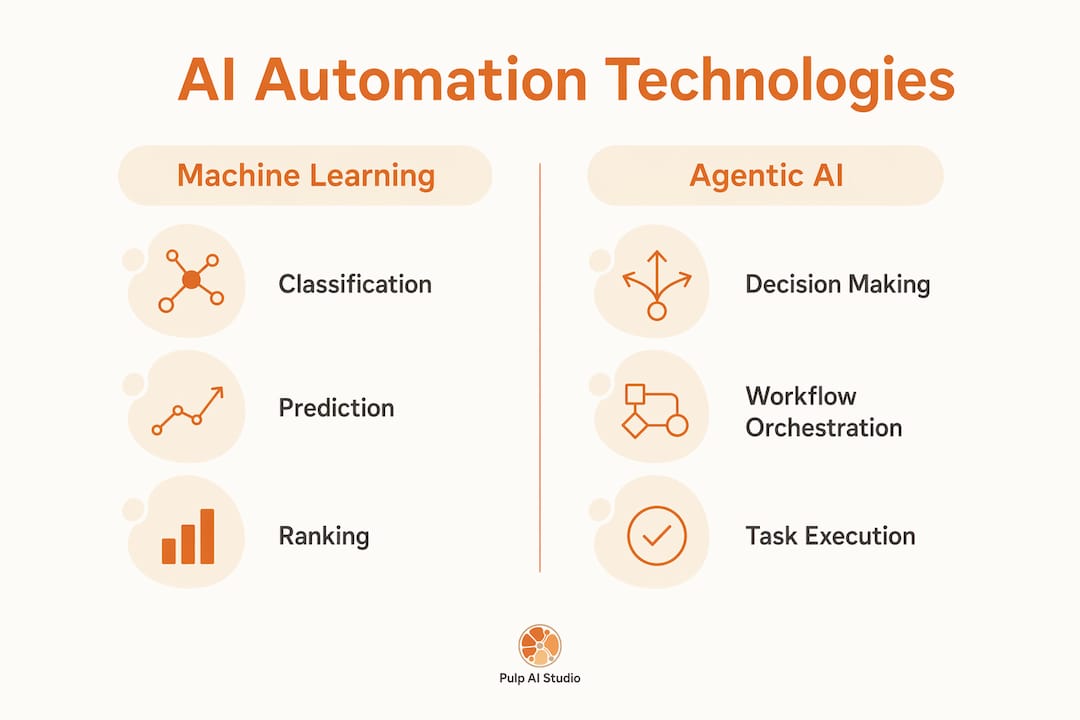
Machine learning trains models on historical data to classify, predict, or rank outcomes. A clinic using machine learning to route patient intake forms is a straightforward example. Natural language processing enables AI to read, write, and respond in plain language, which is what powers AI answering systems and automated email triage. Agentic AI goes further: it takes sequences of actions, calls external tools, and completes multi-step tasks with minimal human prompting. Think of an agentic system as a front-desk employee who never sleeps, handling inquiries, logging data, and escalating only the cases that need a human decision.
Modern deployments rarely use a single model. Multi-model architectures that route tasks by complexity and cost reduce operational costs by 40–60%. A cheaper model handles bulk classification; a more capable model handles nuanced exceptions. That architecture cuts spend while maintaining quality.
Common tasks suited to AI automation include:
- Inbound communication triage: routing calls, emails, and chat messages by intent
- Lead follow-up: sending personalized responses within seconds of a missed contact
- Document processing: extracting, validating, and filing structured data from forms or invoices
- Scheduling and dispatch: matching requests to available capacity in real time
- Reporting: pulling data from multiple systems and generating summaries on a schedule
Platforms like Microsoft Copilot Studio and open-source orchestration frameworks let teams wire these capabilities together without building every component from scratch. The right choice depends on whether you need a bought solution, a hybrid, or a fully custom build. AI Vanguard recommends reserving custom builds for proprietary competitive advantages and buying or using hybrid approaches for standard efficiency projects.
Pro Tip: Before selecting any tool, map the workflow you want to automate end to end. Skipping this step means you will automate a broken process and get faster broken results.
What measurable ROI can AI automation deliver?
The productivity case for AI automation is real, but the numbers require honest interpretation. Firms forecast AI will boost productivity by 1.4% and output by 0.8% over the next three years. Those figures are averages across all firms, including those with minimal deployments. High performers do significantly better.
The adoption gap is striking. 88% of organizations use AI in at least one business function, but only 12% report both cost savings and revenue growth. That 12% share the same profile: strong data quality, clear governance, and redesigned processes. The other 76% are using AI without those foundations.
The table below breaks down the main ROI categories and what drives results in each.
| ROI category | What AI automation changes | What determines the gain |
|---|---|---|
| Labor hours | Routine tasks shift from staff to AI | Volume of repetitive work in scope |
| Error rate | Consistent rule application replaces manual checks | Data quality and model accuracy |
| Response speed | Replies and actions happen in seconds, not hours | Workflow design and trigger setup |
| Revenue capture | Leads and inquiries get immediate follow-up | Coverage of high-value contact points |
| Staff capacity | People shift to complex, judgment-intensive work | Role redesign and training investment |
Traditional metrics often hide AI’s real impact. Teams should redesign KPIs to reflect AI handling routine work while humans focus on complex tasks. Measuring a customer service team by average handle time, for example, will look worse after AI deployment because the AI resolves the easy cases and humans only see the hard ones. The right metric shifts from speed to complexity handled per agent.
The revenue side of AI automation is underreported. A missed call at a plumbing shop or a dental clinic is a lost lead. An AI system that replies within 30 seconds, qualifies the caller, and books an appointment converts that missed call into revenue. That is a direct, measurable gain that shows up in booking rates, not in productivity surveys. You can see real-world AI automation wins across industries where this pattern repeats.
How should you implement AI automation in your organization?
Successful AI automation follows a defined sequence. A typical implementation roadmap runs 6–10 weeks and covers seven phases. Skipping any phase is the most common cause of failure.
- Scope: Define the single process you are automating. Narrow scope beats broad ambition every time.
- Map: Document every step, decision point, and data input in the current workflow. This is where you find the redesign opportunities.
- Design: Decide which steps AI handles, which humans handle, and what triggers escalation. Build the human-in-the-loop model here, not after launch.
- Build: Construct the system. For most efficiency use cases, this means configuring an existing platform rather than writing custom code from scratch.
- Test: Run the system against real data in a controlled environment. Measure accuracy, edge case handling, and escalation behavior.
- Deploy: Go live with monitoring in place. Set alert thresholds before you launch, not after something breaks.
- Measure and iterate: Compare results against the KPIs you defined in the scope phase. Adjust the model, the triggers, or the escalation rules based on what the data shows.
Starting with a high-volume, low-complexity process builds trust and establishes data readiness before you tackle core workflows. A contractor automating missed-call follow-up is a better first project than automating job costing. The first project is well understood, high volume, and the failure mode is low risk.
Three human-in-the-loop models work well for most deployments:
- Pre-write review: AI drafts a response; a human approves before it sends. Best for high-stakes communications.
- Confidence-threshold routing: AI handles responses above a confidence score; humans handle everything below it. Best for classification tasks.
- Sampled review: AI acts autonomously; a human reviews a random sample each week. Best for mature, proven workflows.
Automating outdated processes without redesign wastes potential. AI should handle the routine 90% of a workflow while humans focus on the complex 10%. If your current process has five manual steps, the redesigned AI workflow might collapse those into two, with AI executing the first and humans deciding on the second.
Pro Tip: Pick your first use case by asking three questions: Is this process well understood? Does it happen at high volume? Can you measure success clearly? If the answer to all three is yes, start there.
What strategic challenges come with AI automation adoption?
The technology is rarely the hard part. Governance, accountability, and change management determine whether AI automation delivers or disappoints.
Deloitte warns that failure to redesign accountability alongside AI autonomy leads to operational risk and audit failures. When an AI agent makes a decision, someone in your organization must own that decision. Define escalation paths, approval thresholds, and override procedures before you deploy. Without those guardrails, autonomous AI creates liability without a clear owner.
The governance model that works at scale pairs central strategy with decentralized execution. A central AI policy sets standards for data use, model accountability, and risk thresholds. Individual teams own the implementation within those standards. This prevents both the chaos of ungoverned AI experiments and the paralysis of requiring central approval for every workflow change.
Common pitfalls leaders encounter include:
- Optimistic automation rates: Assuming AI will handle 95% of cases when the real number is 70%, leaving the remaining 30% without a clear human process
- Scope creep: Expanding the first project before it is stable, which compounds errors and makes root cause analysis harder
- Neglecting workforce transition: Deploying AI without telling staff how their roles change, which creates resistance and undermines adoption
- Skipping measurement: Launching without defined success metrics, which makes it impossible to justify the next investment
Workforce role redesign is not optional. Humans shift to complex exceptions while AI handles routine volume, and that shift requires new job descriptions, new training, and new performance reviews. Leaders who treat this as a technology project rather than an organizational change project consistently underperform. You can explore industries already navigating this shift to benchmark your own sector’s readiness.
The AI policy question is also urgent. Every organization needs a written policy covering which decisions AI can make autonomously, which require human approval, and how AI outputs get audited. Without that policy, individual teams make inconsistent choices, and you end up with a patchwork of AI deployments that cannot be governed or improved systematically.
Key Takeaways
Artificial intelligence for automation delivers measurable results only when organizations pair the right technology with redesigned processes, clear governance, and KPIs built for AI-enabled workflows.
| Point | Details |
|---|---|
| Adoption gap is real | 88% of firms use AI, but only 12% achieve both cost savings and revenue growth. |
| Workflow redesign is required | Automating legacy processes without redesign wastes potential; collapse steps first, then automate. |
| Start narrow and high-volume | First projects should be well understood, high volume, and easy to measure for success. |
| Governance prevents failure | Define accountability, escalation paths, and an AI policy before deploying autonomous agents. |
| KPIs must change | Measure complexity handled and volume processed, not just speed, to capture AI’s real impact. |
What I’ve learned building AI automation for small businesses
The conventional wisdom says start with strategy. My experience says start with one painful, repetitive problem and fix it completely before touching anything else.
Every business owner I have worked with through Pulp AI Studio has the same blind spot: they underestimate how much revenue walks out the door through unanswered calls and slow follow-up. A missed call at a dealership or a clinic is not just an inconvenience. It is a lead that called your competitor next. The AI workflow guide I put together goes deeper on this, but the short version is that the highest-ROI first project for most small businesses is not a complex analytics system. It is a reliable, fast response to every inbound contact.
The second thing I have learned is that measurement discipline separates the 12% who get results from everyone else. If you do not define what success looks like before you build, you will rationalize whatever you get. Set a specific target, measure it weekly for the first 90 days, and adjust based on what the data shows. That discipline is more valuable than any particular AI tool.
Finally, do not let the governance conversation wait. I have seen businesses deploy AI agents that sent incorrect information to customers because no one defined what the agent was allowed to say. The fix was simple, but the damage to trust was not. Build the guardrails first. The AI answering service guide covers how to set those boundaries practically for inbound communication systems.
— Adam
How Pulp AI Studio puts AI automation to work for your business
We set up agentic AI for small businesses, including shops, clinics, dealerships, contractors, and retailers. The flagship setup is a missed-call text-back system that sends an SMS reply within 30 seconds of a missed call, handles the conversation with AI, and alerts the owner instantly so no lead goes cold. For businesses that need coverage around the clock, the after-hours AI answering service keeps the front desk open when staff are not. Most start on the managed setup: scoped to your shop, live in about two weeks, and run by us at one flat monthly price. Shops that want the whole system on hardware they own can step up to a custom build, live in about 30 days. Most shops start managed and grow into a rig, and the person you talk to on day one is the same person running it.
FAQ
What is artificial intelligence for automation?
Artificial intelligence for automation is the use of machine learning, natural language processing, and agentic AI to execute business tasks without constant human input. The industry standard term is intelligent automation, which combines these technologies into coordinated systems that perceive, decide, and act.
Why do most AI automation projects fail to show ROI?
Only 12% of organizations report both cost savings and revenue growth from AI, because most deploy AI onto existing broken processes rather than redesigning workflows first. High performers invest in data quality, governance, and process redesign before scaling.
How long does an AI automation implementation take?
A standard implementation roadmap runs 6–10 weeks and covers seven phases: scope, map, design, build, test, deploy, and measure. Skipping phases, especially human review loops and measurement, is the leading cause of deployment failure.
What should a business automate first?
Start with a process that is well understood, high volume, and easy to measure. Missed-call follow-up, inbound inquiry routing, and appointment scheduling are strong first projects because they are clearly defined and the ROI is direct and trackable.
How does AI automation affect employees?
AI handles routine, high-volume tasks while employees shift to complex, judgment-intensive work. This requires role redesign, new training, and updated performance metrics that measure complexity handled rather than raw transaction speed.