
 Adam Pichardo
TL;DR:
- AI answering services use artificial intelligence to handle calls, understand caller needs, and take actions without human involvement. They provide 24/7 coverage, reduce missed calls, and lower staffing costs for small businesses. Proper setup and ongoing monitoring improve accuracy, making these systems an effective tool to capture leads and enhance customer experience.
An AI answering service is a software system that uses artificial intelligence to receive inbound calls, understand what callers need, and take action without a human picking up the phone. Think of it as a front-desk employee who never sleeps, never calls in sick, and never puts a customer on hold because the line is busy. For small business owners managing clinics, retail shops, or contracting work, this technology closes the gap between business hours and customer expectations. The industry term for this category is “AI virtual receptionist,” and the two phrases are used interchangeably across platforms like Dialpad, Rosie AI, and Smith ai.
What is an AI answering service and how does it work?
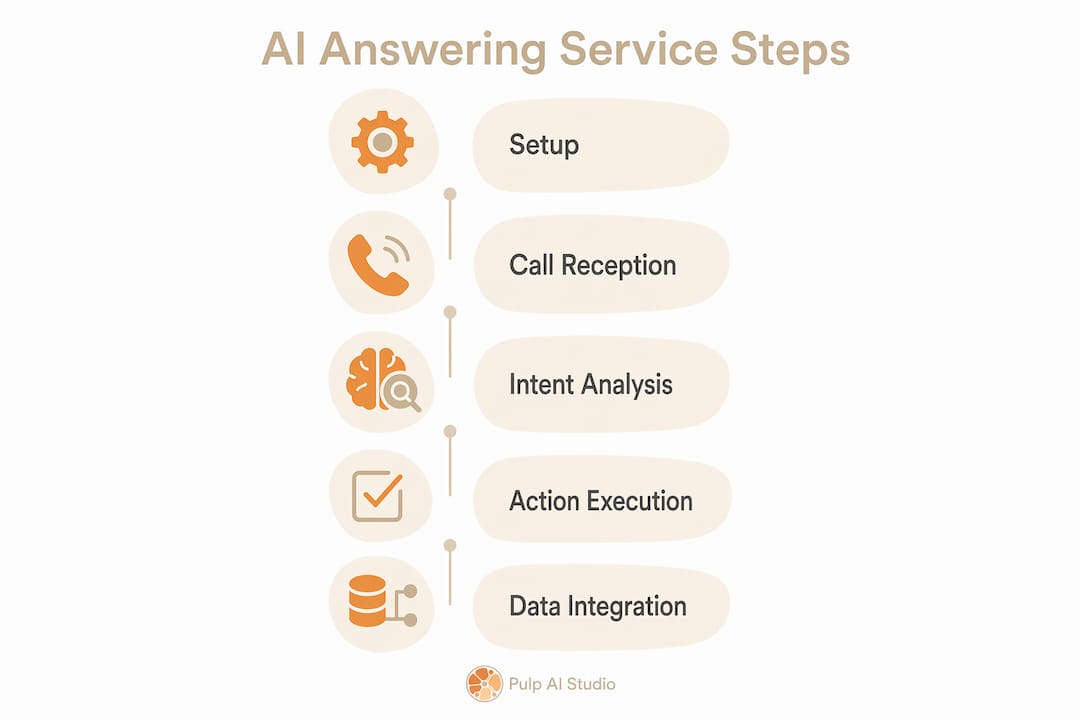
An AI answering service handles inbound calls by understanding caller intent and performing actions such as answering FAQs, routing calls, or scheduling follow-ups. The core technology behind this is Natural Language Processing, or NLP. NLP lets callers speak in full sentences instead of pressing 1 for billing or 2 for support. That shift alone removes one of the most common sources of caller frustration.

When a call comes in, the AI listens, identifies the caller’s intent, and matches it to a predefined workflow. If a caller says “I need to reschedule my appointment for Thursday,” the system recognizes the intent as a booking change and either completes it automatically or routes the caller to the right person with that context already attached. This is fundamentally different from a traditional phone tree, which routes by menu selection rather than by what the caller actually wants.
Here is what a well-configured AI phone answering service can handle without any human involvement:
- Answering frequently asked questions about hours, pricing, and location
- Collecting caller name, phone number, and reason for calling
- Booking or rescheduling appointments
- Sending follow-up texts with job details or confirmation numbers
- Routing urgent calls to an on-call staff member
Pro Tip: Set up your AI to collect the caller’s name and reason for calling before any transfer. When a human agent picks up, they already have context. That handoff feels professional and saves the caller from repeating themselves.
Dialpad AI Agents integrate with existing phone systems and CRM platforms, which means call data flows directly into your records without manual entry. Rosie AI focuses specifically on appointment booking and texting call details back to the business owner after each interaction. Both approaches show how AI answering tools are built around specific business workflows, not generic call handling.
What are the main benefits for small businesses?
The single biggest benefit of an AI answering service is 24/7 call coverage without the cost of a full-time receptionist. A plumber who misses a call at 9 PM loses that job to whoever answers first. An AI system captures that lead, collects the details, and sends the owner a text summary before the caller even considers calling a competitor.
Here are the core advantages small business owners report after switching to an automated answering service:
- No more missed calls. The system answers every call, day or night, including weekends and holidays.
- Faster response times. Callers get an immediate response instead of voicemail or a busy signal.
- Consistent FAQ handling. Every caller gets the same accurate answer about your hours, rates, or service area.
- Scalability during call spikes. A Monday morning rush or post-storm surge does not overwhelm the system the way it would a single receptionist.
- Lower staffing costs. AI call management software replaces or supplements a receptionist role at a fraction of the annual salary.
- Better handoff quality. When a call does escalate to a human, the AI preserves conversation context so the agent knows exactly what was discussed.
The cost argument is straightforward. A part-time receptionist working 20 hours per week costs a small business thousands of dollars per month in wages alone, before benefits or training. An AI virtual assistant covers 168 hours per week at a fixed monthly fee. For retailers, clinics, and contractors, that math is hard to ignore.
Customers also respond better to AI that understands full sentences. NLP-driven systems reduce wait times and eliminate the frustration of navigating keypad menus. That improvement in caller experience directly affects whether a lead converts or hangs up and calls someone else.
How do top AI answering services compare for small businesses?
The market for intelligent phone answering tools has grown quickly, and the options differ significantly in price, features, and ease of setup. The table below compares five widely used platforms on the dimensions that matter most to small business owners.
| Service | Best for | Key feature | Pricing model |
|---|---|---|---|
| Dialpad | Teams needing CRM integration | NLP routing with context handoff | Per-seat subscription |
| Rosie AI | Solo operators and contractors | Appointment booking and text summaries | Flat monthly fee |
| Allo | Businesses wanting call screening | AI call screening with voicemail transcription | Flat monthly fee |
| Smith ai | Businesses needing live agent backup | AI plus human agent hybrid | Per-call or monthly plan |
| Goodcall | Restaurants and service businesses | Google-integrated AI receptionist | Free tier available |
Popular AI answering services like Dialpad, Rosie AI, Allo, Smith ai, and Goodcall each target slightly different business profiles. Dialpad emphasizes natural language routing and works best when you need the AI to hand off calls to a live team with full context. Rosie AI is built for the solo contractor or clinic owner who wants a text summary of every missed call sent directly to their phone.
Smith ai takes a hybrid approach. It combines AI call handling with access to human agents when the AI cannot resolve a request. That model suits businesses where caller needs vary widely and some calls genuinely require human judgment. The tradeoff is cost: per-call pricing adds up quickly for high-volume operations.
Goodcall stands out for its free entry tier and Google Business Profile integration. A restaurant or salon that already manages its Google listing can connect Goodcall and have a working AI receptionist within an hour. The depth of customization is limited compared to Dialpad, but for straightforward FAQ handling and hours information, it performs well.
A few factors to evaluate before choosing any platform:
- Call volume: High-volume businesses need a platform with no per-call caps.
- Integration needs: If you use a CRM like HubSpot or Salesforce, confirm the AI connects to it natively.
- Customization depth: Some platforms let you script detailed conversation flows; others offer only basic templates.
- Setup time: Rosie AI and Goodcall deploy in hours. Dialpad requires more configuration but delivers more control.
Pro Tip: Before committing to any platform, run a free trial and call your own number as a customer would. Note every point where the AI hesitates, misunderstands, or gives a wrong answer. That test reveals gaps faster than any feature comparison.
What are the challenges and limitations of AI answering services?
AI answering services are not perfect, and small business owners who go in with unrealistic expectations tend to abandon the technology too quickly. The most common limitation is accuracy. An AI trained on generic data will misinterpret industry-specific terms, unusual accents, or complex multi-part questions. Proper escalation protocols and context retention are the primary tools for managing this gap.
The main challenges to plan for include:
- Misinterpretation errors. The AI may route a call incorrectly if the caller’s phrasing does not match trained patterns. Regular review of call logs catches these gaps early.
- Caller frustration. Some callers, particularly older adults, resist talking to an AI. A clear option to reach a human at any point reduces drop-off.
- Training investment. The AI needs business-specific data to perform well. That means uploading your FAQs, service descriptions, pricing, and call scripts before launch.
- Privacy and data handling. Call recordings and transcripts contain sensitive customer information. Confirm that your chosen platform complies with applicable state and federal privacy laws.
- Legacy system compatibility. Older phone systems, particularly analog PBX setups, may require a VoIP adapter or full system replacement before integration is possible.
The good news is that most of these challenges are manageable with preparation. Businesses that integrate AI with CRM systems and review performance data weekly see faster improvement than those who set the system up and walk away.
How can small businesses implement an AI answering service effectively?
A successful rollout follows a clear sequence. Skipping steps, particularly the training and monitoring phases, is the most common reason small businesses underperform with AI call management software.
- Audit your current call patterns. Pull three months of call logs and identify your top ten most common caller questions. These become the foundation of your AI’s knowledge base.
- Choose the right platform. Match the platform to your call volume, integration needs, and budget. A solo contractor has different requirements than a five-location retail chain.
- Train the AI with your business data. Upload your service descriptions, pricing, hours, service area, and FAQ answers. The more specific the data, the more accurate the responses.
- Connect your CRM and scheduling tools. Integrating with CRM platforms means every call generates a contact record automatically. No lead falls through because someone forgot to log a call.
- Set clear escalation rules. Define exactly which call types go to a human immediately. Complaints, emergencies, and high-value sales calls should never stay with the AI.
- Monitor and refine weekly. Review misrouted calls, unanswered questions, and drop-off points. Adjust the AI’s scripts and routing logic based on real call data.
- Communicate the change to your team and customers. Staff need to know what the AI handles and what it escalates. A brief note on your website or hold message sets customer expectations correctly.
For after-hours coverage specifically, the implementation is simpler. The AI answers every call that comes in outside business hours, collects the caller’s details, and either sends a text summary to the owner or books a callback. That single workflow, described in detail for after-hours call management, recovers a significant share of leads that would otherwise go to voicemail and never convert.
Key takeaways
An AI answering service gives small businesses 24/7 call coverage, faster lead response, and consistent customer handling at a cost that full-time staffing cannot match.
| Point | Details |
|---|---|
| Core function | AI answering services understand caller intent and act on it, replacing keypad menus with natural conversation. |
| Top platforms | Dialpad, Rosie AI, Allo, Smith ai, and Goodcall each suit different business sizes and call volumes. |
| Primary benefit | 24/7 availability captures leads after hours before callers reach a competitor. |
| Key challenge | AI accuracy depends on business-specific training data and regular performance reviews. |
| Implementation priority | Connect the AI to your CRM and set clear escalation rules before going live. |
Why I think most small businesses are still underusing this technology
I have worked with small business owners across retail, contracting, and healthcare, and the pattern is consistent. They know they are missing calls. They know those missed calls cost them jobs. But they assume an AI phone answering service is either too expensive, too complicated, or too impersonal to work for their customers.
The expense concern is the easiest to dismiss. A flat-fee AI setup costs less per month than a single day of a receptionist’s wages. The complexity concern is real but solvable. The businesses I have seen struggle with AI answering tools are almost always the ones that skipped the training phase. They launched with generic settings and then blamed the technology when it gave wrong answers.
The impersonal concern is the most interesting one. Callers do not actually mind talking to an AI if the AI gives them a fast, accurate answer. What they mind is being trapped in a menu system that does not understand them. That is exactly the problem that NLP-based call handling solves. When the AI says “Got it, you want to reschedule your Thursday appointment. Let me pull that up,” the caller feels heard. That experience is better than being put on hold by a human who is juggling three other tasks.
The mistake I see most often is treating the AI as a set-and-forget tool. The businesses that get real results review their call logs every week, update the AI’s scripts when new questions appear, and treat the system like a new hire that needs ongoing coaching. That mindset shift, from tool to team member, is what separates businesses that convert more leads from those that give up after a month.
For small businesses that want to understand the broader AI-powered customer service picture before committing to a phone-specific solution, starting with that foundation makes the phone implementation much cleaner.
— Adam
How Pulp AI Studio helps small businesses stop missing calls
Pulp AI Studio builds custom AI answering setups for small businesses as a scoped build with a two-week deployment timeline — you own the rig, and a managed plan is optional. The after-hours AI rig answers calls, collects lead details, and sends text summaries to the business owner the moment a call ends. That means a contractor finishing a job at 6 PM still captures the lead that called at 8 PM. For businesses ready to stop losing leads to voicemail, the after-hours answering service is a direct starting point.
FAQ
What is an AI answering service?
An AI answering service is a software system that answers inbound calls, understands what the caller needs using Natural Language Processing, and takes action such as routing the call, answering questions, or booking appointments. It operates without a human receptionist and works around the clock.
How much does an AI phone answering service cost?
Pricing varies by platform and model. Flat-fee services like Rosie AI charge a fixed monthly rate, while platforms like Smith ai use per-call pricing. Setup-based providers like Pulp AI Studio scope the build up front, so you own the system, with an optional managed plan.
Can an AI answering service handle after-hours calls?
Yes. After-hours coverage is one of the strongest use cases for AI call management software. The system answers every call outside business hours, collects caller details, and notifies the business owner, preventing leads from going to voicemail and converting to lost jobs.
Will callers know they are talking to an AI?
Most platforms disclose the AI nature of the interaction, and many business owners choose to be transparent about it. Callers who get fast, accurate answers from an AI typically respond positively, particularly compared to being placed on hold or reaching voicemail.
How long does it take to set up an AI answering service?
Setup time ranges from under an hour for simple platforms like Goodcall to two weeks for fully customized builds. Pulp AI Studio’s scoped deployment delivers a working system within two weeks, including business-specific training and CRM integration.