
 Adam Pichardo
TL;DR:
- AI workflows are structured systems that embed AI steps within business processes to automate decisions and ensure consistent results. Success depends more on governance, process mapping, and human oversight than on AI model sophistication or complexity. Small businesses can quickly implement high-volume tasks with measurable ROI, improving cycle times, error rates, and overall efficiency.
An artificial intelligence workflow is a structured, repeatable sequence of AI-powered steps embedded within business processes to automate decisions, reduce manual effort, and produce consistent outputs at scale. Unlike a standalone AI tool, an AI workflow connects triggers, data inputs, AI processing, human review checkpoints, and output delivery into a single governed system. The industry term for this architecture is “agentic workflow orchestration,” and understanding it separates organizations that get real results from those that run expensive pilots that go nowhere. This guide covers the core architecture, how AI workflows differ from traditional automation, governance best practices, realistic cost and timeline benchmarks, and the measurable business value you can expect.
What is the core architecture of an artificial intelligence workflow?
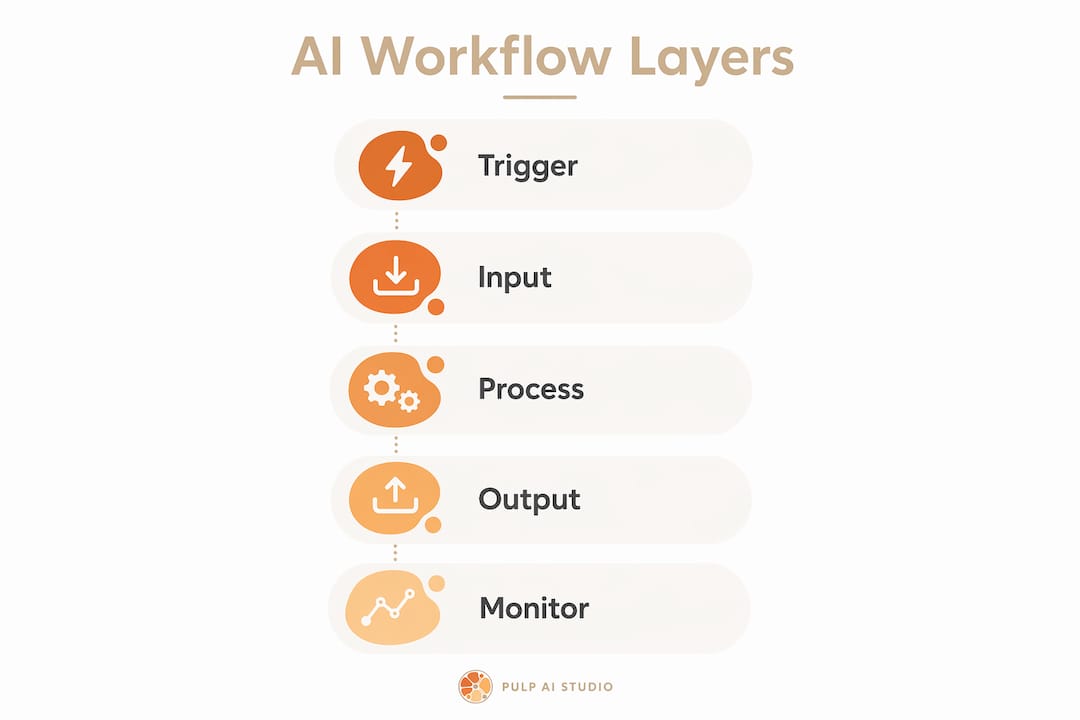
An AI workflow is built from five distinct layers, each with a specific job. Confusing these layers is the most common reason implementations stall.
The five layers are:
- Trigger layer. An event starts the workflow. This could be an inbound email, a form submission, a missed phone call, or a scheduled time.
- Data intake layer. The system collects and normalizes inputs. Raw data, documents, or messages get structured so the AI can process them reliably.
- AI processing layer. The AI model performs a bounded task: classification, extraction, summarization, routing, or generation. High-value AI patterns include classification as the safest and most common first insertion point in any workflow.
- Human review layer. For high-stakes decisions, a human approves or rejects the AI’s output before the process continues. This is not optional in regulated or high-impact contexts.
- Output integration layer. The result writes to a CRM, sends a message, updates a record, or triggers the next workflow step.
The orchestrator ties all five layers together. Structured AI workflows combine AI steps embedded in deterministic orchestrators that handle retry logic, audit logging, and human approvals. The orchestrator owns reliability. The AI model owns reasoning within defined boundaries.
| Layer | Role | Example | Key risk |
|---|---|---|---|
| Trigger | Starts the workflow | Missed call, form submission | Missing or duplicate triggers |
| Data intake | Collects and normalizes inputs | PDF parsing, CRM field mapping | Dirty or incomplete data |
| AI processing | Performs bounded AI task | Classification, extraction, routing | Hallucination, low confidence |
| Human review | Approves high-impact outputs | Manager sign-off on contract | Bottleneck if not time-boxed |
| Output integration | Delivers result to systems | CRM update, SMS reply, report | Integration failure, data loss |

Modularity matters here. Each layer should be replaceable without rebuilding the entire system. Observability, meaning the ability to log and monitor every step, is non-negotiable for governance and debugging.
How is AI workflow automation different from traditional automation?
Traditional rule-based automation follows fixed logic. If condition A is true, do action B. It breaks the moment an input falls outside the rules it was written for. AI workflow automation handles variability. The AI layer interprets ambiguous inputs, classifies edge cases, and routes them appropriately, while the deterministic orchestrator still enforces the process structure.
The distinction matters because many organizations buy isolated AI tools expecting workflow results. A standalone AI tool answers a question or generates text. An AI workflow takes that output and acts on it within a governed process, writes it to a system, routes it for approval, or triggers a downstream action.
Three categories define the spectrum:
- Rule-based automation. Fixed logic, zero AI. Fast and reliable for stable, predictable processes. Breaks on variation.
- AI workflow automation. AI handles variable inputs within a structured, deterministic process. Combines flexibility with governance.
- Fully autonomous AI agents. AI makes decisions and takes actions with minimal human oversight. High capability, high risk, and not appropriate for most business processes today.
| Category | Handles variation | Human oversight | Best for |
|---|---|---|---|
| Rule-based automation | No | Low | Stable, repetitive tasks |
| AI workflow automation | Yes | Configurable | Variable inputs, regulated processes |
| Fully autonomous agents | Yes | Minimal | Research, low-stakes exploration |
The human-in-the-loop checkpoint is what separates AI workflow automation from autonomous agents. Embedding human review checkpoints transforms AI from a black box into a controllable business tool. For most decision-makers, that control is the difference between a system they can trust and one they cannot deploy.
What are the best practices for implementing AI workflows?
The single most important rule is this: fix the process before you automate it. Mapping triggers, inputs, business rules, exceptions, and approval points before automation prevents scope creep and increases workflow effectiveness. Automating a broken process produces broken results faster.
Select workflows based on three criteria: volume, risk level, and data readiness. High-volume, low-risk processes with clean, structured data are the right starting point. Accounts payable matching, lead qualification, appointment scheduling, and document classification all fit this profile. Avoid starting with processes that require nuanced judgment, have regulatory exposure, or depend on unstructured data you have not yet cleaned.
Governance is not a phase you add at the end. Most AI workflow failures stem from poor governance, not model intelligence. Failures arise from bolting AI onto messy processes that lack ownership and controls. Assign a named owner to every workflow. Define what “correct” looks like before you build. Set confidence thresholds below which the AI routes to a human rather than acting.
Pro Tip: Design your human review step with a time limit. If a reviewer does not act within a defined window, the workflow should escalate or default to a safe fallback. An unreviewed approval queue is a process failure waiting to happen.
Production-grade AI workflows require stateful execution that can pause and resume around human approvals with full audit logs. Build rollback capability from day one. If the AI layer degrades or produces unexpected outputs, you need a path back to the manual process without losing data or breaking downstream systems.
Pro Tip: Run a 2–4 week parallel shadow test before going live. Feed real traffic through both the old process and the new AI workflow simultaneously, then compare outputs. Edge cases you never anticipated in design will surface in the first week.
What are realistic timelines and costs for AI workflow projects?
Decision-makers need numbers, not vague estimates. Initial scoped AI workflow projects cost between $12,000 and $40,000 for companies with 10–25 employees. Production-grade systems run $50,000 to $100,000. These figures reflect Q2 2026 benchmarks and account for integration, testing, and governance setup, not just model access.
A phased approach keeps risk low and learning high.
- Scoping (weeks 1–2). Map the target process in detail. Identify triggers, data sources, exception paths, and approval points. Define success metrics before writing a line of code.
- Pilot build (weeks 3–8). Build the minimum viable workflow. Include the AI layer, one human review checkpoint, and basic logging. Deploy to a subset of real traffic.
- Shadow testing (weeks 9–12). Run the AI workflow in parallel with the existing process. Compare outputs. Measure confidence scores, error rates, and processing time.
- Production hardening (weeks 13–14+). Address edge cases found in shadow testing. Add monitoring dashboards, alerting, and rollback procedures. Expand to full traffic.
Typical AI workflow implementation timelines range from 4 to 14 weeks depending on integration complexity and governance requirements. Simpler workflows with clean data and no regulatory exposure land at the shorter end. Multi-system integrations with compliance requirements take longer.
ROI measurement should focus on operational metrics, not abstract value claims. Track cycle time before and after. Measure error rates, processing volume per staff hour, and lead response time. Organizations see faster innovation cycles by deploying AI workflows quickly and iteratively, with usage metrics and KPIs monitored from the first week of production. For small businesses considering the hardware side of AI deployment, a local AI agent setup can reduce ongoing cloud costs significantly.
AI also reduces the cost of experimentation across the board. Entrepreneurs and small business owners who understand how AI cuts invention costs can apply the same logic to workflow projects: smaller pilots, faster feedback, and lower sunk cost when a direction does not work.
How do AI workflows deliver measurable business value?
The business case for AI workflow automation is not theoretical. Companies report 30–60% reduction in repetitive task time and faster lead response after deploying structured AI workflows. That time reduction translates directly to labor cost savings and faster customer service.
The KPIs most affected by AI workflow integration include:
- Cycle time. The time from trigger to completed output drops when AI handles classification and routing instantly rather than waiting for a human to triage.
- Error rate. AI models applied to structured extraction tasks produce fewer transcription and data entry errors than manual processing.
- Lead response time. Automated workflows that respond to inbound inquiries within seconds, rather than hours, convert more leads before they contact a competitor.
- Staff capacity. When repetitive tasks run automatically, staff redirect their time to judgment-intensive work that AI cannot handle reliably.
- Audit completeness. Automated logging captures every step, every decision, and every exception, which manual processes rarely achieve consistently.
“The most underrated benefit of AI workflow automation is not speed. It is consistency. A well-governed AI workflow applies the same logic to the ten-thousandth case as it did to the first. Human processes drift. AI workflows do not drift unless you change them intentionally.”
Data-driven decision-making also improves when workflows generate structured logs. Every AI decision becomes a data point. Over time, that data reveals where the process breaks down, which exception types are most common, and where human review adds the most value versus where it creates unnecessary delay. Effective pilot projects measure realistic KPIs tied to business outcomes like saved hours or cycle time improvements, not just technical performance metrics.
For small businesses, the practical entry point is often a single high-volume, customer-facing workflow. An AI chatbot for small business is one common first deployment that generates measurable ROI quickly and builds organizational confidence in AI-driven processes before tackling more complex internal workflows.
Key Takeaways
An AI workflow succeeds when governance, process design, and human oversight are built in from the start, not added after the fact.
| Point | Details |
|---|---|
| Fix the process first | Map every trigger, rule, and exception before adding AI to avoid automating broken steps. |
| Start with high-volume, low-risk tasks | Classification and routing workflows deliver fast ROI with manageable governance requirements. |
| Build human review in by design | Time-boxed approval checkpoints keep AI outputs controllable and auditable in regulated contexts. |
| Budget realistically | Scoped projects run $12,000–$40,000; production systems run $50,000–$100,000 for small to mid-size teams. |
| Measure operational KPIs from day one | Track cycle time, error rate, and lead response time to prove and improve workflow value. |
What I have learned about AI workflows after building them
The conversation around AI workflows tends to focus on the AI part. The model choice, the prompt engineering, the capability benchmarks. In my experience, that focus is almost always misplaced.
The workflows that fail do not fail because the AI model was not good enough. They fail because nobody mapped the process before building, nobody defined what “correct” looks like, and nobody assigned ownership when something went wrong. AI success depends more on governance and workflow design than on model sophistication. That finding matches what I see in practice every time.
The other thing I would push back on is the idea that AI workflows are primarily an enterprise concern. Small businesses often have more to gain per dollar spent because their manual processes are more visible and their volume is concentrated. A single workflow automating missed-call follow-up or appointment triage can recover meaningful revenue that was previously lost to voicemail.
The leaders who get the most from AI workflow projects are the ones who treat the first deployment as a learning exercise, not a transformation program. They pick one process, instrument it carefully, measure it honestly, and use what they learn to build the next one. That iterative discipline, not the sophistication of the AI, is what separates organizations that build durable capability from those that run one expensive pilot and stop.
— Adam
How Pulp AI Studio applies AI workflows for real businesses
We set up AI workflows for small businesses, including clinics, dealerships, contractors, and retailers. The flagship system handles missed calls automatically: when a call goes unanswered, the caller receives an SMS reply within 30 seconds, the AI manages the conversation, and the owner gets an instant alert. No lead goes cold waiting for a callback. For healthcare practices, Pulp AI Studio’s automated medical answering service applies the same workflow architecture to patient communication, keeping the practice responsive after hours without adding staff, with a HIPAA-compliant setup and a signed BAA. Most start on the managed setup: scoped to your business, live in about two weeks, and run by us at one flat monthly price. Businesses that want the whole system on hardware they own can step up to a custom build, live in about 30 days. Most shops start managed and grow into a rig.
FAQ
What is an artificial intelligence workflow?
An artificial intelligence workflow is a structured sequence of AI-powered steps embedded within a business process to automate decisions, route tasks, and produce consistent outputs. It combines AI models with a deterministic orchestrator that handles retries, logging, and human approvals.
How long does it take to implement an AI workflow?
Implementation timelines range from 4 to 14 weeks depending on integration complexity and governance requirements. Simple workflows with clean data deploy faster; multi-system integrations with compliance needs take longer.
What does an AI workflow project cost for a small business?
Scoped internal AI workflow projects cost between $12,000 and $40,000 for companies with 10–25 employees. Production-grade systems with full monitoring and governance run $50,000 to $100,000.
Why do most AI workflow implementations fail?
Most failures come from poor governance and process design, not from AI model limitations. Bolting AI onto an unmapped, unowned process produces unreliable outputs regardless of how capable the underlying model is.
What is the difference between AI workflow automation and a standalone AI tool?
A standalone AI tool generates an output. An AI workflow takes that output and acts on it within a governed process, writing results to systems, routing for approval, or triggering downstream steps. The workflow adds structure, accountability, and integration that a standalone tool cannot provide.