
 Adam Pichardo
TL;DR:
- AI-driven automation uses machine learning, NLP, and workflow orchestration to handle business tasks automatically. Successful implementation begins with measuring high-volume workflows, adopting modular architecture, and training staff from the start. Tracking metrics like response speed, containment rate, and customer satisfaction ensures continuous improvement.
Artificial intelligence driven automation is the process of using AI technologies to handle complex, repetitive business tasks without constant human input. The industry term for this discipline is intelligent process automation, which combines machine learning, natural language processing, and workflow orchestration into a single operational layer. 90% of small businesses using AI report measurable efficiency improvements from automation. That number signals a shift: AI automation is no longer a luxury reserved for enterprise budgets. Business owners who act now gain a real operational edge over those still running manual workflows.
What core AI technologies power artificial intelligence driven automation?
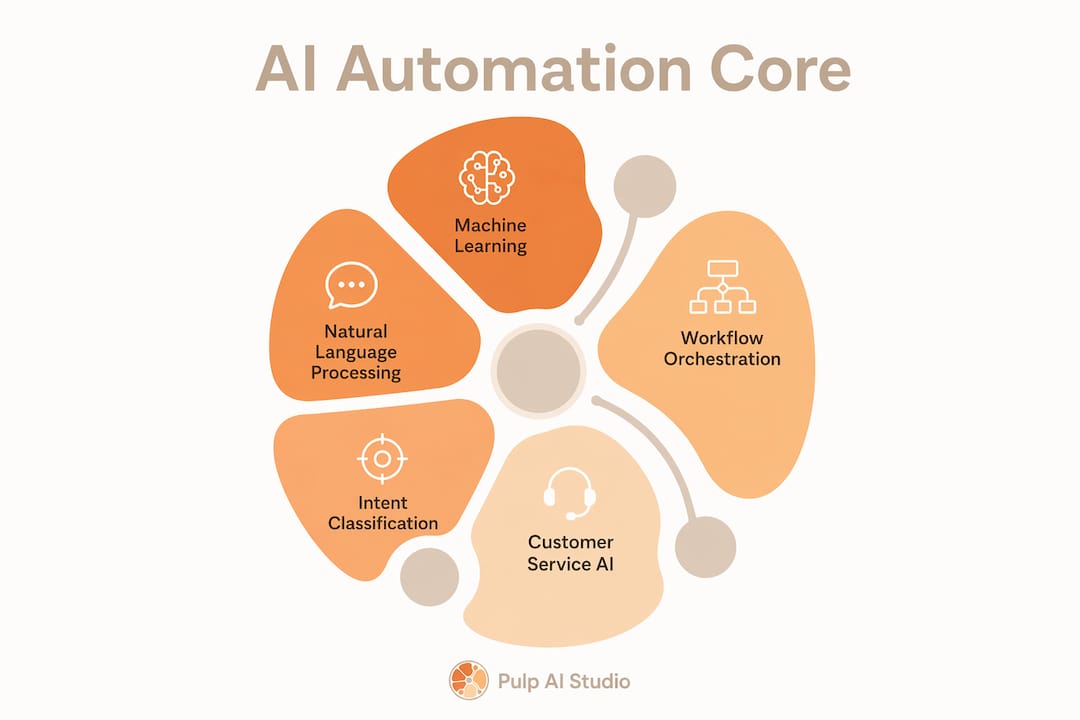
Artificial intelligence driven automation runs on three foundational technologies: machine learning, natural language processing, and predictive analytics. Each one handles a different layer of the automation stack, and together they make complex workflows possible without human intervention at every step.

Machine learning trains systems to recognize patterns in data and improve their own accuracy over time. A machine learning model watching your customer inquiry volume learns which hours spike, which questions repeat, and which responses close tickets fastest. It gets better the longer it runs.
Natural language processing (NLP) lets AI systems read, interpret, and respond to human language. NLP powers the intent classification layer that decides whether an incoming message is a billing question, a complaint, or a sales inquiry. Without NLP, AI automation collapses at the first unstructured input.
Predictive analytics uses historical data to forecast future outcomes. A retailer can use predictive analytics to flag low inventory before a stockout happens. A clinic can use it to predict appointment no-shows and fill gaps proactively.
These three technologies integrate through workflow orchestration, the coordination layer that routes tasks between systems based on rules and AI decisions. Modular architectures that separate data ingestion, intent classification, knowledge retrieval, and orchestration allow component upgrades without destabilizing the whole system. That separation is what makes AI powered workflows maintainable at scale.
- Data ingestion: Collects inputs from email, SMS, web forms, and phone calls into a single pipeline.
- Intent classification: Categorizes each input so the right workflow fires automatically.
- Knowledge retrieval: Pulls accurate answers from a governed content library, not a free-form guess.
- Workflow orchestration: Routes the task to the right system, agent, or human based on classification output.
- Observability: Monitors every step in real time so failures surface before customers notice them.
Pro Tip: Start with intent classification before building anything else. If your AI cannot reliably categorize incoming requests, every downstream workflow produces unreliable results. Nail classification first, then layer on retrieval and orchestration.
Understanding how these components connect is the foundation for any AI-powered customer service system worth building.
What are best practices for implementing AI-driven automation?
Successful implementation of intelligent process automation follows a clear sequence. Businesses that skip steps pay for it later with failed rollouts, frustrated teams, and systems that require constant manual correction.
-
Map your highest-volume repetitive workflows first. Identify the tasks your team performs most often that follow a predictable pattern. Missed calls, appointment confirmations, and order status updates are strong starting points. These workflows have clear inputs, clear outputs, and measurable success criteria.
-
Choose a modular architecture over an all-in-one platform. Effective AI automation systems separate ingestion, classification, retrieval, and orchestration so you can upgrade one component without rebuilding everything. All-in-one platforms lock you into a vendor’s upgrade cycle and limit your ability to adapt.
-
Deploy in phases, not all at once. Phased deployment starting with a single workflow and a single success metric is the recommended approach. Prove performance on one workflow before expanding to the next. This keeps risk contained and builds internal confidence.
-
Train your team alongside the AI. Automation does not replace your team’s judgment. It handles the volume so your team can focus on the exceptions. Train staff on how to review AI outputs, when to escalate, and how to flag errors for model improvement.
-
Set operational targets from day one. Best practice calls for 99%+ system uptime and sub-minute AI response times, with weekly performance reviews during the first three months. Without defined targets, you cannot tell whether the system is working or slowly degrading.
-
Build escalation paths before you go live. Every AI system will encounter a request it cannot handle confidently. Define the escalation workflow before launch so customers never hit a dead end. A human-in-the-loop process is not a failure of automation. It is a sign of a well-designed system.
Pro Tip: Run your first AI workflow in parallel with your existing manual process for two weeks before switching over fully. This gives you a direct comparison of accuracy and speed, and it gives your team time to trust the output before they depend on it.
For businesses exploring how AI handles calls outside business hours, the after-hours AI call guide from Pulp AI Studio covers the operational specifics in detail.
What challenges do businesses face when adopting AI-driven automation?
Adoption challenges fall into three categories: human factors, technical quality, and security. Each one can stall or kill an otherwise well-designed implementation.
Human factors are the most underestimated risk. Most AI project failures stem from neglecting human factors. Teams that feel threatened by automation resist it quietly. They stop flagging errors, avoid using the system, and revert to manual workarounds. The fix is involving your team in the design process from the start, not announcing the system after it is built.
- Trust gaps: Employees distrust AI outputs when they do not understand how decisions are made. Transparency about what the AI does and does not do closes this gap faster than any training deck.
- Escalation confusion: If staff do not know when to override the AI, they either over-rely on it or ignore it entirely. Clear escalation rules solve this.
- Knowledge quality: AI systems are only as accurate as the information they retrieve from. Outdated FAQs, inconsistent product data, and unreviewed content pipelines produce wrong answers at scale. Canonical intent taxonomies and governed knowledge pipelines are required for consistent answer quality.
Security and data privacy are non-negotiable. Compliance measures such as PII masking and audit logging are foundational to gaining customer trust for any conversational AI system. Businesses in healthcare, finance, and legal services face additional regulatory requirements on top of baseline data hygiene. Security maturity is not just a technical requirement. It is a business enabler that determines whether customers trust your AI enough to engage with it.
Unrealistic expectations create early abandonment. Business owners who expect AI to handle 100% of interactions from week one set themselves up for disappointment. A well-tuned system handling 70% of inquiries automatically, with clean escalation for the rest, is a strong result. Gradual expansion of AI workflows, tied to measured performance, produces durable gains rather than a flashy launch followed by a quiet rollback.
For sector-specific challenges, medical practices face unique compliance and communication requirements. The AI tools for medical practices guide covers those in detail.
How can businesses measure the impact of AI-driven automation?
Measurement is what separates a successful AI deployment from an expensive experiment. The right metrics tell you whether the system is working, where it is breaking down, and what to fix next.
AI-powered customer engagement delivers 25–40% improvements in customer satisfaction scores, 30–50% faster response times, and 20–35% higher conversion rates. These are the benchmarks your system should be measured against, not internal gut feelings.
| Metric category | Key metric | What it tells you |
|---|---|---|
| Operational efficiency | System uptime | Whether the AI is available when customers need it |
| Speed | Average response time | Whether the AI is faster than your manual baseline |
| Quality | Containment rate | What percentage of inquiries the AI resolves without escalation |
| Customer experience | CSAT score | Whether customers are satisfied with AI interactions |
| Revenue impact | Conversion rate | Whether AI engagement converts inquiries into sales |
Track these metrics weekly for the first three months. After that, monthly reviews are sufficient unless a metric drops sharply. Use your observability layer to catch anomalies in real time so you are not discovering problems through customer complaints.
Feedback loops are the engine of continuous improvement. Every escalated conversation is a data point. Every negative CSAT score points to a gap in your knowledge base or a flaw in your intent classification. Build a process for reviewing escalations weekly and feeding corrections back into the system. AI models that receive no feedback drift toward lower accuracy over time. The businesses that get the most from automating business processes are the ones that treat the AI as a living system, not a one-time installation.
Pro Tip: Set a containment rate target before launch. A target of 65–75% for a new deployment is realistic. If you hit it in month one, expand the workflow scope. If you miss it, fix the knowledge base before adding more volume.
Pulp AI Studio’s approach to automated text replies shows how even a single automated touchpoint, like a missed-call SMS reply, produces measurable conversion gains when tracked correctly.
Key takeaways
Intelligent process automation produces measurable gains in efficiency, response speed, and customer satisfaction when deployed in phases with clear metrics, governed knowledge pipelines, and team training built in from the start.
| Point | Details |
|---|---|
| Start with one workflow | Pick the highest-volume repetitive task and prove performance before expanding. |
| Use modular architecture | Separate ingestion, classification, retrieval, and orchestration to stay flexible. |
| Train your team first | Human trust in AI outputs determines adoption success more than technology capability. |
| Secure your data pipeline | PII masking and audit logging build customer trust and satisfy compliance requirements. |
| Measure containment and CSAT | Track how many inquiries the AI resolves and how satisfied customers are with those resolutions. |
What I have learned from building AI automation for small businesses
The conventional wisdom says to start with the biggest pain point. My experience says to start with the most measurable one. Those are not always the same thing.
When we set up AI automation at Pulp AI Studio, the first question I ask a client is not “What takes the most time?” It is “What can we count?” If you cannot measure the before and after, you cannot prove the value, and you cannot get your team to trust the system. A missed call is countable. A slow response time is countable. Vague “customer experience improvements” are not.
The second thing I have learned is that the human side of implementation is harder than the technical side. Every time. The AI is trainable. People are more complicated. I have seen well-built systems get quietly abandoned because no one explained to the front desk staff why the AI was answering calls. They felt bypassed, so they started forwarding calls manually again. The technology worked perfectly. The rollout failed.
The third lesson is about scope. Businesses that try to automate everything at once automate nothing well. The clients who get the best results start with one workflow, run it for 30 days, and then ask what to automate next. That patience feels slow in month one. By month six, it looks like a completely different operation.
AI is not a project you finish. It is a capability you build. The businesses that treat it that way are the ones still running their systems two years later, not the ones who launched with a press release and rolled back six months in.
— Adam
How Pulp AI Studio builds AI automation that works from day one
We set up AI automation for small businesses, including shops, clinics, dealerships, contractors, and retailers. The flagship system is a missed-call text-back that fires an SMS reply within 30 seconds of a missed call, handles the conversation with AI, and sends the owner an instant phone alert. Leads that used to go to voicemail stay warm. Most start on the managed setup: scoped to your shop, live in about two weeks, connected to the CRM and tools you already use, and run by us at one flat monthly price. Your contacts, conversation history, and phone number stay yours to export. Shops that want the whole system on hardware they own can step up to a custom build, live in about 30 days. Most shops start managed and grow into a rig. For medical practices, the automated medical answering service handles patient inquiries around the clock, with a HIPAA-compliant setup and a signed BAA. The person you talk to on day one is the same person writing the code.
FAQ
What is artificial intelligence driven automation?
Artificial intelligence driven automation is the use of machine learning, natural language processing, and workflow orchestration to handle business tasks without constant human input. The industry term is intelligent process automation.
How does AI automate tasks in a small business?
AI automates tasks by classifying incoming requests, retrieving the right information from a knowledge base, and triggering the correct workflow automatically. Common examples include missed-call text-back systems, appointment reminders, and order status updates.
What is the difference between robotic process automation and AI automation?
Robotic process automation follows fixed rules to repeat structured tasks, like copying data between systems. AI automation adds machine learning and NLP so the system can handle unstructured inputs, learn from new data, and make judgment-based decisions.
How long does it take to implement an AI automation system?
A focused, single-workflow deployment can go live in two weeks when the scope is clearly defined. Pulp AI Studio’s managed setup goes live within that timeframe and is run for you at one flat monthly price. A custom build the client owns outright takes about 30 days.
What metrics should I track after deploying AI automation?
Track system uptime, average response time, containment rate, customer satisfaction score, and conversion rate. AI-powered engagement benchmarks show 25–40% CSAT improvement and 30–50% faster response times as realistic targets for a well-tuned system.