
 Adam Pichardo
The fastest way to save money with AI automation is to pick one repetitive bottleneck, run a 90-day pilot with a defined budget, and measure two numbers: hours saved per week and change in days to cash collection. Everything else follows from that discipline.

The SBA recommends starting small with internal efficiencies like email sorting, scheduling, and invoicing before scaling. That advice is worth taking literally.
This week, do three things:
- Identify the single task consuming the most repetitive labor in your business (missed calls, invoice chasing, or data entry are common culprits).
- Set a 90-day budget cap before you spend a dollar. Know your ceiling.
- Decide whether you’ll build it yourself with no-code tools or hand it to a managed provider like Pulp AI Studio that sets it up and runs it for you in about two weeks.
A properly configured automation stack can recover 13–22 hours per week for a typical small business. Track hours saved and days-to-cash from day one, not after the fact.
Which AI automation use cases actually save money for small businesses?
The highest-ROI automations share one trait: they touch cash flow or customer response time directly. Here are the use cases worth piloting first, ranked by typical payback speed:
- Missed-call lead capture and after-hours answering. Every unanswered call is a lost lead. An AI answering system that texts back within 30 seconds keeps prospects warm. Measure: leads recovered per week.
- Invoice processing and payment reminders. Targeted automations can cut invoice-processing time by up to 80%, reducing late fees and unlocking early-payment discounts. Measure: days-to-cash before and after.
- Bookkeeping transaction categorization. Connect QuickBooks to an AI categorization layer and eliminate the manual sort. Measure: bookkeeping errors per month and hours saved.
- Scheduling and appointment automation. Replace back-and-forth emails with a booking flow. Measure: staff hours freed per week.
- Email triage and response drafting. Use the OpenAI API to draft replies to common inquiries. Measure: average response time.
- Inventory tracking and reorder triggers. Automate reorder alerts via Make (formerly Integromat) or Zapier. Measure: stockout incidents and carrying cost.
- Bid and estimate drafting for trades. Feed job specs into a prompt template and generate first-draft estimates. Measure: estimate turnaround time.
Industry analysis confirms that bankable outcomes like faster cash collection and fewer bookkeeping errors are the primary value drivers for AI adoption, not vague efficiency gains.
Pro Tip: Target tasks that consume more than 15% of a role’s weekly time. Below that threshold, the setup cost rarely pays back inside 90 days.
How to run a 90-day pilot that produces measurable results
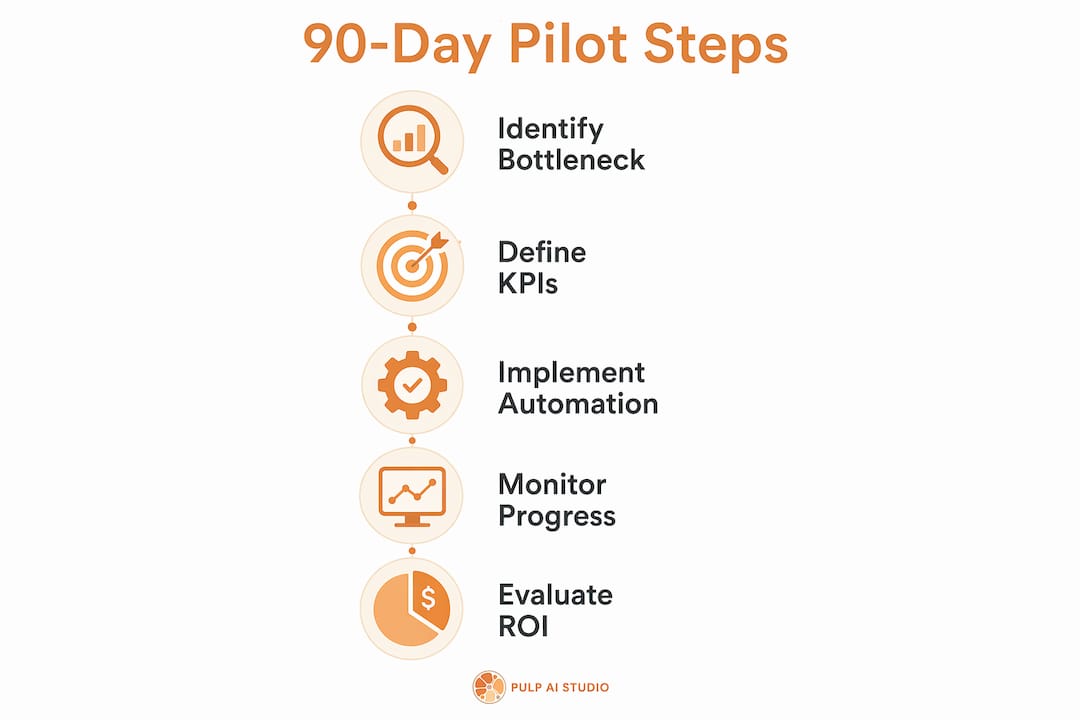
A disciplined 90-day pilot with measurable KPIs consistently outperforms scattered multi-tool experiments. The table below maps the milestones.
| Week | Milestone | Owner action |
|---|---|---|
| 1–2 | Discovery and baseline | Document the current process; log hours and error rates |
| 3–4 | Build or configure | DIY no-code setup or managed setup (Pulp AI Studio: live in about two weeks) |
| 5–6 | Internal testing | Run parallel with old process; catch edge cases |
| 7–8 | Live rollout | Go live with one team or one workflow |
| 9–12 | Measurement window | Collect KPI data; compare to baseline |
KPI checklist to track from day one:
- Hours saved per week (per role affected)
- Cycle time reduction (e.g., invoice approval time)
- Change in days-to-cash
- Error rate before vs. after
- Customer response time
Budget ranges by path:
- DIY no-code stack: low monthly tool costs and a few weeks to configure
- Integrated SMB stack with paid tools: moderate monthly costs and a few weeks to configure
- Managed setup: one flat monthly price, live in about two weeks, run for you
- Custom build: scoped project, about 30 days, client owns the software outright
Decision gates:
- Day 30: Is the automation running without manual intervention? If not, diagnose before spending more.
- Day 90: Do measured KPIs show positive ROI? If yes, scale. If not, stop and redirect the budget.
SMB-specific ROI scenarios show AI automation can cost 60–75% less than a fully-loaded human alternative, with break-even in 1.9–6.6 months depending on function.
How do you measure ROI from AI automation?
Track hours saved and cash impact, not feelings of efficiency. Three formulas do most of the work:
- Labor savings: Hours saved per week × blended hourly rate × 52 = annual labor value recovered
- Cash flow improvement: Reduction in days-to-cash × average daily revenue = working capital freed
- Error cost reduction: Error rate improvement × cost per error × monthly volume = monthly savings
Sample calculation (invoice automation): A five-person shop processing 80 invoices per month spends roughly 2 hours per invoice cycle manually. An 80% reduction in processing time saves about 128 hours per month. At a $25 blended rate, that’s $3,200 in recovered labor monthly, before counting late fees avoided.
Data collection checklist:
- Export time logs from your project management or scheduling tool before the pilot starts.
- Pull accounts-receivable aging reports from QuickBooks at baseline and at day 30/90.
- Log error counts manually for two weeks before automation goes live.
- Review tool dashboards weekly; set a calendar reminder so it actually happens.
What are the best implementation paths for small business budgets?
The right path depends on your technical comfort, timeline, and how much owner time you can invest. Most businesses fall into one of three categories.
| Path | Timeline | Owner time | Technical skill | Control |
|---|---|---|---|---|
| DIY no-code (Zapier, Make) | 1–4 weeks | High | Low–medium | Full |
| Integrated SMB stack (Twilio, OpenAI API, QuickBooks) | 2–6 weeks | Medium | Medium | Full |
| Managed setup (done for you) | About 2 weeks | Low | None required | Contacts, history, and number portable |
| Custom build (owned agent) | About 30 days | Low | None required | Full (client-owned) |
Tool categories to know:
- No-code workflow platforms: Zapier and Make connect apps without writing code. Good for data routing, notification triggers, and simple multi-step flows.
- Conversational voice and SMS: Twilio powers phone and text automations, including missed-call text-back and appointment reminders.
- Bookkeeping automation: QuickBooks integrations handle transaction categorization, payment reminders, and reporting.
- LLM text APIs: The OpenAI API generates draft emails, estimates, and summaries from structured prompts.
The most durable automations redesign the workflow so data moves automatically between systems, rather than just speeding up a manual step. A lead that flows from a missed call into your CRM and triggers a personalized follow-up text is a redesigned workflow. A person copying that same data faster is not.
Security, privacy, and U.S. compliance quick checklist
One rule covers most of the risk: minimize the personal data you send to any AI system, and keep a human in the loop for anything regulated.
Compliance checklist:
- Classify data before automating: separate PII, payment card data, and protected health information (PHI) from general business data.
- Encrypt data at rest and in transit for any workflow touching customer records.
- Apply role-based access controls so only the right people can view or modify automation outputs.
- For payment flows: never send raw card numbers to an LLM. Use a PCI-compliant payment processor (Stripe, Square) as the data layer; pass only tokens or confirmation IDs downstream.
- For medical practices: HIPAA applies to PHI. Pseudonymize or redact patient identifiers before any data touches a third-party AI service. Review your Business Associate Agreements.
- Log all automation activity and set a retention policy before going live.
Pro Tip: The SBA’s AI guidance recommends starting with internal, non-regulated workflows first. If your pilot touches PHI or regulated financial data, consult a compliance specialist before launch, not after.
For healthcare-specific pilots, Pulp AI Studio’s medical practice AI context covers HIPAA-adjacent considerations in more detail.
How do you choose who builds your automation?
Ask these questions before signing anything:
- What is the delivery timeline, and what does “live” mean specifically?
- Who owns the code or configuration when the project ends?
- Can you show a sample KPI baseline and a pilot ROI case from a comparable business?
- How do you handle integrations with QuickBooks, Twilio, or the OpenAI API?
- What is the escalation path if something breaks after handoff?
Red flags to walk away from:
- No KPI baseline proposed before build starts.
- Multi-month procurement cycles for a single-workflow pilot.
- Vendor retains ownership of the code or locks you into a proprietary platform you cannot export.
- Vague security practices with no documentation.
The BDC’s pilot-first guidance aligns with a simple rule: if a vendor cannot tell you what success looks like in measurable terms before they start, they are not ready to build for you.
Pro Tip: Choose a managed build when speed matters and owner time is scarce. Choose DIY when you have the hours and want to learn the tooling yourself. The worst outcome is a half-built automation that nobody maintains.
At Pulp AI Studio, most shops start on the managed setup, live in about two weeks at one flat monthly price; the step up is a custom build the client owns outright, live in about 30 days. The person you talk to on day one writes the code.
Key Takeaways
A properly scoped 90-day pilot targeting one high-volume bottleneck is the most reliable way for a U.S. small business to produce bankable savings from AI automation.
| Point | Details |
|---|---|
| Pick one bottleneck first | Target tasks consuming more than 15% of a role’s time for the fastest payback. |
| Track bankable KPIs | Measure hours saved, days-to-cash change, and error rate from day one, not after the pilot ends. |
| Budget before you build | Price out your DIY tool stack before you build; a managed setup is live in about two weeks at one flat monthly price. |
| Gate decisions at day 30 and 90 | Stop or pivot if the automation is not running cleanly by day 30; scale only after day 90 confirms ROI. |
| Pulp AI Studio option | Managed setup live in about two weeks at one flat monthly price; custom build with client-owned software in about 30 days, with an optional managed plan. |
When AI actually saves money and when it doesn’t
The businesses that see real returns from AI automation are not the ones with the most tools. They are the ones that measured their baseline before they built anything.
The most common failure mode is automating a process that was never clearly defined in the first place. If three people handle the same task three different ways, an AI will faithfully replicate the chaos at scale. Workflow redesign has to come before, or alongside, the automation build. That is not a technology problem; it is an operations problem.
Common pitfalls the 90-day pilot discipline prevents:
- Buying tools before identifying a specific, measurable bottleneck.
- Running pilots without a baseline, so you cannot prove the outcome.
- Automating low-volume tasks where the setup cost never pays back.
- Scaling before the first pilot is stable.
The pilot-first approach is not cautious; it is precise. A narrow, well-measured pilot produces a number you can take to the bank. A broad, unmeasured rollout produces a story you cannot verify.
Pulp AI Studio runs your automation for you
Most small business owners do not have six weeks to configure a no-code stack or months to manage a contractor. Pulp AI Studio is built for that reality. Most shops start on the managed setup: a hosted CRM with the AI built in, set up and run by us, live in about two weeks at one flat monthly price, with your contacts, conversation history, and phone number kept portable. Shops that want the software on hardware they own step up to a custom build, live in about 30 days. Most shops start managed and grow into a rig.
The flagship build is a missed-call text-back and after-hours AI answering system: a caller who goes to voicemail gets an SMS reply within 30 seconds, the AI handles the conversation, and you get an instant alert on your phone. Other common pilots include invoice automation and booking automation. On a custom build, an optional managed plan covers ongoing monitoring and improvements.
Ready to scope your pilot? Request a scoped setup and get a clear delivery timeline and KPI baseline before any work begins.
Sources and further reading
- AI for Small Business, U.S. Small Business Administration — Primary government guidance on starting small with AI; cited for pilot design and compliance context.
- Industry Analysis on AI Value, Springer — Supports bankable outcomes framing (cash collection, error reduction) in measurement and use-case sections.
- 15 Powerful Ways AI Is Transforming Businesses, Fintrivas — Core citation for 90-day pilot discipline and workflow redesign guidance.
- How to Automate Your Small Business With AI Tools, Tech Future Lab — Source for 13–22 hours/week recovery benchmark, invoice automation 80% reduction figure, and starter stack cost ranges.
- How AI Can Make Your Business More Profitable, BDC — Pilot-first selection criteria and low-risk budgeting guidance.
- AI Workforce Planning for Small Business, PeopleStackHub — Break-even timelines (1.9–6.6 months) and 60–75% cost reduction vs. human alternative.
- AI Automation Guide, Pulp AI Studio — Internal reference for workflow examples and implementation proof points.
- AI Answering Service for Small Business, Pulp AI Studio — Deep dive on missed-call capture use case and after-hours answering ROI.
- Why Medical Practices Need AI Tools, Pulp AI Studio — HIPAA-adjacent compliance context for healthcare pilots.
FAQ
How much can a small business save with AI automation?
A properly configured automation stack can recover 13–22 hours per week for a typical small business, with AI automation costing 60–75% less than a fully-loaded human alternative and break-even in as little as 1.9 months.
What is the best first automation for a small business?
Missed-call lead capture and invoice processing deliver the fastest payback because they directly affect cash flow and customer response time. Target whichever one consumes more than 15% of a role’s weekly time.
How long does a 90-day AI pilot take to set up?
A DIY no-code setup takes 1–4 weeks; a managed setup like Pulp AI Studio’s goes live in about two weeks (a custom build takes about 30 days), with the measurement window running through day 90.
Do I need technical skills to automate my business?
No-code platforms like Zapier and Make require minimal technical skill. For custom builds involving Twilio, the OpenAI API, or QuickBooks integrations, a managed builder handles the technical work and hands you the finished system.
Is AI automation safe for sensitive customer data?
It can be, with the right controls. Classify your data first, never send raw payment card numbers or PHI to an LLM, use PCI-compliant processors for payments, and review Business Associate Agreements before any healthcare pilot goes live.
Recommended
- Artificial Intelligence for Automation: 2026 Business Guide · Pulp AI Studio
- Two-Week Business Automation Setup: A Small Business Guide · Pulp AI Studio
- Artificial Intelligence Driven Automation for Business Growth · Pulp AI Studio
- Artificial Intelligence Workflow: A 2026 Business Guide · Pulp AI Studio