
 Adam Pichardo
TL;DR:
- A two-week business automation approach focuses on rapidly deploying one high-impact, rule-based workflow with clear success metrics. Proper preparation, including process documentation and stability, is crucial for success, while selecting tools with strong error handling supports reliable implementation. Most failures occur due to poor scoping and unrefined processes, not technology limitations, making initial clarity essential for ROI.
A two-week business automation setup is a structured, time-boxed approach where a small business identifies one high-impact workflow, builds a working automated system, and deploys it within 14 days. This method, known formally as a minimum viable product (MVP) automation pilot, is the fastest path from manual chaos to measurable results. Small businesses using automation save a median of 5 hours per week for owners and grow revenue 2.1 times faster than competitors who do not automate. That gap compounds fast. Pulp AI Studio sets up exactly this kind of focused system for small businesses on a managed plan, live in about two weeks and run for you. Custom builds on hardware you own take about 30 days.
What does a two-week business automation setup actually require?
The two-week timeline works only when you pick the right process. Most business owners want to automate everything at once. That instinct kills projects before they start.

The industry standard for automation readiness is clear. A workflow qualifies for rapid automation when it meets readiness criteria including running stably for 3–6 months, completing successfully on the standard path more than 85% of the time, and following rules rather than requiring human judgment. Strong candidate workflows include appointment reminders, invoice processing, and routine reporting. Weak candidates include anything that depends on exceptions, negotiations, or creative decisions.
Before you write a single line of logic, answer these questions:
- Is this process documented? If you cannot write down every step, you cannot automate it.
- Does it run at least weekly? Low-frequency processes rarely justify the build time.
- Does it have a clear success metric? “Faster” is not a metric. “Confirmed appointments per day” is.
- Does it follow a predictable path at least 80% of the time? Anything below that threshold needs process repair first, not automation.
67–70% of digital transformation projects fail because businesses try to automate broken or undocumented workflows. Failed projects cost SMBs between $25,000 and $100,000 in sunk investment. That failure rate is not a technology problem. It is a preparation problem.
| Readiness criterion | What to check |
|---|---|
| Process stability | Running without major changes for at least 3 months |
| Standard path rate | Completes on the normal path more than 85% of the time |
| Task frequency | Happens at least weekly, ideally daily |
| Documentation quality | Every step written down with clear inputs and outputs |
| Success metric | One measurable outcome defined before build starts |
Pro Tip: Map the process by hand before touching any tool. Walk through it yourself three times and write down every decision point. If you find more than five decision points, the process is too complex for a two-week build.
Which tools support a rapid 14-day automation build?
Tool selection determines whether you finish in two weeks or two months. The right category of tool matters more than any specific brand.
For a 14-day automation strategy, you need tools that support rapid prototyping, not enterprise configuration marathons. The 2026 decision guide for automation tools identifies three categories that matter most for small business speed builds: workflow orchestration platforms, CRM automation layers, and AI assistant integrations.
| Tool category | Key feature for speed | Why it matters |
|---|---|---|
| Workflow orchestration | Visual drag-and-drop logic builder | Cuts build time from days to hours |
| CRM automation layer | Native triggers for contacts and deals | Eliminates custom integration work |
| AI assistant integration | Pre-built connectors to common apps | Handles conversation and triage without custom code |
| Error handling layer | Built-in retry logic and logging | Prevents silent failures after launch |
| Monitoring dashboard | Real-time alerts on failures | Catches problems before customers notice |
The feature that most small business owners overlook is error handling. Integration brittleness is the leading cause of post-launch failure in rapid automation builds. A tool that logs every failure, retries failed steps automatically, and sends alerts when something breaks is worth more than a tool with a prettier interface. Build on a platform that treats errors as first-class events, not afterthoughts.
Pro Tip: Before committing to any platform, test its error handling by intentionally breaking a connection during a test run. If the system fails silently with no alert, find a different tool.
How to execute the step-by-step 14-day automation plan
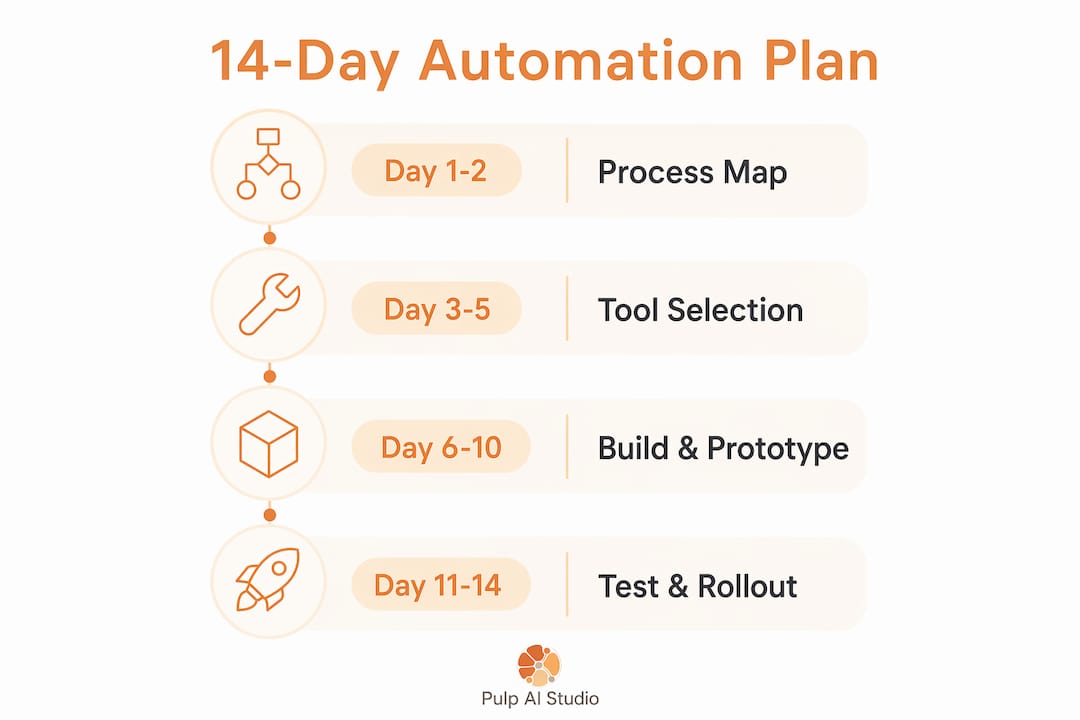
A proven two-week MVP timeline breaks into three phases: discovery and scoping (days 1–3), prototype build and integration (days 4–10), and testing with rollout preparation (days 11–14). Each phase has a hard deliverable. Missing a deliverable means the next phase starts on a broken foundation.
Days 1–3: Discovery and scoping
- Map the current process end to end. Sit with the person who does this task daily. Document every input, every output, and every decision. This takes 2–4 hours and is the most valuable time you will spend.
- Define the automation boundary. Decide exactly where the automation starts and where it hands off to a human. Unclear boundaries cause scope creep that kills timelines.
- Write the success metric. One number. Examples: “Reduce appointment no-shows from 30% to under 10%,” or “Send invoice reminders within 5 minutes of a due date, not 2 days late.”
- Confirm data sources. Identify every system the automation will touch. Check that you have API access or export capability before day 4.
- Get stakeholder sign-off. The person who owns this process must agree on the scope in writing before build starts.
Days 4–10: Prototype build and integration
- Build the trigger first. The event that starts the automation (a new form submission, a missed call, a calendar entry) must fire reliably before anything else matters.
- Build the core logic in one pass. Handle the standard path only. Do not build exception handling yet. Get the happy path working first.
- Connect integrations one at a time. Each new connection is a new failure point. Test each one before adding the next.
- Add error handling after the happy path works. Build retry logic, failure alerts, and fallback notifications. This step takes longer than most people expect. Budget a full day for it.
- Run the automation against historical data. Use real records from the past 30 days. This surfaces edge cases that invented test data never catches.
Pro Tip: Keep a running log of every edge case you find during the build. Each one becomes a test case in phase three. Aim for at least 50 documented scenarios before testing begins.
Days 11–14: Testing, training, and rollout
- Run 50–200 test cases. Experts recommend this range specifically because thorough testing is what separates automations that survive real-world use from ones that break on day two.
- Test failure scenarios deliberately. Disconnect an integration. Submit a record with missing fields. Send a duplicate entry. The automation must handle all of these gracefully.
- Train the team. Write a one-page standard operating procedure (SOP) covering what the automation does, what it does not do, and how to escalate when something looks wrong.
- Set up monitoring before launch. Configure alerts for failure rates, processing delays, and volume anomalies. You need to know about problems before your customers do.
- Launch with a rollback plan. Define the exact condition that triggers a rollback to the manual process. Write it down. Share it with the team.
The automated text reply approach is a strong first automation for most small businesses because the trigger is simple (a missed call or form submission), the logic is rule-based, and the success metric is immediate (response time drops from hours to seconds).
How do you troubleshoot problems and keep adoption on track?
Most automations that fail do not fail at launch. They fail in weeks two through six, when the initial excitement fades and edge cases accumulate. Knowing the common failure patterns in advance is the best defense.
The most frequent post-launch problems are:
- Integration breakage. An API changes, a credential expires, or a third-party platform updates its schema. Build monitoring that alerts you within minutes, not days.
- Data mismatches. Records arrive in unexpected formats. A phone number field contains letters. A date field is blank. Every automation needs input validation that catches bad data before it causes a silent failure.
- Manual effort creep. Team members start bypassing the automation because it does not handle their specific case. This is a signal that the exception handling is incomplete, not that the automation is wrong.
- Unclear ownership. Nobody knows who is responsible when the automation fails. Assign one person as the automation owner before launch.
Effective automation success is measured by error reduction, process consistency, and reduced team stress, not merely by time saved. An automation that runs reliably and removes daily friction from your team’s work is worth far more than one that saves 10 minutes but requires constant babysitting.
For ongoing improvement, run a brief weekly review for the first month. Check the error log, review the escalation count, and ask the team one question: “What did the automation get wrong this week?” That feedback loop is how you turn a working MVP into a reliable system. Learning how to transform automation workflows through iterative refinement is what separates businesses that sustain gains from those that revert to manual processes.
Forrester TEI studies report a 248–260% ROI over three years on automation implementations, with payback under six months. That return does not come from the launch. It comes from the months of consistent, monitored operation that follow.
Key Takeaways
A focused, well-prepared two-week automation pilot delivers measurable time savings and revenue growth when built on a stable, documented, rule-based workflow with clear success metrics.
| Point | Details |
|---|---|
| Choose the right process | Automate only workflows that are stable, documented, and follow a standard path more than 85% of the time. |
| Build error handling early | Add retry logic, failure alerts, and logging during the build phase, not after launch. |
| Test with 50–200 cases | Use real historical data and deliberate failure scenarios to surface edge cases before go-live. |
| Measure what matters | Track error rates, process consistency, and team stress reduction, not just time saved. |
| Plan for adoption | Assign an automation owner, write a one-page SOP, and run weekly reviews for the first month. |
Why I think most two-week automation projects fail for the wrong reasons
The conventional wisdom blames technology. The tools were too complex, the integrations were too fragile, the AI was not ready. After building these systems for small businesses across retail, healthcare, and service industries, I have found the opposite to be true.
The technology is ready. The preparation is not. Business owners come to a two-week build with a process that has never been written down, exceptions that outnumber the standard cases, and a success metric that amounts to “make it better.” That is not a technology problem. That is a scoping problem.
The second failure pattern I see constantly is what the industry calls “automation theater.” It looks like automation. It has triggers and logic and a dashboard. But it saves 8 minutes a week on a task that was never the bottleneck. The team ignores it within a month. Avoiding automation theater means being ruthless about impact before you write a single rule. If automating this process does not visibly change someone’s day, pick a different process.
The builds that succeed share one trait: the business owner could explain the process clearly before the build started. Not perfectly. Clearly. That clarity is what makes a two-week timeline realistic. Without it, two weeks becomes two months, and the ROI calculation falls apart. Start with one process, get it right, and let the results make the case for the next one.
— Adam
Pulp AI Studio gets your first automation live in about two weeks
Small businesses that want a working automation without the trial and error have a direct path. We set up and run a hosted CRM with the AI built in for shops, clinics, dealerships, and contractors, live in about two weeks at one flat monthly price (it can run a little longer when compliance work like HIPAA or carrier registration is involved). The flagship workflow handles missed calls automatically: when a call goes unanswered, the caller receives an SMS reply within 30 seconds, the AI manages the conversation, and the owner gets an instant alert. Your contacts, conversation history, and phone number stay yours to export. For medical practices and clinics, the automated medical answering service is purpose-built for after-hours coverage, with a HIPAA-compliant setup and a signed BAA. For any business losing leads to voicemail, the after-hours AI answering system is the place to start. Shops that want the whole system on hardware they own can step up to a custom build, which takes about 30 days. Most shops start managed and grow into a rig.
FAQ
What is a two-week business automation setup?
A two-week business automation setup is a time-boxed MVP pilot where one rule-based workflow is mapped, built, tested, and deployed within 14 days. The goal is a working system with measurable results, not a full automation overhaul.
Which workflows are best for a rapid automation build?
Appointment reminders, invoice processing, and missed-call responses are the strongest candidates. The best workflows run stably for at least 3 months, complete on the standard path more than 85% of the time, and follow clear rules rather than requiring judgment calls.
How many test cases does a two-week automation need?
Experts recommend running 50–200 test cases before launch. This range covers the standard path, common edge cases, and deliberate failure scenarios that reveal how the system behaves when something goes wrong.
What causes most automation projects to fail after launch?
Integration breakage, data mismatches, and manual effort creep are the three leading causes. Building monitoring and retry logic from day one, and assigning a single automation owner, prevents most post-launch failures.
What ROI can a small business expect from automation?
Forrester TEI studies report a 248–260% ROI over three years on automation implementations, with payback periods under six months. Small businesses using automation also grow revenue 2.1 times faster than non-automated competitors.