
 Adam Pichardo
TL;DR:
- An appointment setting answering service books and confirms appointments directly into your calendar, reducing missed revenue. Proper integration and rule definition ensure bookings are confirmed automatically, while AI and human agents handle different call types based on complexity. Most small businesses fail due to poor setup, but configured systems can help capture every booking and minimize scheduling errors.
An appointment setting answering service is defined as a live or automated system that books, confirms, and manages appointments directly into your calendar, rather than simply taking a message and passing it along. This distinction matters enormously for small businesses. Businesses using 24/7 answering services outside normal hours significantly reduce missed leads and increase bookings, because customers who cannot reach you after hours will call a competitor instead. The core value of a true appointment setting answering service is confirmed bookings, not voicemails. Whether you run a clinic, a contracting company, or a retail service, the difference between a message and a confirmed slot on your calendar is the difference between a lead and a paying client.
What is an appointment setting answering service, and how does it work?
An appointment setting answering service goes far beyond a traditional call answering service. A standard answering service records a caller’s name and number and emails it to you. An appointment setting service connects directly to your scheduling software and books the caller into a real time slot, sends a confirmation, and updates your calendar instantly.

The industry term for this capability is “live scheduling integration,” and it requires a two-way connection between the answering service and your calendar platform. Without that connection, every appointment remains tentative until you manually confirm it. That gap costs you clients.
The practical result for a small business owner is significant. You stop playing phone tag. Your calendar fills automatically. Customers receive instant confirmation, which builds trust before they ever walk through your door.
How appointment setting answering services integrate with your calendar software
Calendar integration works through real-time, two-way API syncing with platforms like Google Calendar, Microsoft Outlook, and Calendly. When a caller books a slot, the service writes directly to your calendar. When you block time off, the service sees that block and stops offering it to callers. Neither side operates in isolation.
Setup time varies by complexity. Integration typically takes 15 minutes to 1–2 days depending on whether you use a simple calendar app or a full CRM with custom fields. A solo contractor using Google Calendar can be live in under an hour. A multi-location clinic using a proprietary booking system may need a day of configuration.
Before going live, you define your scheduling rules. These rules tell the service exactly what to offer callers.
| Scheduling rule | What it controls | Why it matters |
|---|---|---|
| Business hours | When slots are available to book | Prevents bookings outside your working window |
| Meeting duration | Length of each appointment type | Avoids under- or over-booking time per client |
| Buffer time | Gap between consecutive appointments | Gives you travel or prep time between jobs |
| Cancellation policy | Notice period and penalties | Reduces last-minute no-shows |
| Time zone | Caller’s local time vs. your local time | Critical for multi-region or remote service businesses |
Without two-way API integration, appointments stay tentative rather than confirmed. That limitation frustrates customers and creates double-booking risk. Proper integration eliminates both problems.
Pro Tip: Before connecting any answering service to your calendar, audit your existing scheduling rules. Define buffer times, meeting durations, and cancellation windows in your calendar app first. The answering service will inherit those settings automatically, saving you hours of configuration.
Human live agents vs. AI virtual receptionists: which should you choose?
The choice between a human agent and an AI virtual receptionist is not about price. Experts recommend choosing based on call complexity and business value, not cost alone. Each model has a distinct role in a well-run appointment management service.
When human agents outperform AI
Human live agents are necessary for high-value or nuanced consultations where qualification and discretion matter. A personal injury law firm, a cosmetic surgery clinic, or a high-ticket home renovation company needs a trained agent who can read tone, ask follow-up questions, and qualify the lead before booking. These calls carry real revenue risk if handled poorly.
Human agents also handle objections, explain service options, and build rapport. That kind of conversation cannot be scripted into a decision tree without losing nuance.
What AI virtual receptionists do best
An AI receptionist handles booking with zero hold times and 24/7 availability. It follows your scheduling rules every time, without fatigue or error. For businesses with structured intake workflows, such as HVAC companies, dental offices, or beauty salons, AI covers the full booking cycle without human involvement.
AI handles these tasks reliably:
- Collecting caller name, contact number, and service type
- Checking real-time calendar availability and offering open slots
- Sending SMS or email confirmations immediately after booking
- Triggering follow-up reminders 24 hours before the appointment
- Updating CRM records with caller details and booking status
The hybrid model
Most growing small businesses land on a hybrid approach. AI handles after-hours calls and routine bookings. Human agents take over for complex consultations or high-value leads during business hours. You can read more about how AI handles after-hours calls and where human judgment still adds value.
Pro Tip: Map your call types before choosing a model. List every reason a customer calls you and sort each one as “structured” or “nuanced.” Structured calls go to AI. Nuanced calls go to a human agent. That single exercise prevents you from over-automating or under-automating your front desk.
Scheduling nuances and edge cases that affect appointment setting
Real-world scheduling is messier than a clean calendar grid suggests. A professional appointment management service handles the edge cases that break basic booking tools.
-
Cancellations and instant calendar updates. When a client cancels, the slot must open immediately for rebooking. A service without live sync leaves that slot blocked, costing you a replacement booking. Two-way API integration solves this automatically.
-
Time zone conversions. A plumber serving three counties or a consultant with remote clients across states needs automatic time zone detection. Without it, callers book in their local time and arrive an hour early or late. A quality virtual appointment scheduling system converts time zones at the point of booking.
-
Deposit collection. A quality appointment setting service collects payments securely over the phone through integrations with processors like Stripe or PayPal. This feature is critical for industries that require deposits to hold a booking, such as event photography, custom fabrication, or specialty medical procedures.
-
Buffer time management. Back-to-back bookings without travel or prep time create a cascade of late arrivals. Defining buffer times in your scheduling rules prevents this. A 15-minute buffer between a 60-minute HVAC service call and the next job is not optional for a field technician.
-
Lead qualification during booking. Appointment setting services update client records instantly and qualify leads during calls. Integration with CRMs like HubSpot or Salesforce means the agent or AI captures service type, urgency, and budget range before the appointment is confirmed. You arrive at every job knowing exactly what the client needs.
Scheduling rules for cancellations, deposits, and time zones must be defined upfront. Skipping this step produces a messy schedule and frustrated clients within the first week.
How to set up an appointment setting answering service for your business
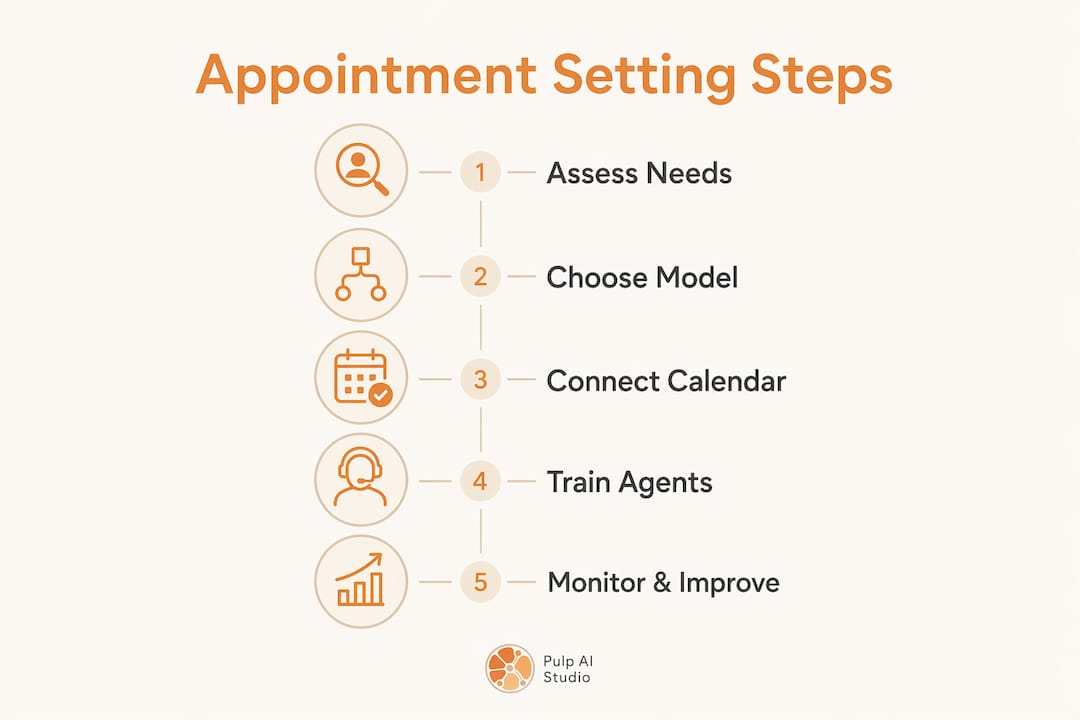
Setting up a professional answering service for appointment scheduling is a five-step process. Each step builds on the last, and skipping any one of them creates problems downstream.
Step 1: Assess your business needs
Start by documenting your call volume, peak hours, appointment types, and average call duration. A solo contractor who gets five calls a day has different needs than a dental office handling 40 booking requests daily. Know your numbers before you evaluate any service.
Step 2: Choose your model
Decide between a live agent service, an AI virtual receptionist, or a hybrid. Use the call-type mapping exercise described earlier. If most of your calls are routine bookings, AI covers the majority of your volume at a fraction of the cost of a full live agent team. For businesses where every call involves a unique scope of work, live agents remain the better choice. The AI vs. receptionist decision deserves careful thought before you commit.
Step 3: Connect your calendar and set scheduling rules
Link your chosen service to Google Calendar, Outlook, or Calendly. Define business hours, meeting durations, buffer times, cancellation policies, and time zone settings before the service goes live. Test the integration by booking a dummy appointment and confirming it appears correctly on your calendar.
Step 4: Train agents or configure AI workflows
For live agent services, provide a detailed call script covering your service types, pricing, and common objections. For AI systems, build out your intake workflow with branching logic for each appointment type. The more specific your configuration, the fewer edge cases the system will mishandle.
Pro Tip: Record your first 20 live calls after launch and review them weekly. You will find gaps in your scripts or AI workflows that no amount of upfront planning could have predicted. Iteration in the first 30 days produces a far better system than perfecting the setup before launch.
Step 5: Monitor performance and improve
Track four metrics weekly: booking rate (calls that result in a confirmed appointment), no-show rate, cancellation rate, and average time to confirm. These four numbers tell you exactly where your appointment scheduling solution is leaking revenue. Adjust your scheduling rules, scripts, or AI workflows based on what the data shows. The AI answering service guide for 2026 covers performance benchmarks worth tracking.
Key Takeaways
An appointment setting answering service confirms bookings directly into your calendar in real time, making it fundamentally different from a message-taking service and directly reducing missed revenue for small businesses.
| Point | Details |
|---|---|
| Two-way API integration is non-negotiable | Without live sync, appointments stay tentative and double-booking risk stays high. |
| Define scheduling rules before launch | Buffer times, cancellation policies, and time zones must be set upfront to avoid calendar conflicts. |
| Match the model to call complexity | Use AI for structured bookings and human agents for high-value or nuanced consultations. |
| Deposit collection reduces no-shows | Integrations with Stripe or PayPal let you collect payments at booking, not on arrival. |
| Monitor four core metrics weekly | Booking rate, no-show rate, cancellation rate, and confirmation time reveal where revenue leaks. |
Why most small businesses get this wrong on day one
I have watched dozens of small business owners set up an answering service, feel good about it for two weeks, and then quietly go back to managing their own calls. The reason is almost always the same. They chose a service that takes messages rather than one that confirms bookings. They assumed “answering service” meant “appointment setting service.” It does not.
The second mistake I see constantly is launching without defining scheduling rules. A business owner connects their Google Calendar, turns on the service, and assumes it will figure out the rest. It will not. The service will offer every open slot on your calendar, including the hour you blocked for lunch and the Friday afternoon you reserved for estimates. You will get double-booked within 48 hours, blame the technology, and cancel the subscription.
The third mistake is choosing purely on price. A $50-per-month AI service sounds appealing until a high-value client calls with a complex question and gets a scripted response that does not address their situation. That client does not book. They call someone else. The cost of that lost job far exceeds the savings on the monthly plan.
The businesses I have seen get this right share one habit. They treat the answering service as a front-desk employee who never sleeps, and they invest the same time in onboarding it that they would invest in training a new hire. They write the scripts. They define the rules. They review the call logs. The agentic AI capabilities now available make this level of configuration genuinely accessible for small businesses, not just enterprise teams. The technology is ready. The question is whether you are willing to configure it properly.
— Adam
How Pulp AI Studio helps small businesses capture every booking
Pulp AI Studio builds custom AI appointment setting systems for small businesses, clinics, contractors, and retailers, as a scoped build with an optional managed plan. Every build includes a missed-call text-back system that contacts a caller within minutes of a missed call, keeping the lead warm before they reach a competitor. Setup takes two weeks, and the system connects directly to your existing calendar and CRM. If you are ready to stop losing bookings to voicemail, explore custom AI chatbot builds designed specifically for small business appointment management. For businesses that want to start with missed-call recovery, the two-week sprint package delivers a fully functioning system you own outright.
FAQ
What is an appointment setting answering service?
An appointment setting answering service books, confirms, and manages appointments directly into your calendar through live agents or AI, rather than simply recording a message for you to follow up on later.
How long does calendar integration take to set up?
Setup typically takes 15 minutes to 1–2 days depending on whether you use a simple calendar app like Google Calendar or a complex CRM with custom booking fields.
When should I use a human agent instead of AI?
Use human agents for high-value or nuanced consultations where lead qualification and discretion matter. Use AI for structured, repeatable booking workflows where speed and 24/7 availability are the priority.
Can an appointment setting service collect deposits?
Yes. Quality services integrate with payment processors like Stripe or PayPal to collect deposits securely at the time of booking, which reduces no-shows significantly.
What scheduling rules do I need to define before going live?
Define business hours, meeting durations, buffer times between appointments, cancellation policies, and time zone settings. These rules prevent double-booking and calendar conflicts from the first day of operation.