
 Adam Pichardo
TL;DR:
- AI receptionists can automate routine calls, reducing costs by up to 95 percent and handling over 90 percent of basic inquiries. However, human staff remain essential for in-person tasks, emotional support, and complex judgment calls. The role of receptionists is shifting toward AI supervision and relationship management, not full replacement.
AI receptionists are software systems that handle phone calls, schedule appointments, answer FAQs, and route messages without human involvement. The question of whether AI will replace receptionists has a clear answer for 2026: AI restructures the role rather than eliminating it. The U.S. Bureau of Labor Statistics reports over 1,000,000 receptionist jobs active in the U.S. with a projected zero percent change through 2034. That stability tells you something important. Automation is absorbing the repetitive work, not the entire job.
Will AI replace receptionists, or just change what they do?
The honest answer is both, depending on the task. AI handles the predictable, repeatable work with high accuracy. It cannot handle the judgment calls, the emotional moments, or the person standing at your front desk.

AI voice agents resolve over 90% of routine requests on the first call. That covers appointment booking, hours and directions, basic FAQs, and after-hours message capture. These are exactly the tasks that consume most of a receptionist’s day.
Where AI falls short is equally clear. It cannot detect emotional distress in a caller’s voice reliably. It cannot sign for a delivery, greet a walk-in client, or make a judgment call when a situation falls outside its programmed rules. A caller who is upset about a billing error needs a human. A new patient who walks in nervous about a procedure needs a human. No voice model currently closes that gap.
Most small businesses use AI to handle 40–60% of their front-desk workload, concentrating on after-hours calls, overflow volume, and routine inquiries. Humans stay responsible for complex and in-person tasks. This split is not a compromise. It is the most efficient model available right now.
What AI receptionists can and cannot do
| Task | AI receptionist | Human receptionist |
|---|---|---|
| 24/7 availability | Yes | No (shift-limited) |
| Appointment scheduling | Yes | Yes |
| FAQ responses | Yes | Yes |
| Emotional support calls | No | Yes |
| Walk-in greeting | No | Yes |
| Delivery and badge access | No | Yes |
| Complex complaint handling | No | Yes |
| Call overflow and after-hours | Yes | Rarely |
Pro Tip: Set your AI to handle all calls during off-hours and overflow periods first. That single change captures the highest ROI before you touch your daytime staffing model.
How AI is restructuring receptionist roles, not replacing them
The front desk is not disappearing. It is changing shape. Receptionists who adapt to this shift become more valuable, not less.
The most significant change is the emergence of what workforce analysts call the “AI supervisor” role. Receptionists who manage AI tools, including setting call routing rules, reviewing escalation logs, and correcting AI errors, become operational assets that a business cannot easily replace. This is a skill upgrade, not a demotion.
Here is what that restructuring looks like in practice:
- Routine call handling shifts to AI. Appointment reminders, directions, hours, and basic intake questions move off the receptionist’s plate entirely.
- Receptionists focus on relationship work. With repetitive calls handled, staff spend more time on clients who need real attention, follow-up calls, and problem resolution.
- AI supervision becomes a core skill. Staff learn to audit call logs, flag AI errors, and update scripts when the system gives wrong information.
- Escalation management becomes formalized. Receptionists define the triggers that send a call from AI to human, then monitor whether those triggers are working correctly.
- Training shifts toward communication and technology. The receptionist of 2026 needs to understand both people and the AI system sitting alongside them.
Upskilling receptionists into AI supervisors creates new role value and helps businesses scale service without adding headcount. That is a direct benefit for small business owners who cannot afford to hire two people when one well-trained person with the right tools can do more.
Pro Tip: Create a written escalation script before you deploy any AI receptionist. Define exactly which call types go to a human immediately. Angry callers, medical emergencies, and complex billing questions should never stay with the AI.
Physical front-desk tasks like greeting walk-ins, handling deliveries, and managing badge access cannot be automated. This is the ceiling on AI replacement, and it is a firm one. Any business with foot traffic needs a human presence. The AI handles the phone. The person handles the room.
What are the cost and operational benefits of AI receptionists?
Cost is where AI makes its strongest argument. The numbers are not close.
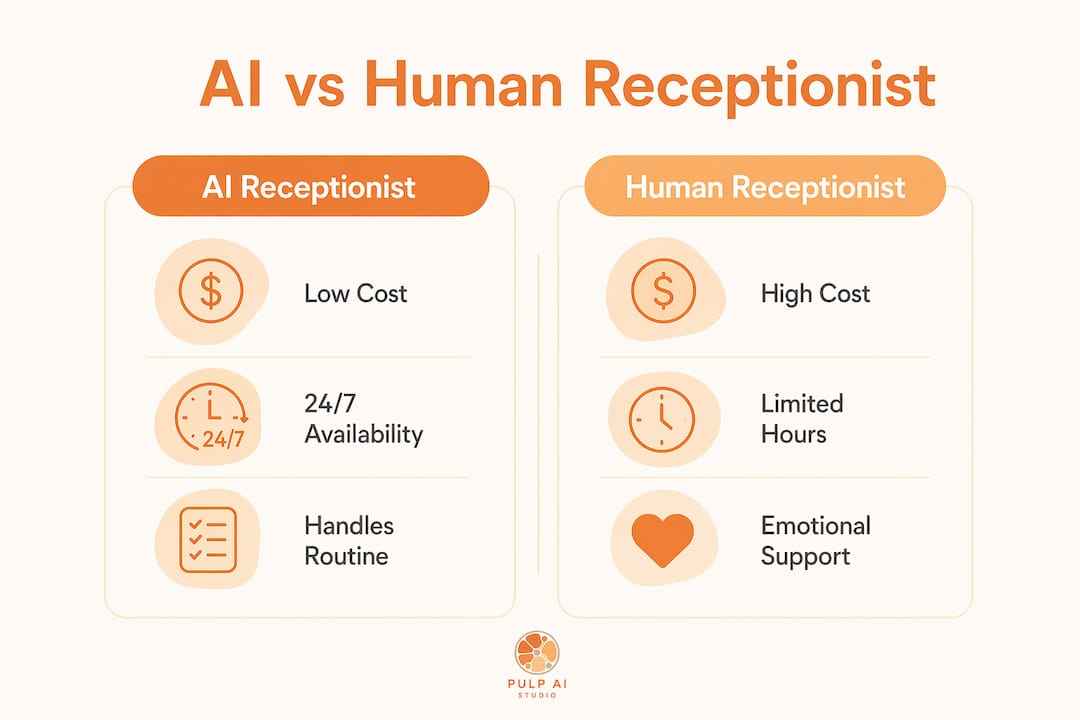
AI receptionist services cost between $25 and $497 per month. A full-time human receptionist costs between $2,500 and $4,000 per month when you include salary, benefits, and employer taxes. That is an 85–95% reduction in cost for the tasks AI can handle. For a small business running tight margins, that difference is significant.
AI voice receptionists operate at $0.05–$0.20 per minute and scale to handle large call volumes without additional cost. A human receptionist hits a ceiling at roughly one call at a time. An AI system handles simultaneous calls without degradation in response quality.
AI vs. human receptionist: cost and performance comparison
| Metric | AI receptionist | Human receptionist |
|---|---|---|
| Monthly cost | $25–$497 | $2,500–$4,000 |
| Availability | 24/7/365 | Business hours only |
| Call answer rate | Up to 99% | Variable |
| Simultaneous calls | Unlimited | 1 at a time |
| Judgment-layer calls | Poor | Strong |
| Setup time | Days to weeks | Weeks to months |
AI increases call answer rates to 99% by covering overflow and after-hours periods. Every missed call is a potential lost client. For a dental office, a law firm, or a home services contractor, one recovered appointment per week can justify the entire monthly cost of the AI system.
The operational case for AI also includes reduced turnover costs. Receptionist roles see high turnover in many industries. Every time you replace a receptionist, you absorb recruiting, onboarding, and training costs. An AI system does not resign, call in sick, or need a performance review.
- AI eliminates after-hours coverage gaps without overtime pay
- Overflow call handling prevents lost leads during busy periods
- Consistent responses reduce errors from staff fatigue or inexperience
- Faster response times improve caller satisfaction on routine requests
What should you consider before adopting AI receptionist technology?
AI receptionist technology works best when you deploy it with clear boundaries. Businesses that treat it as a complete replacement for human staff run into problems quickly.
AI can invent nonexistent policies or mishandle complex questions when it encounters situations outside its training. That kind of error damages trust with clients. The fix is human oversight, not better AI. Someone on your team needs to review call logs regularly and update the system when it gives wrong answers.
The right deployment model depends on your business type:
- High call volume, mostly routine inquiries (e.g., salons, clinics, contractors): AI handles the majority of calls. One human manages escalations and walk-ins.
- Complex service businesses (e.g., law firms, financial advisors): AI handles scheduling and FAQs only. Humans take all substantive calls.
- Businesses with heavy foot traffic: AI covers phones. A human receptionist stays focused on in-person clients.
- Solo operators or micro-businesses: AI covers all calls during off-hours. The owner handles calls during business hours.
In hybrid models, AI typically handles 80% of calls while humans focus on the 20% that require complex judgment and relationship building. That ratio holds across most industries. It is a reliable benchmark for planning your staffing model.
Pro Tip: Before you go live with any AI receptionist, run a two-week test using call recordings. Listen to how the AI handles edge cases. Fix the gaps before clients experience them.
Businesses that see the best results treat AI deployment as an ongoing process, not a one-time setup. Call scripts need updating as your services change. Escalation triggers need reviewing as you learn which call types the AI handles poorly. For guidance on AI prompt best practices and common configuration mistakes, reviewing established frameworks before launch saves significant rework later.
The future of AI in business operations points toward deeper integration between AI systems and human staff, not replacement of one by the other. Business leaders who plan for that integration now will have a structural advantage over those who wait.
Key takeaways
AI restructures receptionist roles by automating routine calls and enabling humans to focus on judgment, empathy, and in-person tasks that no AI system can replicate.
| Point | Details |
|---|---|
| AI handles routine work | Scheduling, FAQs, and after-hours calls are reliably automated at 90%+ resolution rates. |
| Cost savings are substantial | AI receptionist services cost $25–$497 per month versus $2,500–$4,000 for human staff. |
| Human roles evolve, not disappear | Receptionists shift into AI supervision, escalation management, and relationship-focused work. |
| Physical presence stays human | Walk-ins, deliveries, and in-person tasks cannot be automated and require human staff. |
| Hybrid models deliver the best results | AI handles 80% of calls; humans manage the 20% requiring judgment and complex interaction. |
The front desk is not going away. It is getting smarter.
I have worked with enough small business owners to know that the fear around AI replacing staff is real, and it is understandable. But the businesses I have seen get this right are not the ones who replaced their receptionist with a bot. They are the ones who gave their receptionist better tools and a bigger job.
The receptionist who used to spend six hours a day answering the same five questions now spends those hours following up with leads, managing client relationships, and catching problems before they escalate. The AI handles the phone. The person handles everything that actually requires a person.
What I find most interesting is how quickly the “AI supervisor” role becomes indispensable. Once a receptionist learns to manage call routing rules, audit logs, and escalation triggers, they hold institutional knowledge that is genuinely hard to replace. That is the opposite of the displacement story most people expect.
The businesses that struggle are the ones that deploy AI without thinking through the handoff. They set it up, walk away, and then wonder why clients are complaining about getting wrong information or being stuck in a loop. AI needs supervision. It needs someone who knows the business well enough to catch its mistakes.
My honest recommendation: start with after-hours coverage. It is the lowest-risk deployment, it captures real revenue from missed calls, and it gives your team time to learn how the system behaves before it touches your peak hours. That is how you build confidence in the technology without betting your client relationships on it.
— Adam
Pulp AI Studio’s AI solutions for small business front desks
Businesses that want to capture after-hours leads and reduce missed calls without hiring additional staff have a direct path forward with Pulp AI Studio. The platform deploys a missed-call text-back system and AI auto-replies that keep your business responsive even when your office is closed. For businesses ready to automate routine front-desk calls, Pulp AI Studio offers custom AI chatbot builds on a fixed-fee proposal, fully deployed within two weeks — you own the rig, with an optional managed plan if you want ongoing support. Medical offices and clinics can also explore Pulp AI Studio’s automated medical answering services built specifically for healthcare front-desk workflows.
FAQ
Will AI fully replace receptionists?
AI will not fully replace receptionists. It automates routine calls and scheduling, but human staff remain necessary for in-person tasks, emotional support, and complex judgment calls.
What is an AI receptionist?
An AI receptionist is a voice or chat software system that handles calls, books appointments, answers FAQs, and routes messages automatically, without a human operator.
How much does an AI receptionist cost?
AI receptionist services cost between $25 and $497 per month, compared to $2,500–$4,000 per month for a full-time human receptionist, representing savings of 85–95%.
How do AI receptionists work?
AI receptionists use voice recognition and natural language processing to understand caller requests, respond with scripted or dynamic answers, and route complex calls to a human when needed.
What jobs are safe from AI in front-desk roles?
Tasks requiring physical presence, such as greeting walk-ins, handling deliveries, and managing building access, remain exclusively human. Emotional support and complex problem-solving also stay with human staff.