
 Adam Pichardo
TL;DR:
- AI receptionists often outperform live answering services for HVAC businesses in cost, coverage, and booking efficiency. Most systems offer 24/7 call answering, direct FSM booking, and emergency triage, helping contractors capture more leads and reduce missed calls. Hybrid models with human backup are ideal for mid-sized teams, combining automation advantages with quality customer interactions.
Which AI receptionist is best for HVAC businesses right now?
The short answer: for many HVAC companies with a moderate-sized technician team, the best AI receptionist is one that books straight into your field service software (ServiceTitan for most mid-sized shops), escalates no-heat and no-cool calls to the on-call tech, and works alongside your live CSRs instead of replacing them. The options below are the leading services available in the US market today, compared across the dimensions that actually matter for HVAC operations.
Running a plumbing shop instead? The plumbing version of this lives in our AI receptionist for plumbers note.
| Product | Best For | Pricing | HVAC-Specific Features | AI vs. Human Hybrid | FSM Integration |
|---|---|---|---|---|---|
| NextPhone | Small to mid-sized HVAC teams | Tiered plans (not publicly listed) | HVAC call scripting, direct FSM sync | AI-first | ServiceTitan, Jobber |
| Smith.ai | Businesses wanting AI + human flexibility | Starts ~$285/mo | Personalized HVAC scripting | Hybrid AI + live agents | CRM and scheduling tools |
| Allo | Small teams needing all-in-one phone | Flat monthly (no per-call fees) | Unlimited AI answering, easy setup | AI-first | Basic integrations |
| PATLive | Companies preferring live operators + AI | Starts ~$149/mo | Home services scripts, AI routing | Hybrid AI + live operators | Limited FSM |
| AnswerConnect | Professional live answering + AI routing | Starts ~$299/mo | Dedicated HVAC scripts, 24/7 coverage | Hybrid AI + live agents | CRM routing |
| Ruby | Teams needing personable live answering | Starts ~$235/mo | Call booking, live agent quality | Hybrid AI + live agents | Limited FSM |
| Rosie | Conversational AI priority | Not publicly listed | Advanced NLP for HVAC calls | AI-first | FSM workflow integration |
| Avoca.ai | Contractors wanting deep HVAC voice AI | Not publicly listed | Deep HVAC industry automation | AI-first | ServiceTitan, Jobber |
| OnCactus.com | Industry-specific virtual answering | Not publicly listed | Custom home-service scripts | Hybrid | FSM integration |
| Quo Sona | Mid-sized HVAC scheduling and dispatch | Not publicly listed | Dispatch calendar sync | AI-first | Field service calendar |
| Goodcall | Lead capture and booking automation | Starts ~$49/mo | Call analytics, booking automation | AI-first | Google, basic CRM |
| Nextiva Xbert | Enterprises on Nextiva’s platform | Bundled with Nextiva plans | Unified comms + AI receptionist | Hybrid | Nextiva ecosystem |
| RingCentral AIR | Cloud PBX + AI call answering | Bundled with RingCentral plans | Cloud telephony + AI routing | Hybrid | RingCentral ecosystem |
| CloudTalk | Teams scaling call operations | Starts ~$25/agent/mo | Call center AI, analytics | AI-first | CRM integrations |
| Dialzara | Smaller teams needing script customization | Not publicly listed | Flexible HVAC scripting | AI-first | Lightweight FSM |
Every product in this table is available to US-based HVAC businesses. Pricing shown reflects publicly available starting rates where listed; most vendors offer custom quotes for HVAC-specific configurations.
What HVAC businesses should evaluate before choosing an AI receptionist
Picking the wrong tool costs more than the subscription fee. A system that can’t route a “no heat” call to your on-call tech at 11 PM on a Friday is worse than no system at all. Here’s what to weigh before you commit.
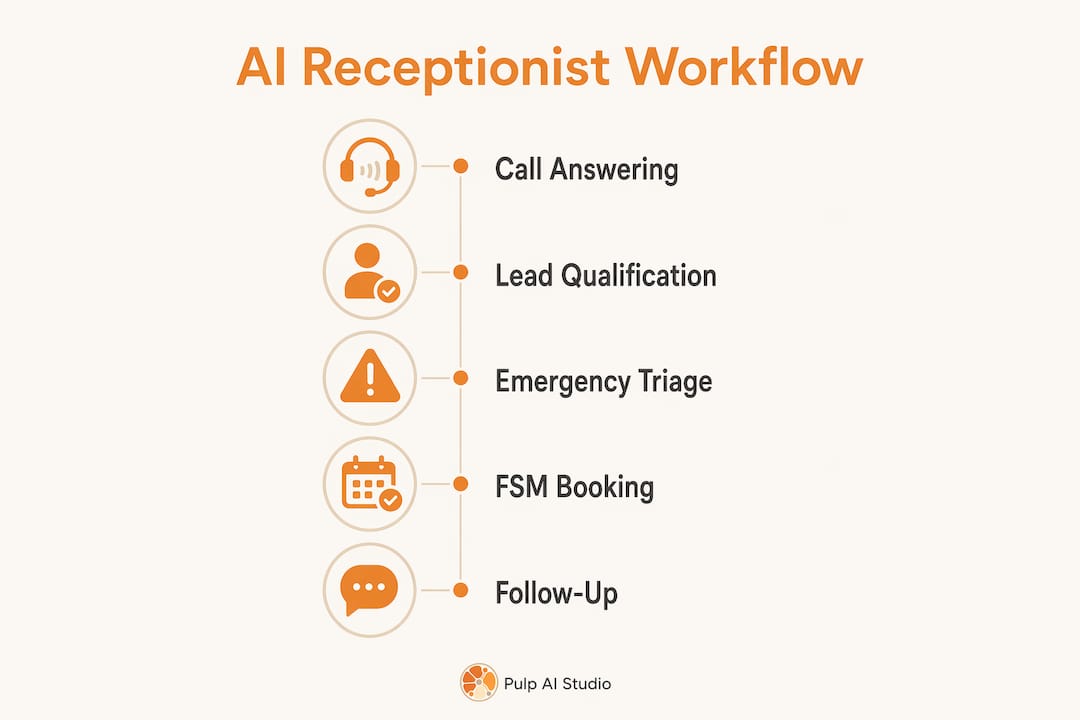
24/7 coverage and emergency triage
HVAC demand doesn’t follow business hours. A homeowner with no heat at 10 PM rarely leaves a voicemail and waits. They call your competitor. Any AI receptionist you evaluate must answer every ring around the clock and recognize emergency keywords like “no heat,” “no cool,” or “gas smell” to trigger an immediate escalation path.
Lead qualification depth
A generic answering service collects a name and a callback number. A purpose-built AI receptionist for HVAC gathers equipment type, system age, problem description, urgency level, and service area on the first call, then pushes all of it directly to your CRM so dispatchers have full context before they assign the job. That difference in data quality changes how efficiently your team can schedule and prioritize.
FSM integration: booking vs. message-taking
This is the single biggest capability gap between an AI receptionist and a traditional answering service. AI receptionists book jobs during the call by reading live availability directly from your field service management software. Answering services take messages and create a callback queue your office has to work through the next morning. For HVAC companies on ServiceTitan, Jobber, Housecall Pro, or FieldEdge, native FSM integration is a requirement, not a nice feature.
Best AI receptionist for HVAC companies that integrates with ServiceTitan
If your shop runs on ServiceTitan, the shortlist gets short fast. Only a handful of the fifteen platforms below write a booked job into ServiceTitan during the call. The rest either connect through a Zapier-style middle layer (which means the job lands as a lead, not a scheduled appointment) or stop at a message and a callback.
| Platform | ServiceTitan integration | What lands in ServiceTitan | Fit |
|---|---|---|---|
| Avoca.ai | Native | Booked job on the live schedule, customer record, call summary | Contractors who want the deepest HVAC-specific voice AI |
| NextPhone | Native | Booked job, customer record, intake notes | Small to mid-sized HVAC teams that want a purpose-built product |
| Smith.ai | Native (plus live-agent backup) | Booked job or qualified lead, depending on plan | Teams that want a human in the loop for complex calls |
| Rosie, OnCactus.com | Connector-based | Lead or note; booking usually needs an office step | Lighter call volume, budget-first buyers |
| Managed setup (Pulp AI Studio) | Native, scoped to your intake script | Whatever your dispatcher does today: job type, tags, zone, on-call page | Shops that want it set up and run for them; a custom build you own is the step up |
Three things to verify on the demo call before you sign, regardless of vendor. First, ask to watch a booking land on the ServiceTitan dispatch board in real time, not in a recorded video. Second, confirm the integration reads live technician availability rather than a static calendar. Third, ask what happens when ServiceTitan is down or the API rate-limits: a good system falls back to a message plus an on-call page, and a bad one drops the call. A custom build gives you that fallback logic by design; see how the 24/7 answering rig pages the tech on emergencies even when the FSM write fails.
What to map before a ServiceTitan integration goes live
"Integrates with ServiceTitan" can mean anything from a booked job with the right tags to a note in a lead inbox. The difference is in the mapping work done before go-live. Have these answers ready, and make the vendor show where each one lands:
- Business units. Which calls belong to residential service, replacement sales, commercial, and maintenance. A no-cool call and a new-system quote should not land in the same unit.
- Job types and priorities. The AI's triage outcome (emergency, urgent, routine) should map to your existing job types and priority codes, not new ones invented for the integration.
- Zones and technician skills. If only two techs work on heat pumps, the AI should only offer slots those techs can take.
- Campaign and call source. Tag every AI-booked job with a campaign so your marketing reports still show which channel drove the call.
- Memberships. If the caller is a maintenance plan member, the booking should show it, and the AI should follow your member rules (priority scheduling, waived fees, whatever your plan promises).
- Existing customer match. The AI should find the existing customer and location record instead of creating a duplicate every time a repeat customer calls.
A vendor that can walk through all six on your own ServiceTitan account is ready. A vendor that answers "we sync with ServiceTitan" and moves on is the Zapier-style middle layer described above.
Core features to evaluate
- 24/7 intelligent answering with no after-hours surcharge
- Emergency triage routing that escalates urgent calls to an on-call technician
- Automated lead qualification capturing equipment type, age, issue, and urgency
- Direct FSM booking into ServiceTitan, Jobber, Housecall Pro, or FieldEdge
- Simultaneous call handling with no hold queues during peak season
- SMS confirmations sent to customers immediately after booking
- Full call transcripts and analytics for every interaction
- Customizable HVAC scripts that match your intake process
Pricing and cost-effectiveness
Published starting rates for the platforms in this guide are in the comparison table above, and several vendors only quote by call volume or bundle the AI into a phone plan. The starting rate is rarely the number that matters. Ask every vendor for the all-in monthly total: setup, after-hours and overage charges, the ServiceTitan or FSM integration, and any per-seat fees for your CSRs. Then weigh it against what the system actually produces: a booked job on the board, or a message someone still has to call back.
Detailed profiles of leading AI receptionist services for HVAC companies
The 15 services below vary significantly in how they approach HVAC call handling. Some are purpose-built for field service contractors. Others are general AI phone platforms that HVAC teams adapt. The right fit depends on your team size, existing software stack, and whether you want a fully automated system or a human backup layer.
1. NextPhone
NextPhone positions itself specifically for HVAC and home service businesses, with call scripting and FSM integrations built into its core product rather than bolted on. It connects directly with ServiceTitan and Jobber, handles after-hours calls without extra fees, and offers tiered pricing that scales with call volume. For small to mid-sized HVAC teams that want a purpose-built virtual assistant without building one from scratch, NextPhone is a strong starting point. One G2 reviewer noted the system’s ability to handle HVAC-specific intake questions without sounding robotic.
2. Smith.ai
Smith.ai runs a hybrid model: AI handles the initial intake and routing, and live agents step in for calls that need a human touch. That flexibility matters for HVAC businesses that occasionally deal with complex warranty disputes or upset customers who won’t engage with an automated system. Smith.ai offers personalized scripting, integrates with a wide range of CRM and scheduling tools, and publishes transparent pricing starting around $285 per month. The tradeoff is that the hybrid model costs more than a pure AI solution, and the live agents are generalists rather than HVAC specialists.
3. Allo
Allo bundles an AI answering system into a complete phone platform with no per-call fees. For a small HVAC team that wants to replace its existing phone system and answering solution in one move, that all-in-one structure removes a lot of friction. G2 reviews highlight the straightforward setup and the absence of surprise charges. The FSM integration options are more limited than dedicated HVAC platforms, so teams running ServiceTitan at scale may find it less capable on the booking side.

4. PATLive
PATLive has operated as a 24/7 answering service for home services businesses for years, and its AI layer sits on top of that live-operator foundation. Calls are answered by trained agents using AI-assisted routing and scripting. For HVAC owners who want a human voice on every call but also need after-hours coverage and smarter routing, PATLive offers a middle ground. Starting rates around $149 per month make it one of the more accessible hybrid options, though direct FSM booking is limited compared to AI-first platforms.
5. AnswerConnect
AnswerConnect provides 24/7 live answering with AI routing and dedicated scripts for HVAC businesses. Its strength is coverage depth: the live agent network handles high call volumes reliably, and the HVAC-specific scripts mean callers aren’t navigating a generic intake process. Pricing starts around $299 per month. The limitation is the same one that applies to most live-agent services: agents take messages and schedule callbacks rather than booking directly into your dispatch calendar.
6. Ruby
Ruby focuses on premium live agent quality. Its virtual receptionists are trained to sound like in-house staff, and the AI layer handles routing and call prep. HVAC teams that prioritize caller experience and brand voice over pure automation tend to prefer Ruby. Pricing starts around $235 per month. Like AnswerConnect, Ruby’s live agents don’t integrate directly with FSM platforms for real-time booking, so it works best alongside a dispatcher who handles the final scheduling step.
7. Rosie
Rosie is built around natural conversation. Its NLP engine is tuned specifically for HVAC service calls, which means it handles the back-and-forth of a diagnostic intake without sounding like a phone tree. Rosie integrates with HVAC workflow tools and can route emergencies appropriately. It’s a good fit for companies that have had bad experiences with AI systems that frustrate callers with rigid scripts. Pricing is not publicly listed; most deployments are quoted based on call volume and integration requirements.
8. Avoca.ai
Avoca.ai is one of the most HVAC-focused voice AI platforms on the market. It’s built specifically for home service contractors, with deep automation for intake, triage, and booking. The platform integrates with ServiceTitan and Jobber and handles the full call flow without human involvement. For contractors who want a purpose-built system rather than a general AI platform adapted for HVAC, Avoca.ai is worth a close look. Pricing is not publicly listed.
9. OnCactus.com
OnCactus.com specializes in virtual receptionist services for HVAC and other home-service contractors. Its scripts are built around the specific intake needs of field service businesses, and it offers FSM integration for dispatch calendar sync. The service suits HVAC firms that want industry-specific answering without building a custom AI system. Pricing is not publicly listed.
10. Quo Sona
Quo Sona focuses on automated scheduling and dispatch for field service businesses. Its dispatch calendar sync is a standout feature for mid-sized HVAC companies managing multiple technicians across different service zones. The platform handles inbound scheduling calls and routes them directly to the right calendar slot. Pricing is not publicly listed.
11. Goodcall
Goodcall leads with call analytics and booking automation. Its AI captures lead data, qualifies callers, and books appointments, with a dashboard that shows call conversion rates and missed call patterns. Starting around $49 per month, it’s one of the most accessible AI receptionist options for smaller HVAC operations. The FSM integration depth is lighter than dedicated HVAC platforms, but the analytics layer gives owners visibility into call performance that most answering services don’t provide.
12. Nextiva Xbert
Nextiva Xbert is the AI receptionist layer within Nextiva’s broader unified communications platform. For HVAC enterprises already running Nextiva for their phone system, Xbert adds AI call handling without requiring a separate vendor. The integration is tight within the Nextiva ecosystem, but it’s less useful for teams not already on that platform. Pricing is bundled with Nextiva’s communication plans.
13. RingCentral AIR
RingCentral AIR combines AI call answering with RingCentral’s cloud PBX infrastructure. For HVAC firms that want a single vendor for their phone system and AI receptionist, it’s a practical option. The AI routing and answering features sit inside the RingCentral platform, so teams already using RingCentral can activate AIR without a separate integration. Pricing is bundled with RingCentral plans.
14. CloudTalk
CloudTalk is primarily a cloud call center platform with AI features layered in. HVAC teams scaling their call operations, particularly those managing inbound volume across multiple locations, find its call management tools useful. G2 reviewers highlight the call analytics and routing capabilities. Starting around $25 per agent per month, it’s priced for teams rather than solo operators. The HVAC-specific scripting requires more configuration than purpose-built platforms.
15. Dialzara
Dialzara is a lightweight AI receptionist with flexible script customization. For smaller HVAC companies that need a tailored intake script but don’t have the call volume to justify a premium platform, Dialzara offers a practical entry point. Deployment is fast, and the scripting tools let owners define exactly how calls are handled. Pricing is not publicly listed.
Pro Tip: Before requesting demos, map your current call flow on paper: how calls arrive, how emergencies are flagged, which FSM platform you use, and what your peak call hours look like. Vendors who can walk through that exact flow in a demo are the ones worth evaluating seriously.
How to choose the right AI receptionist for your HVAC business
The decision comes down to four variables: call volume, FSM software, budget, and how much human backup you want in the system. Work through these in order.
Step-by-step buying guide
- Audit your missed calls first. Pull your call data for the last 90 days. How many calls went unanswered? How many came in after hours? That number tells you the revenue floor you’re working with.
- Confirm FSM compatibility. If you run ServiceTitan, Jobber, Housecall Pro, or FieldEdge, verify that any platform you evaluate has a native integration, not just a Zapier workaround. Direct booking during the call is the capability that separates AI receptionists from answering services.
- Decide on AI-only vs. hybrid. Pure AI systems like NextPhone, Avoca.ai, and Rosie handle the full call without a human. Hybrid services like Smith.ai, PATLive, and Ruby route complex calls to live agents. AI operating alongside a part-time office person is often the most effective model for mid-sized HVAC companies, covering after-hours and overflow while the human team handles in-shop complexity.
- Set a realistic budget. Compare all-in monthly totals, not starting rates. Hybrid services with live agents usually run higher than AI-first platforms. If your call volume is low, Goodcall’s entry-level pricing may be sufficient. If you’re running 10+ technicians through peak season, a platform with unlimited simultaneous call handling is worth the higher tier.
- Test the emergency routing. Call the demo number at an odd hour and say “no heat.” Watch what happens. If the system doesn’t escalate that call immediately, it’s not ready for HVAC use.
- Review the scripting tools. Your intake script is your first impression. Platforms that let you customize every branch of the conversation produce better caller experiences than those with fixed templates.
- Check the analytics dashboard. You should be able to see call transcripts, booking rates, and missed call patterns. If a platform doesn’t surface that data, you can’t improve what you can’t measure.
AI-only vs. hybrid: the real trade-off
Pure AI systems cost less, scale infinitely, and never have a bad day. The gap shows up with callers who are upset, confused, or dealing with a situation the script didn’t anticipate. Hybrid systems handle those edge cases better, but the live agent layer adds cost and introduces the same availability constraints you’re trying to eliminate. For most HVAC teams, the right answer is AI for all standard intake and after-hours calls, with a human available during business hours for escalations.
Pro Tip: Request a 14-day trial with your actual call forwarding number, not just a sandbox demo. Real calls reveal script gaps that staged demos never surface. Most reputable vendors offer this.
Using AI to support live CSRs at HVAC companies
The best HVAC shops are not choosing between AI and their customer service reps. They use AI to take the load that burns CSRs out, so the people on the phones spend their time on the calls that need them. Here is where the AI earns its keep alongside a live team:
- Overflow on spike days. The first heat wave or cold snap brings more calls than any CSR team can answer at once. The AI picks up every call your CSRs can't, books what it can, and queues the rest with a summary instead of letting them ring out.
- After hours and lunch hours. The AI covers the hours your CSRs are off the phones, using the same booking rules they use, so the board looks the same in the morning as if a person had taken the calls.
- The repetitive calls. "What time is my tech coming?", "Do you service my area?", "Can I move my tune-up?" These eat CSR hours and need no judgment. The AI handles them end to end.
- Warm transfers with context. When a call needs a person (an angry customer, a warranty dispute, a big replacement quote), the AI transfers it with the caller's details and a short summary already on screen, so the CSR never has to ask the customer to start over.
- Consistent intake. Every call gets the same questions in the same order (equipment type, system age, symptoms, urgency), which gives CSRs and dispatchers cleaner data on every job, including the ones the AI booked overnight.
Setting this up well is mostly a rules exercise. Your best CSR's habits become the AI's script: which calls they book on the spot, which they escalate, which questions they always ask. Sit your lead CSR in on the setup and the first week of transcript reviews. They know where the edge cases are, and they are the ones who will trust the system once they see it handle the calls the way they would.
What to track once it is live: how many calls the AI resolved without a transfer, how many it transferred and why, and how many calls rang out entirely. The goal is that last number at zero, with your CSRs spending their day on the calls only a person should take.
What an AI receptionist must actually do for HVAC workflows
The core job of an AI receptionist for HVAC isn’t just answering phones. It’s resolving calls. That means the caller hangs up with a confirmed appointment, not a promise that someone will call them back.
The four non-negotiable capabilities
24/7 intelligent answering means the system picks up every call, at any hour, without an after-hours surcharge. During a July heat wave, when call volume outruns what any office can answer, that coverage directly translates to booked jobs.
Automated lead qualification goes well beyond collecting a name. A properly configured AI receptionist captures equipment type, system age, the nature of the problem, urgency level, and service area on every call. That data goes directly into your CRM so dispatchers have full context before they assign a technician. The consistency matters too: every caller gets the same questions in the same order, regardless of call volume or time of day.
Emergency triage is what separates an HVAC-specific AI system from a general-purpose phone bot. The system must recognize urgency keywords, branch the script immediately, and either book an emergency slot or warm-transfer to your on-call technician. A system that treats a “gas smell” call the same as a maintenance request is a liability.
Direct FSM integration is the capability that closes the loop. AI receptionists book jobs during the call by reading live availability from your scheduling software. The customer gets an SMS confirmation before they hang up. No callback required, no dispatcher queue to work through the next morning. That’s the operational difference between an AI receptionist and an answering service.
What the deployment process actually looks like
Most AI receptionist platforms follow a similar setup path. You share your current intake script or describe your call flow in a 30-minute session. The vendor configures the AI and gives you a test number. FSM integration is connected, call forwarding is set up, and after-hours rules are tested. You go live and monitor the first batch of calls to refine the script. The typical setup process runs five to seven business days from kickoff to live calls.
The AI doesn’t replace your office manager or dispatcher. It handles the intake layer: answering inbound calls, qualifying leads, booking appointments, and escalating emergencies. Your team focuses on scheduling complexity, customer relationships, and the calls that genuinely need a human. That division of labor is what makes the hybrid staffing model work in practice.
Pro Tip: After going live, review call transcripts weekly for the first month. You’ll find two or three script branches that need adjustment. Fixing them early prevents those gaps from compounding across hundreds of calls.
A Plan Run for You, Not Another Tool to Run
Most owners did not lose the lead because a tool was missing. They lost it because nobody had time to run the tool. So we run it for you: a hosted CRM with the AI already wired in, set up and managed for your shop, live in about two weeks, and priced in the same range as the do-it-yourself AI receptionist plans, at one flat monthly price. The pieces most shops start with:
- Voice AI receptionist. Answers, qualifies, and books onto your calendar day or night, connected to the CRM or field software you already use, and hands the call to a person when it needs one. See the after-hours answering service.
- Speed to lead. A new form fill, ad lead, or missed call gets a text back right away, while the customer is still shopping. More on why the first few minutes decide the job.
- Database reactivation. The old leads and past customers already sitting in your system get a conversational text campaign that books the ones who are ready now. Related: why leads go quiet and how to restart them.
- AI social replies. Facebook and Instagram comments and DMs get answered and routed instead of sitting unread until Monday. The AI chatbot guide covers how those replies work.
Your contacts, your conversation history, and your phone number stay yours to export or port out if you leave. For shops that want the whole system on hardware they own, prompts, logs, and models included, the custom build below is the step up (about 30 days, since there is hardware to set up). Most shops start managed and grow into a rig, not the other way around.
Pulp AI Studio builds custom AI answering systems for HVAC contractors
Most AI receptionist platforms hand you a tool to configure yourself. Pulp AI Studio takes a different approach: we scope the system to your exact HVAC workflow and run it for you, and shops that want the whole system on hardware they own can step up to a custom build where you own the rig outright.
The flagship build is a missed-call text-back and after-hours AI answering system that responds to unanswered calls within 30 seconds via SMS, handles the conversation through AI, and sends the owner an instant alert. For HVAC businesses losing leads to voicemail after hours, that 30-second response window keeps callers warm before they dial a competitor. The managed setup is live in about two weeks, built to your intake script, connected to your existing FSM software (ServiceTitan, Housecall Pro, and the like), and run by us at one flat monthly price, with ongoing monitoring and script improvements included. A custom build you own takes about 30 days. The person you talk to on day one is the same person running your system. Most shops start managed and grow into a rig.
The HVAC version of that setup, including no-heat and no-cool triage and the on-call page, is laid out on our HVAC after-hours answering service page.
Key takeaways
The best AI receptionist for HVAC companies in 2026 combines 24/7 call coverage, direct FSM booking, and emergency triage into a single system that resolves calls rather than creating callback queues.
| Point | Details |
|---|---|
| Missed calls go to competitors | Most callers who reach voicemail do not leave a message; they call the next shop. |
| ServiceTitan integration is the key differentiator | Direct booking into ServiceTitan (or Jobber, Housecall Pro) during the call eliminates the callback loop. Verify business units, job types, campaigns, and memberships map before go-live. |
| AI supports live CSRs | AI takes overflow, after-hours, and repetitive calls, and warm-transfers the hard ones with context, so CSRs spend their time where judgment matters. |
| Compare the all-in total | Starting rates vary widely; ask for setup, overage, integration, and per-seat costs in writing. |
| Pulp AI Studio offers a done-for-you alternative | A managed setup live in about two weeks, missed-call SMS reply in 30 seconds, and a custom build you own as the step up. |
The real reason most HVAC owners hesitate on AI receptionists
The hesitation I hear most often isn’t about cost. It’s about trust. HVAC owners worry that an AI will frustrate a caller who’s panicking about a broken furnace in January, or that it will miss the nuance of a complex service request and book the wrong technician.
That concern is legitimate, but it’s aimed at the wrong version of the technology. The early generation of phone bots, the ones that made callers repeat themselves three times and still transferred them to hold music, earned that reputation. The current generation of HVAC-specific AI receptionists operates differently. They’re trained on the exact intake flows that experienced CSRs use, they recognize urgency signals in natural speech, and they hand off to a human when the situation calls for it. If you want the plain mechanics first, see how AI receptionists work, from ring to booked job.
The more interesting question isn’t whether AI can handle the call. It’s whether your current setup is actually handling it. Most HVAC businesses are missing a meaningful share of their inbound calls after hours and during peak volume periods, and those callers are not waiting around. The competitor who answers at 10 PM gets the job.
What I’d push back on is the idea that you need to choose between AI and human. The operators who get the most out of these systems use AI for the intake layer and keep a person available for the calls that genuinely need judgment. That combination is faster to deploy, cheaper to run, and more consistent than either option alone. The AI receptionist for small business model has matured enough in 2026 that the deployment risk is low. The risk of not deploying it is higher than most owners realize. For the honest both-sided version, including when to skip it, read is an AI receptionist worth it.
FAQ
What does an AI receptionist for HVAC actually do?
An AI receptionist answers every inbound call 24/7, qualifies the lead by collecting equipment type, system age, issue description, and urgency, books the appointment directly into your FSM software, and escalates emergency calls to your on-call technician. It resolves the call rather than taking a message.
What is the best AI receptionist for HVAC companies that integrates with ServiceTitan?
The best fit is one that writes a booked job onto your live ServiceTitan dispatch board during the call, not a lead or a note. In this guide, Avoca.ai, NextPhone, and Smith.ai list direct ServiceTitan integrations. Before you sign, watch a test booking land on your own board and confirm it maps your business units, job types, campaigns, and memberships correctly.
Which AI receptionists integrate with ServiceTitan or Jobber?
NextPhone, Avoca.ai, and Smith.ai all offer direct integration with ServiceTitan and Jobber. Rosie and OnCactus.com also support FSM workflow connections. Always verify native integration during the demo, since some platforms rely on third-party connectors rather than direct API links.
Can AI support live CSRs at an HVAC company instead of replacing them?
Yes, and that is how most HVAC shops get the most out of it. The AI takes overflow on spike days, after-hours calls, and repetitive questions like ETAs and reschedules, and warm-transfers the calls that need a person with a summary already attached. Your CSRs spend their time on upset customers, warranty issues, and replacement quotes.
Should I use an AI-only or hybrid AI-human receptionist for my HVAC business?
For most HVAC teams, AI handles after-hours and overflow calls while a part-time office person manages in-shop complexity and escalations during business hours. Pure AI platforms cost less and scale better; hybrid services with live agents handle edge cases more gracefully but run at a higher monthly rate.
How much does an AI receptionist for HVAC cost?
It varies widely. Some platforms publish starting rates, many quote by call volume, and some bundle the AI into a phone system plan. Compare the all-in monthly total, including setup, after-hours and overage charges, FSM integration, and per-seat fees. We set up and run a managed setup at one flat monthly price, with a custom build you own as the step up.
How long does it take to set up an AI receptionist for HVAC?
Most platforms go live within five to seven business days. The process involves sharing your intake script, configuring the AI, connecting your FSM software, setting up call forwarding, and running live tests before full deployment.
Recommended
- How AI Receptionists Work: A Guide for Business Owners
- Is an AI Receptionist Worth It, or Just Another Thing to Maintain?
- AI Receptionist for Small Business: 2026 Guide · Pulp AI Studio
- AI Receptionist for HVAC, No-Heat, No-AC, No Voicemail · Pulp AI Studio
- Will AI Replace Receptionists? What Business Owners Must Know · Pulp AI Studio
- Answering Service for Real Estate: 2026 Agent Guide · Pulp AI Studio