
 Adam Pichardo
SMS is plain text, universal, and cheapest per message; MMS carries photos, GIFs, and longer copy but costs more and needs a data connection. If your message is a confirmation, alert, or anything time-sensitive, send SMS. If a picture or video will change whether someone acts, send MMS.
Roughly 90% of the world now carries a smartphone, but SMS still works on devices with no app installed and no signal beyond basic cellular service, which is exactly why the CTIA treats it as the baseline messaging standard carriers must support. Pulp AI Studio builds missed-call text-back systems around this reality: when a call goes unanswered, the caller gets a plain SMS reply within about 30 seconds, because reach matters more than polish in that moment.
- Order confirmations, OTPs, appointment reminders: SMS
- Product photos, coupons with barcodes, promotions: MMS
- Anything urgent where delivery certainty matters more than visuals: SMS
Key Takeaways
Choosing between SMS and MMS comes down to matching message urgency and content type to each channel’s reach, cost, and media capability.
| Point | Details |
|---|---|
| Default to SMS for urgency | Confirmations, OTPs, and alerts need reach and reliability more than visuals. |
| Reserve MMS for visual impact | Product photos, coupons, and promotions convert better with images attached. |
| Watch segment billing | Long SMS messages split into segments that are billed separately, sometimes costing more than one MMS. |
| Check file size before sending | MMS payloads over carrier limits get compressed or silently fail to deliver. |
| Treat RCS as a bonus, not a default | It adds read receipts and richer media only when both devices and carriers support it. |
SMS vs MMS: How Standard Text Messages Actually Work
SMS, or Short Message Service, rides on your carrier’s signaling channel, the same low-bandwidth pathway phones use to talk to cell towers. That’s why it works in dead zones where data won’t load a webpage. No app, no data plan, no fuss.
The catch is length. A standard segment holds 160 characters under GSM-7 encoding, or just 70 if you use an emoji or a non-Latin character, which switches the message to Unicode. Type past that limit and your phone splits the text into multiple segments, then reassembles them on the recipient’s screen as one message. You see a single bubble; the carrier sees, and bills, several.
Delivery reporting is inconsistent. Some carriers return a delivery receipt, some return a failure notice, and some return nothing at all, so don’t build a workflow that assumes certainty.
Pro Tip: Skip decorative emoji and trim boilerplate signatures in transactional texts. One stray character can push a 158-character message into a second segment and quietly double its cost.
What Makes MMS Different From SMS
MMS, or Multimedia Messaging Service, is what turns a text into a photo, a GIF, a short video clip, or an audio note. It also loosens the character limit dramatically. Where SMS caps out at 160 characters, MMS commonly allows around 1,600, so a long promotional message that would fragment into three SMS segments can travel as one MMS instead.
The trade-off is infrastructure. MMS needs an active data connection and an MMS-capable handset on both ends.
- File-size limits are carrier-dependent, typically landing somewhere between a few hundred KB and roughly 1 MB
- Carriers often compress oversized images automatically, sometimes badly enough to blur text or logos
- On an incompatible device or a data-starved connection, MMS can fail silently, with no bounce, no error, nothing
MMS vs SMS Features Compared Side by Side
| Dimension | SMS | MMS |
|---|---|---|
| Media support | Text only | Images, GIFs, short video, audio |
| Character limit | 160 per segment (70 if Unicode) | Roughly 1,600 |
| Cost shape | Cheapest per segment | Higher per message |
| Delivery/read receipts | Inconsistent across carriers | Also inconsistent; varies by carrier and device |
| Device/carrier compatibility | Near-universal | Requires MMS support and data on both ends |
| File-size limits | Not applicable | Carrier-dependent, often several hundred KB to ~1 MB |
| Best use cases | OTPs, confirmations, urgent alerts | Promotions, product photos, visual follow-ups |
A few things stand out once you line these up. Reach and reliability favor SMS every time; visual persuasion favors MMS. If a campaign dashboard shows open rates but no delivery confirmation, that’s normal, not a bug. Most SMS and MMS providers report engagement (clicks, replies) far more reliably than they report device-level delivery, so judge performance by response, not by receipts.
When to Use SMS or MMS for Personal and Business Messages
Match the channel to the job, not to habit. For personal messaging, SMS remains the default for anything quick: a “running 10 minutes late” text or a group chat logistics update. MMS earns its place when a picture does the explaining, like sending a photo of the couch you’re asking a friend about before buying it.
For small businesses, the split looks similar but with sharper stakes:
- SMS territory: appointment reminders, shipping updates, one-time passcodes, missed-call text-back replies
- MMS territory: new arrival photos, limited-time offer graphics, QR-coded coupons, before-and-after images for service businesses
A dealership using automated vehicle interest follow-up texts is a good example of mixing both: the first alert goes out as SMS the moment a lead goes cold, and a photo of the actual vehicle follows as MMS once there’s a real conversation.
Pro Tip: Send the urgent nudge as SMS first, then follow with MMS only once you know the person is engaged. Leading with a heavy image file to a cold contact risks a delivery failure they’ll never explain to you.

Costs, File-Size Limits, and Common Gotchas
Pricing shapes differ in a way many business owners miss. SMS segments typically run $0.005 to $0.02 each, while MMS often costs two to five times more per message. That sounds like MMS always loses, until you run the segment math on a long promotional text.
- A message over 160 characters (or 70 Unicode) splits into multiple segments, each billed separately
- Concatenated SMS segments carry only 153 usable characters each, since 7 characters go to reassembly data
- A three-segment SMS can cost more than a single MMS carrying the same message plus a photo
File size is the other constraint. MMS payloads that exceed a carrier’s ceiling get compressed, sometimes into an unreadable mess, or rejected outright, with the recipient never seeing anything land. MMS campaigns tend to post better click-through and opt-in numbers than plain SMS, but that lift only pays off if you’re measuring cost per conversion, not cost per send.
How to Tell If a Text Is SMS or MMS and Change the Setting
Look for the giveaway on-screen before digging into settings. A paperclip or attachment icon, a “MMS” label near the timestamp, or a message that downloads media after you tap it all signal MMS. Plain text with no load delay is SMS.
- On Android/Samsung: open Messages, go to settings, and look for an option like “Delivery reports” or “Auto-retrieve MMS” to control conversion behavior
- On iPhone: MMS Messaging toggles under Settings > Messages; turning it off forces group texts and long messages to fail rather than convert
- Troubleshooting: if media won’t download, check for a weak data connection first, since MMS won’t retrieve over cellular signaling alone
If long messages keep splitting into unexpected segments and inflating your bill, that’s usually a character-encoding issue, not a carrier problem. Switching to plain ASCII characters and dropping the emoji, usually fixes it.
Where RCS and Messaging Apps Fit In
RCS (Rich Communication Services) and apps like iMessage or WhatsApp add read receipts, encryption, and higher-quality media than either SMS or MMS. RCS supports deterministic delivery reporting, but only when both the sender’s platform and the recipient’s device support it; otherwise, the message quietly falls back to SMS.
- Use RCS or an app-based channel when you know the recipient’s device supports it and rich interaction genuinely improves the message
- Default to SMS when you don’t know the recipient’s setup, since it’s the one channel guaranteed to reach almost any phone
- Expect providers to track capability per recipient and route future messages accordingly once a fallback occurs
The Segmentation Detail Most Businesses Get Wrong
Phones reassemble multi-segment SMS into one readable bubble, so the technical split is invisible to the recipient. Carriers still bill every segment, and that’s the part businesses overlook when writing campaign copy.
Run the numbers: three SMS segments at $0.01 each cost $0.03, while a single MMS in the $0.02 to $0.05 range might land the same message with a photo attached for less than three plain-text segments would.
- Test actual per-recipient cost on a small batch before committing to a full campaign
- Trim SMS copy to fit one segment whenever the message doesn’t need an image
Pro Tip: Before a large send, run 20 to 30 test messages through your provider’s dashboard and check the actual segment count charged per message, not just the character count you typed.
My Take: Match the Channel to the Urgency, Not the Budget
Use SMS for anything operational or time-sensitive, and reserve MMS for messages where the visual genuinely changes the outcome. Most small businesses default to whichever channel they set up first, which is backward.
- Pulp AI Studio’s missed-call text-back builds reply by SMS within seconds, because a lead going cold cares about speed, not a photo
- A business auto-response system should default to SMS unless a specific campaign calls for imagery
Ready for a System That Handles This Decision for You
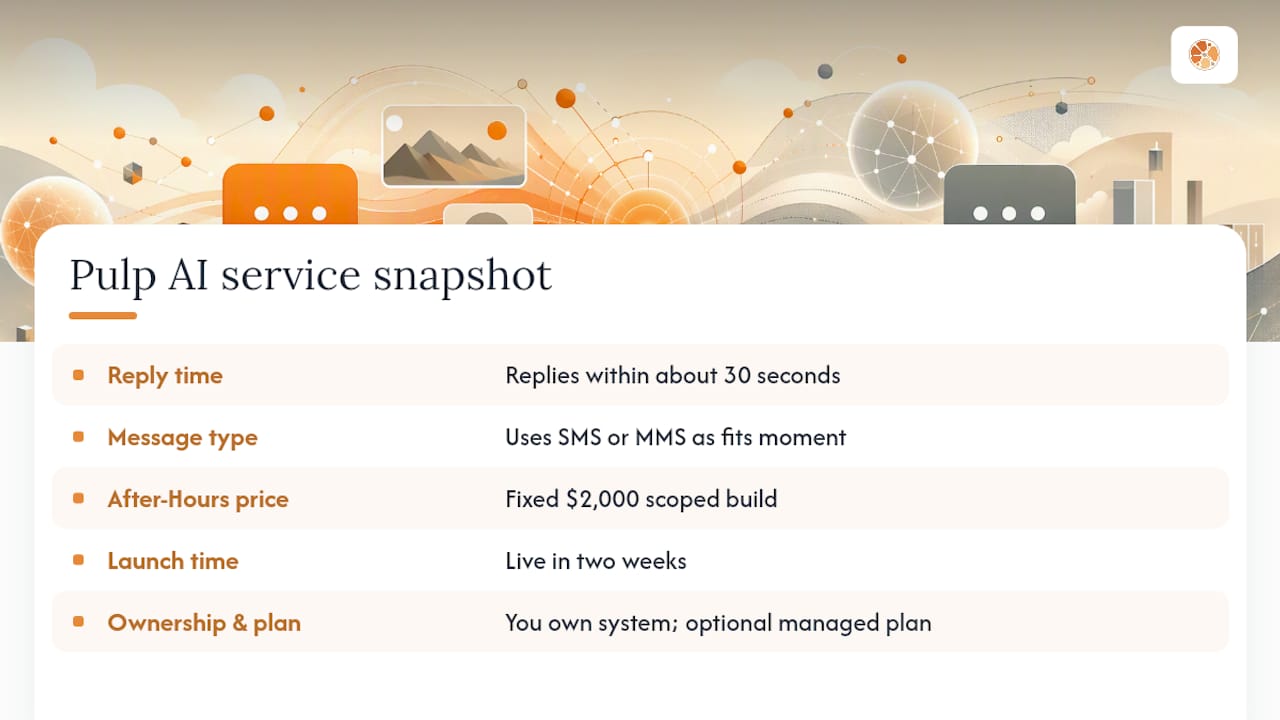
Pulp AI Studio builds custom missed-call text-back and after-hours answering systems that reply to unanswered calls within about 30 seconds, using whichever message type fits the moment, so leads that used to hit voicemail stay in the conversation. The After-Hours Answering Service is a scoped build, live in two weeks, and you own the system outright, with an optional managed plan if you want ongoing tuning. For businesses running larger SMS campaigns, understanding 10DLC versus short code registration is worth doing before volume ramps up.
Useful Sources for Going Deeper
For technical specifics on segmentation and encoding, see SamMobile’s breakdown of SMS and MMS. For cost benchmarks, SIPNEX’s business comparison covers per-segment pricing. For engagement data, see MessageFlow’s use-case breakdown.
FAQ
Should both SMS and MMS be turned on?
Yes, in most cases. Leaving both enabled lets your phone or provider automatically choose the right format, sending plain text as SMS and anything with media as MMS.
How do I know if my texts are SMS or MMS?
Check for an attachment icon, a media preview that loads after tapping, or an “MMS” label near the timestamp; plain, instantly visible text is SMS.
Should I use MMS or SMS for messaging?
Use SMS for urgent, transactional, or high-volume messages where reach and cost matter most, and use MMS when a photo, GIF, or longer message will meaningfully improve the response.
How do I change from MMS to SMS?
On iPhone, turn off MMS Messaging under Settings > Messages; on Android, look for an “Auto-retrieve MMS” or similar toggle in your messaging app’s settings to stop automatic conversion.