
 Adam Pichardo
TL;DR:
- Choosing a flat-rate AI answering service, a human-plus-AI hybrid, or a custom-owned AI agent depends on your call volume, lead value, and data control needs. Flat-rate plans generally offer predictable costs, while building a custom system provides full ownership and deep integrations, suitable for data-sensitive workflows. Most effective growth strategies favor flat-rate or ownership models due to cost advantages and scalability over per-minute services.
If you’re researching heyrosie.com alternatives, the short answer is this: choose a flat-rate AI answering service for predictable monthly costs, a human-plus-AI hybrid when caller judgment matters, or a client-owned custom AI agent (like what Pulp AI Studio builds) when you want data control, deeper workflow automation, and a system you own outright. The right pick depends on your call volume, lead value, and how much of the system you want to own.
Here’s what this guide prioritizes:
- Flat-rate pricing over per-minute billing (predictable, often cheaper at volume)
- SMS missed-call text-back within 30 seconds of a missed call
- Appointment booking and human handoff with clear escalation triggers
- CRM and Zapier integrations so leads flow into your existing tools automatically
The vendors covered below include HeyRosie, Pulp AI Studio, Smith.ai, ChirpReply, Ruby Receptionists, Podium, and AnswerConnect.
What are the best HeyRosie alternatives at a glance?
| Category | Best For | Pricing Model | Sample Starting Price | SMS Missed-Call | After-Hours | Appt. Booking | Human Handoff | Integrations | Customization | Time to Live | Support SLA |
|---|---|---|---|---|---|---|---|---|---|---|---|
| Flat-rate AI SaaS | High-volume, budget-conscious SMBs | Flat monthly fee | ~$199/mo | Yes | Yes | Limited | Limited | Zapier, CRM APIs | Low | Days | Email/chat |
| Per-minute legacy | Low-volume, occasional overflow | Per-minute + fees | — | Rarely | Yes | Varies | Yes | Basic | Very low | Days | Phone |
| Human-plus-AI hybrid | High-value, low-volume callers | Per-seat or per-minute | ~$300+/mo | Sometimes | Yes | Yes | Yes (live agent) | Moderate | Low | about two weeks | Phone + chat |
| Client-owned custom agent | Data-sensitive, scaling workflows | Scoped one-time build | Scoped build | Yes (30 sec) | Yes | Yes | Configurable | Deep (CRM, SMS, Zapier) | Full | ~2 weeks | Managed plan |
Category quick takes:
- Flat-rate AI SaaS (HeyRosie, Podium, ChirpReply): Live in a day or two and the bill doesn’t move when your marketing works. You’re renting a seat on someone else’s platform, so customization stops where the product stops.
- Per-minute legacy (e.g., AnswerConnect at standard tiers): Familiar model, live-agent quality, but per-minute pricing becomes a trap once call volume grows.
- Human-plus-AI hybrid (Smith.ai, Ruby Receptionists): The best caller experience of the four, with a real person on the calls that matter. Worth the premium when one new client is worth thousands, hard to justify on routine volume.
- Client-owned custom agent: Slowest to stand up (about two weeks) and the only option where the integrations, the data, and the system itself are yours. Right call when the AI has to touch your CRM, calendar, and SMS in one conversation.
How do you choose between these alternatives?
Work through this checklist before booking a single demo:
- Call volume: How many calls go unanswered in a normal month, and is that number growing? Per-minute billing only stays cheap if the answer is low and flat.
- Lead value: What is one booked job or new client actually worth? At a few hundred dollars, optimize for cost per call; at a few thousand, optimize for the caller experience.
- SMS speed: Does a missed call trigger a text back within 30 seconds, automatically? Anything slower and the caller has already dialed the next shop.
- Appointment booking: Do you need the AI to write directly to your calendar (Google Calendar, Calendly, etc.), or is taking a message enough?
- Human handoff: What fires an escalation to a person, how fast does it happen, and does the caller have to press a key to get there?
- Integrations: Does lead data land in your CRM on its own, or are you retyping it from an email digest every morning?
- Data control: Are you handling medical, legal, or financial details that can’t live on a vendor’s servers by default?
Questions to ask on every vendor demo
Ask vendors these directly: “What triggers a human handoff, and how fast does it happen?” and “What are your overage rates if I exceed the plan’s call limit?” Red flags include vague answers on overages, no published SLA for response time, and handoff that requires the caller to press a key rather than happening automatically.
Annual cost exercise
Trials frequently surface hidden costs that the pricing page doesn’t mention. Run the math on your own volume before you commit: at a typical $1.29 per minute and three minutes per call, per-minute billing passes a $199/month flat-rate plan at roughly 50 calls a month.
Pro Tip: Set your human-handoff trigger lower than you think you need to. Emotional callers, urgent service requests, and high-ticket prospects are the exact situations where AI mishandles the conversation and costs you the lead. Test any vendor with at least 10 real calls before full cutover.
Short profiles of each alternative approach
Flat-rate AI SaaS (HeyRosie, Podium, ChirpReply style)
These services answer calls, send SMS missed-call replies, and handle basic FAQs for a flat monthly fee. Podium’s messaging platform, for example, includes review requests and two-way SMS alongside its answering features. ChirpReply focuses tightly on missed-call text-back for contractors and service businesses. HeyRosie itself sits in this category: fast to activate, no long-term contract on entry tiers, but you’re renting the system and customization is limited to what the platform allows.
Pros: Quick setup (often same day), predictable billing, no technical overhead. Cons: You own nothing; pricing scales with seat count or usage tiers; integrations are pre-built only.
Per-minute legacy services (AnswerConnect)
AnswerConnect offers 24/7 live-agent answering with bilingual support and basic CRM integrations. The per-minute model works when call volume is low and unpredictable, but the math turns against you fast. At 300 calls per month averaging three minutes each, annual spend approaches $14,000 before overages.
Pros: Live human on every call, established reliability, no AI failure modes. Cons: Cost scales directly with volume; no SMS missed-call recovery by default; limited automation.
Human-plus-AI hybrid (Smith.ai, Ruby Receptionists)
Smith.ai combines AI call screening with live virtual receptionists who handle escalations. Ruby Receptionists offers a similar model with a strong emphasis on caller experience and warm transfers. For businesses where a few high-value clients drive most revenue, this hybrid approach reduces the risk of losing an important lead to a bad AI interaction.
Pros: Best caller experience; human judgment on complex calls; appointment booking included. Cons: Higher per-interaction cost; less customizable than a built system; still a subscription.
Pro Tip: If you run a professional services firm (law, real estate, medical), a hybrid service is worth the premium for inbound new-client calls. Automate the follow-up and appointment reminders separately.
Client-owned custom agent (Pulp AI Studio)
A custom-built agent answers after-hours calls, sends an SMS within 30 seconds of a missed call, books appointments directly to your calendar, and pushes lead data to your CRM. You own the system outright. There’s no per-seat fee and no per-minute charge: you own the rig. Pulp AI Studio delivers these builds in about two weeks as a scoped, fixed-fee project, with an optional managed plan for ongoing tuning.
Why flat-rate pricing is winning and how to calculate true cost
Per-minute answering services are a pricing trap for growing businesses. The math is simple: a per-minute service charges you more every time your marketing works. Flat-rate plans in the market currently run roughly $199–$899/month for unlimited calls, depending on features. At typical call volumes, flat-rate pricing can result in significantly lower annual expenses compared to per-minute billing.
A client-owned system flips the economics entirely. After the one-time build cost, marginal cost per call is effectively zero. The crossover point where ownership beats SaaS typically arrives within about a year to a year and a half for businesses with substantial monthly call volume.
When should you build a custom agent instead of buying SaaS?
Buy SaaS when you need to be live this week and your workflow is standard. Build a custom agent when you need the system to take multi-step actions across your internal tools or when data ownership matters.
Custom agents cost more upfront but offer deeper integration and lower marginal costs at scale. The agentic AI architecture behind a well-built custom system, including tool calling, retrieval, and multi-step planning, is what separates a true owned agent from a chatbot widget.
Build indicators:
- You need the AI to write to your CRM, booking system, and SMS gateway in a single conversation
- You handle sensitive data (medical, legal, financial) and need to control where it lives
- Your monthly SaaS spend is approaching or exceeding $500/month with no end in sight
- You want the system trained on your specific inventory, services, or protocols
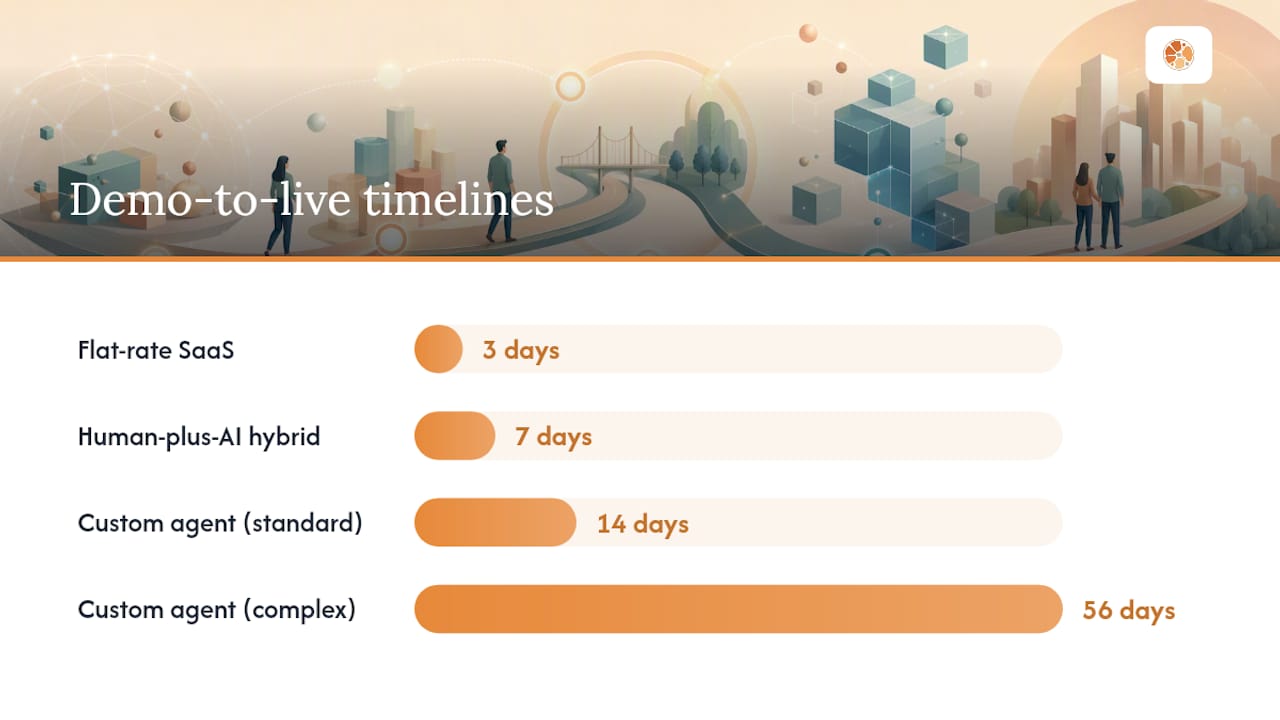
Typical timelines:
| Path | Demo to Live |
|---|---|
| Flat-rate SaaS | Typically within a few days |
| Human-plus-AI hybrid | Within about a week |
| Custom-owned agent (standard scope) | About two weeks |
| Custom-owned agent (complex integrations) | Several weeks to a few months |
For a deeper look at how AI workflow architecture affects long-term flexibility, the distinction between SaaS and owned systems becomes especially clear when you map out a multi-step lead-response workflow.
Which option fits your situation?
- High-value, low-volume professional services (law, real estate, medical): Go human-plus-AI hybrid for inbound new-client calls. The cost per call is justified when a single client is worth thousands. See the real estate answering guide for workflow specifics.
- Data-sensitive or custom-workflow business (medical practices, dealerships): Build from day one. A client-owned system with HIPAA-capable handling is the only option that gives you full data control.
Request a demo or trial from any SaaS vendor before committing. For a custom build, ask for a scoped estimate with a fixed delivery date.
Key Takeaways
The most cost-effective path for a US small business is a flat-rate or client-owned AI answering system, not per-minute billing, because per-minute costs compound directly with growth.
| Point | Details |
|---|---|
| Flat-rate beats per-minute | At 300 calls/month, flat-rate saves roughly $9,000/year versus per-minute billing at $1.29/min. |
| Human handoff matters | Set escalation triggers conservatively; high-value and emotional calls are where AI loses leads. |
| SMS speed is the metric | A missed-call text-back within 30 seconds keeps leads warm; longer delays lose them to competitors. |
| Build crossover point | A client-owned system typically pays for itself within 12–18 months at 200+ calls per month. |
| Pulp AI Studio option | Pulp AI Studio delivers a client-owned missed-call and after-hours AI system in about two weeks as a scoped build you own outright, with an optional managed plan. |
The gap between what phone-AI promises and what actually breaks
Most articles on heyrosie.com alternatives spend their energy comparing feature lists. The real differentiator is what happens when the AI fails, and it will fail at some point.
The failure modes that cost businesses real money are almost never “the AI didn’t understand the question.” They’re the calls where a frustrated caller gets stuck in a loop, or a high-value prospect hangs up because the AI couldn’t confirm a specific appointment slot, or an after-hours emergency gets handled with a generic “we’ll call you back” message. Those aren’t edge cases. They’re predictable, and they happen most often when the human-handoff threshold is set too high.
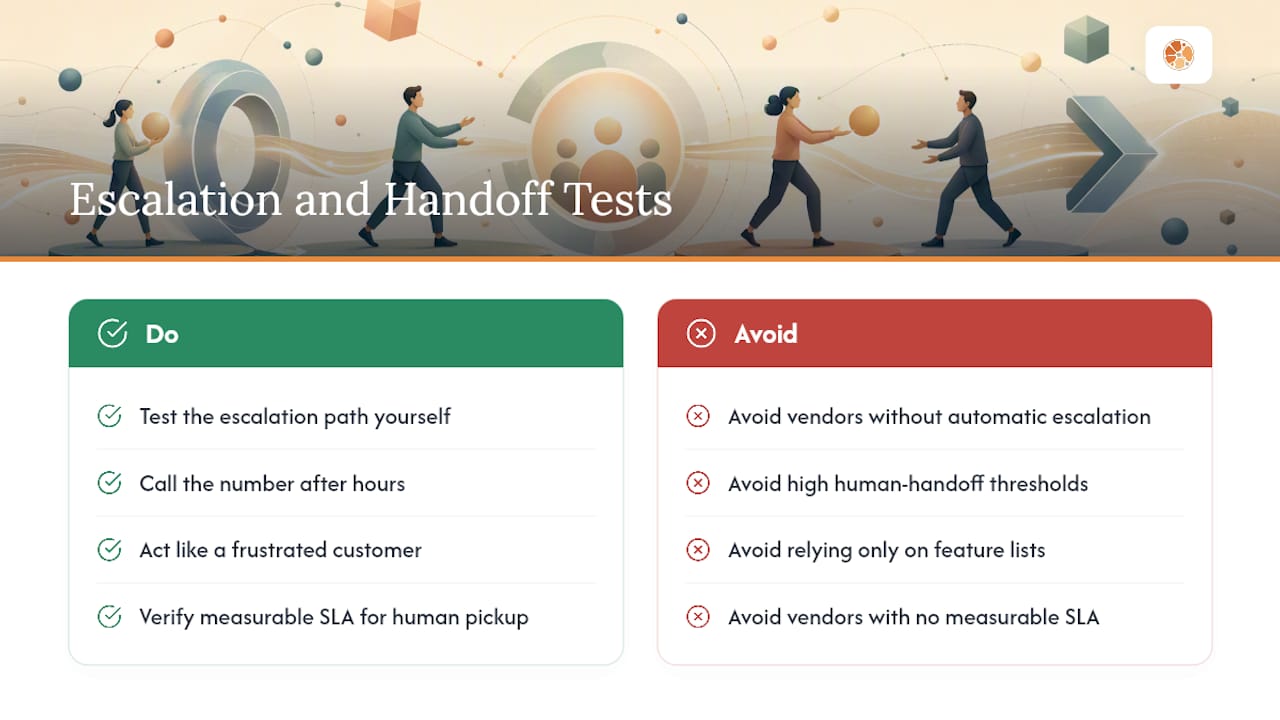
The vendors that handle this well are the ones with a clear, automatic escalation path and a measurable SLA for how fast a human picks up after the trigger fires. Before you sign anything, test that path yourself. Call the number after hours, act like a frustrated customer, and see what happens. The answer tells you more than any feature comparison table.
Your own AI answering system, built and owned by you
Most sites like HeyRosie rent you a seat on their platform. Pulp AI Studio builds the system for you and hands you the keys. When a call goes unanswered, your caller gets an SMS within 30 seconds, the AI handles the conversation, and you get an instant alert on your phone. No per-minute charges, and costs don’t climb with your call volume: the system is yours.
Every build is scoped, quoted as a fixed-fee proposal, and delivered in about two weeks. You own the system outright, and an optional managed plan keeps it tuned as your business grows. For regulated businesses, the medical after-hours answering service build includes HIPAA-capable handling from day one.
Ready to stop renting and start owning? Get a scoped estimate for your after-hours AI system and see exactly what you’d be getting before you commit.
Selected sources and further reading
- AI Phone Receptionists for Small Business: What They Cost and Where They Quietly Lose You Money - Lilach Bullock | AI Implementation Consultant
- I Let AI Answer My Business Phone for 30 Days. Here’s What Nobody Tells You - Lilach Bullock | AI Implementation Consultant
- Build vs Buy AI Agents: Decision Guide (2026)
- Custom AI Agent vs Chatbot Platform: What to Pick · Pykero Agency
- Agentic AI - devPulse
FAQ
What is the main difference between HeyRosie and a custom-built AI agent?
HeyRosie is a SaaS subscription you rent monthly; a custom-built agent like those from Pulp AI Studio is a system you own outright, with no per-seat fee and full control over your data and workflows.
Which HeyRosie alternative is best for a medical or regulated business?
A client-owned system with HIPAA-capable handling is the safest choice; Pulp AI Studio’s automated medical answering build is designed specifically for that requirement.
How fast can I get an AI answering service live?
Flat-rate SaaS options like Podium or ChirpReply can go live in a day or two; a custom-built system from Pulp AI Studio typically takes about two weeks from scoping to launch.
When does a custom-owned system become cheaper than SaaS?
The crossover typically arrives within 12–18 months for businesses handling 200 or more calls per month, after which the one-time build cost is fully amortized and marginal cost per call is effectively zero.
Do I need Zapier to connect an AI answering service to my CRM?
Many flat-rate SaaS services use Zapier for CRM connectivity; a custom-built agent can connect directly to your CRM via API, which is faster and more reliable than a Zapier middleware chain.