
 Adam Pichardo
Yes, you can automate your payroll process, and for most U.S. small and mid-sized businesses, it is the single most reliable way to eliminate manual calculation errors, stay current with IRS deposit deadlines, and free up hours every pay period. The next step is straightforward: gather your federal Employer Identification Number (EIN) and state employer registration numbers, then select a full-service payroll platform. Software setup typically takes 2–4 hours of active time once those credentials are in hand.
Before you open a single vendor tab, confirm you have these four prerequisites:
- Federal EIN from the IRS (apply free at irs.gov; issued instantly online)
- State employer registration for income tax withholding and unemployment insurance (allow 2–4 weeks for processing)
- Employee tax and eligibility forms (W-4, I-9, and any applicable state withholding forms)
- Dedicated payroll bank account to isolate payroll funds and simplify audits
Timeline at a glance: Software configuration takes 2–4 hours; state registrations are the real bottleneck at 2–4 weeks. Start those registrations the moment you know you will be hiring, not shortly before your first payroll run.
What does payroll automation actually do?
Payroll automation replaces manual data entry and spreadsheet-based calculations with software that runs on a defined schedule, pulls data from connected systems, and executes payments and filings without human intervention at each step. The American Payroll Association recognizes it as a core operational discipline, not just a convenience feature.
The specific tasks a full-service automated payroll system handles include:
- Gross pay calculation — regular hours, overtime, shift differentials, commissions, and bonuses, applied per your configured pay rules
- Withholding and deductions — federal and state income tax, FICA, benefits premiums, retirement contributions, and garnishments
- Direct deposit — ACH payments to employee accounts on your pay schedule
- Tax deposits and filings — with the IRS and state agencies (Forms 941, 940, state equivalents)
- Year-end forms — W-2s for employees and 1099s for contractors, generated and distributed
- Recordkeeping — pay stubs, audit trails, and reports retained for compliance
What automation does not solve on its own: worker classification decisions. Whether a worker is an employee or an independent contractor requires human judgment and, often, legal review. The IRS and most states presume employee status unless you can document contractor status clearly. That distinction matters because misclassification carries significant penalties, and no software can make that call for you.
Why automating payroll pays off quickly
The business case for automated payroll software is not abstract. Time savings alone are significant: manual payroll for a 10-person team can consume several hours per pay period across data entry, calculations, and reconciliation. Automation compresses that to a review-and-approve workflow measured in minutes.

Beyond time, the compliance benefit is concrete. Payroll errors and missed tax deposit deadlines trigger IRS penalties, and those penalties compound quickly. Automated systems deposit taxes on schedule and file returns electronically, removing the human-error risk from the most penalty-prone steps.
Security improves as well. Treating payroll as a specialized function with its own dedicated bank account limits exposure: if a payment error or fraud event occurs, it is contained to that account rather than your operating funds. Most platforms also encrypt data in transit and at rest, and role-based permissions mean only authorized staff can approve or modify payroll runs.
Scalability is where automation earns its keep over the long term. Adding employees in a new state, adjusting pay schedules, or onboarding a new pay type takes a configuration change rather than a process rebuild. That flexibility matters when your headcount grows or you expand into a second market.
Pro Tip: Open a dedicated payroll bank account before your first automated run. It simplifies reconciliation, makes audits cleaner, and creates a clear paper trail that your accountant will thank you for.
How payroll automation works from data to deposit
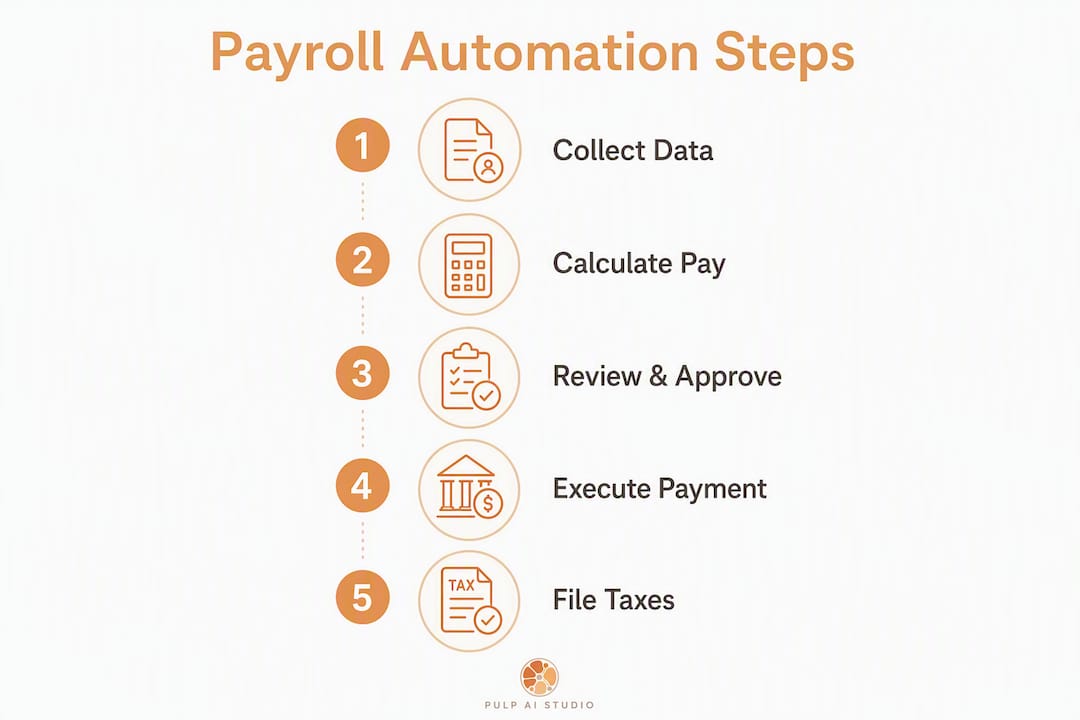
Think of automated payroll as a pipeline with five stages. Data enters at one end; compliant payments and filings come out the other.
- Data intake — Hours flow in from your time-tracking system, and employee records (pay rates, withholding elections, deductions) come from the payroll database or a connected HRIS.
- Calculation — The system computes gross pay, applies overtime and PTO rules, then subtracts taxes, benefits, and any garnishments to produce net pay.
- Review and approval — A summary goes to whoever holds approval rights. Exceptions and anomalies surface here, before money moves.
- Payment — Approved net pay is sent by ACH to employee accounts on your pay schedule.
- Tax deposits and filings — Federal and state tax deposits are submitted electronically on IRS-mandated schedules. Quarterly and annual returns are filed automatically or queued for review.
Common integrations that feed this pipeline include time and attendance platforms, HRIS systems, accounting software, benefits administration tools, and background-check services. These integrations eliminate duplicate data entry across systems, which is where most manual errors originate.
Modern platforms go further. AI-powered anomaly detection can flag unusual pay amounts, identify compliance risks, and generate predictive labor-cost insights before a problem becomes a penalty. For a lean HR team, that kind of early warning is the equivalent of a second set of eyes on every run.

Approval workflows add a human checkpoint without adding manual work. A manager reviews a summary, approves with one click, and the system executes. Exceptions, like a new hire whose state registration is still pending, surface automatically rather than slipping through.
What features should you prioritize in payroll software?
Not every feature on a vendor’s marketing page is worth paying for. For a small or mid-sized U.S. business, the evaluation should start with a short list of must-haves and a longer list of nice-to-haves.
Key evaluation criteria for SMB payroll software include automation depth, ease of use, data security, AI capabilities, and multi-state support. Here is how those translate into a practical feature checklist:
| Feature | Priority | Notes |
|---|---|---|
| Automated tax calculation and filing | Must-have | Full-service means the vendor files and deposits on your behalf |
| Multi-state payroll support | Must-have if you have remote workers | Confirm which states the vendor covers |
| Direct deposit | Must-have | ACH timing and same-day options vary by vendor |
| Employee self-service portal | Must-have | Employees access pay stubs and W-2s without HR involvement |
| Integrations (time tracking, accounting, HRIS) | Must-have | Reduces duplicate entry; confirm your specific tools are supported |
| Audit trail and reporting | Must-have | Required for compliance and internal review |
| Role-based permissions | Must-have | Limits who can approve or modify payroll |
| Data encryption and security | Must-have | Confirm SOC 2 certification or equivalent |
| AI anomaly detection | Nice-to-have | Flags unusual amounts before they become errors |
| Benefits administration | Nice-to-have | Useful as headcount grows |
| Garnishment management | Nice-to-have (required if applicable) | Mandatory if you have employees with court-ordered deductions |
| Mobile app | Nice-to-have | Useful for approvals on the go |
On the operational side, the system needs accurate employee data before it can run correctly. That means pay schedules defined in the system (weekly, biweekly, semi-monthly), overtime rules configured per state, and PTO accrual policies entered as automated rules rather than tracked in a spreadsheet. Enter overtime, sick time, and vacation accrual rules early — these automated instructions prevent manual entry errors later and are far easier to set up before the first live run than to correct afterward.
Step-by-step implementation checklist for U.S. payroll automation
A clean implementation follows four phases. Each phase has a clear owner and a defined output.
Phase 1: Prerequisites and planning
- Apply for your federal EIN at irs.gov if you do not already have one.
- Register for state income tax withholding and state unemployment insurance in every state where you have employees. Start this immediately; processing takes 2–4 weeks.
- Collect completed W-4 forms from all employees and I-9 eligibility verification documents.
- Open a dedicated payroll bank account.
- Document every pay type your business uses — regular wages, overtime, shift differentials, contractor payments, commissions — and forecast your headcount for the next 12–24 months. This prevents selecting a platform you will outgrow.
Phase 2: Vendor selection and data preparation
- Choose your payroll approach: full-service payroll (vendor files and deposits taxes), payroll-only (you file), or payroll bundled with HRIS.
- Confirm the vendor supports every state where you have employees and every pay type you documented.
- Prepare a clean employee data file: legal names, SSNs, addresses, pay rates, withholding elections, and direct deposit details.
- Map your current accounting chart of accounts to the payroll system’s expense categories.
Phase 3: System configuration
- Enter pay schedules, overtime rules, PTO accrual policies, and garnishment orders into the system.
- Configure tax settings for each state and locality.
- Set up integrations with your time-tracking and accounting systems.
- Assign role-based permissions: who can enter hours, who can approve, who can modify pay rates.
Phase 4: Testing and go-live
- Run a parallel or test payroll for one pay period. Compare results to your last manual payroll run and reconcile any differences.
- Many vendors allow test runs while state registrations are still processing, so you can validate configurations before going live.
- Correct any discrepancies, then schedule your first live payroll run.
- After the first live run, verify that tax deposits were submitted on time and that all employee direct deposits cleared.
Pro Tip: State employer registration is the hidden bottleneck in most implementations. Initiate those registrations the moment you know you will be hiring, not just the week payroll is due. Running a test payroll in the software while you wait keeps the project moving without risking a compliance gap.
How long does setup take, and what does it cost?
Setup time splits into two categories that most guides conflate: software configuration and government registrations.
- Software setup: 2–4 hours of active time for a business owner who already has an EIN and state registration numbers. That covers entering employee data, configuring pay schedules, and connecting integrations.
- State registrations: several weeks for processing in most states. This is the real timeline driver, not the software.
On cost, small-business payroll platforms typically charge a base monthly fee plus a per-employee fee. Common pricing structures include a base monthly fee plus a per-employee fee for entry-level tiers, with higher tiers adding HR features, benefits administration, and dedicated support. Multi-state payroll, garnishment processing, and custom integrations push costs higher. Year-end W-2 and 1099 filing may be included or charged as an add-on depending on the vendor and tier.
What drives costs up: running payroll in multiple states, managing garnishments, needing a dedicated account manager, or requiring custom integrations with legacy systems. What keeps costs down: consolidating to a single platform that handles payroll and time tracking together, reducing the number of integration points.
Pro Tip: Before your first vendor demo, prepare a standardized employee data spreadsheet and your 12–24 month headcount forecast. Vendors can give you a more accurate quote, and you will avoid the most common onboarding delay: missing or inconsistent employee records.
How do you choose the right payroll automation software?
The right payroll system for a 12-person retail shop is not the same as the right system for a 75-person multi-state services firm. Selection starts with a clear picture of your current state and where you expect to be in two years.
Evaluation criteria
- Headcount and growth trajectory — Confirm the platform scales to your projected size without a tier jump that doubles your cost.
- Multi-state support — If you have remote employees or plan to expand, verify which states the vendor covers and whether multi-state is included or an add-on.
- Tax filing scope — Full-service means the vendor deposits and files on your behalf. Self-file means you are responsible. For most SMBs, full-service is worth the premium.
- Integrations — Confirm compatibility with your time-tracking system, accounting software, and HRIS before signing.
- Security certifications — Look for SOC 2 Type II compliance at minimum.
- Support model — Phone support with a dedicated rep versus a ticketing system matters when a payroll run has a problem at 4 PM on a Friday.
- Scalability of the pricing model — Understand what triggers a tier upgrade and what features are locked behind it.
Questions to ask vendors during demos
- Who files and deposits payroll taxes — your team or ours?
- What is your SLA for ACH deposit timing?
- How are payroll corrections handled after a run is submitted?
- Which states do you support for multi-state payroll, and is that included in the base price?
- What happens if a tax deposit is late due to a system error — who is liable?
- How do you handle garnishments and court-ordered deductions?
Red flags to watch for
- No audit trail or change log in the system
- Vague answers about who bears liability for late tax deposits
- Multi-state support listed as “available” but requiring manual overrides for common scenarios
- No ability to run test or parallel payrolls before going live
- Pricing that changes significantly once you add your actual pay types and state count
Which payroll platforms are worth considering for U.S. SMBs?
These six platforms appear consistently in SERP consensus for U.S. small and mid-sized businesses. Each has a distinct strength. Confirm current pricing and state coverage directly with each vendor before committing, as both change regularly.
| Platform | Best for | Tax filing | Multi-state | Notable integration | Setup effort |
|---|---|---|---|---|---|
| Gusto | Small businesses wanting an all-in-one HR and payroll experience | Full-service: files and deposits taxes | Yes, included in higher tiers | Benefits, time tracking, accounting | Low; guided onboarding |
| ADP | Mid-sized to larger businesses needing enterprise-grade compliance and dedicated support | Full-service across all tiers | Yes, broad state coverage | HRIS, time, benefits, background checks | Moderate; implementation support available |
| Paychex | Small to mid-sized businesses wanting a dedicated payroll specialist and flexible service levels | Full-service; dedicated rep available | Yes | HR, benefits, time tracking | Moderate; rep-assisted setup |
| QuickBooks Payroll | Businesses already using QuickBooks accounting | Full-service on higher tiers | Yes | Native QuickBooks sync; time tracking | Low for existing QuickBooks users |
| Rippling | Fast-growing companies needing deep HRIS, IT, and payroll integration in one platform | Full-service | Yes, including international | HRIS, IT provisioning, benefits, time | Moderate to high; feature-rich setup |
| Ramp | Finance teams wanting spend management paired with payroll-adjacent expense automation | Payroll via partner integrations | Varies by integration | Expense management, accounting, ERP | Low for expense workflows; payroll via integration |
A few practical notes on this list. Gusto’s guided onboarding makes it a natural starting point for first-time payroll automation. ADP’s depth in compliance and its network of HR professionals suits businesses where regulatory complexity is high. Rippling stands out when you need payroll, IT, and HR to operate as a single system rather than three connected tools. Ramp’s core strength is expense and spend management; its payroll capabilities depend on integration partners, so verify the specific workflow before selecting it as a payroll solution.
Where automation still needs a human in the loop
Payroll automation handles the routine with precision. It struggles with the unusual, and the unusual is exactly where errors become expensive.
- Worker classification — Software cannot determine whether a worker is an employee or contractor. The IRS and most states default to employee status, and misclassification penalties are significant. Any classification decision requires human review and, in complex cases, legal counsel.
- Retroactive corrections — A missed raise, a wrong pay rate, or an incorrect withholding election discovered after a run has to be unwound by hand, often across multiple pay periods and tax filings.
- Garnishment setup — Court-ordered deductions arrive as legal documents with specific calculation rules and priority ordering. Entering them correctly is a human reading task; the system only executes what you configure.
- Final paychecks and terminations — State rules on timing, accrued PTO payout, and delivery method vary widely, and getting them wrong carries penalties.
- Multi-state and remote-worker edge cases — Reciprocity agreements, local taxes, and nexus questions need judgment before you configure the state settings.
The practical safeguard for every edge case: build an approval workflow that surfaces exceptions before the payroll run executes, not after. An automated flag that says “this employee’s hours are 40% above their average” costs nothing to configure and can prevent a significant overpayment or a missed garnishment. Pair that with a quarterly human review of your payroll configuration — tax rates, pay rules, and state requirements change, and the system only knows what you told it.
For major classification changes or a payroll audit, bring in a CPA or payroll attorney. Automation is a force multiplier for your team, not a replacement for professional judgment in high-stakes situations.
This article provides general information about payroll automation and is not legal, tax, or professional advice. Confirm current IRS requirements, state registration rules, and tax rates with the IRS, your state tax agency, or a qualified payroll professional before running payroll.
Key Takeaways
Automating payroll in the U.S. requires four prerequisites (EIN, state registrations, employee tax forms, and a dedicated payroll bank account), takes 2–4 hours to configure in software, and delivers lasting compliance and time savings once those registrations clear.
| Point | Details |
|---|---|
| Prerequisites come first | Collect your EIN, state employer IDs, W-4/I-9 forms, and open a dedicated payroll bank account before touching any software. |
| State registration is the timeline driver | Software setup takes 2–4 hours; state registrations take 2–4 weeks, so start them immediately when hiring is likely. |
| Full-service payroll reduces compliance risk | Full-service platforms file and deposit taxes on your behalf, removing the most penalty-prone manual steps from your workflow. |
| Plan for your future headcount | Document every pay type and forecast headcount for 12–24 months before selecting a vendor to avoid outgrowing your platform. |
| Pulp AI Studio for adjacent automation | For payroll-adjacent workflows like automated notifications, approvals, and custom integrations, Pulp AI Studio builds scoped custom systems, live in about 30 days, that you own outright. |
The part most guides skip about payroll automation
Payroll automation advice tends to focus on the software decision and skip the organizational readiness question. The platform you choose matters less than the quality of the data and rules you put into it. A well-configured Gusto account with clean employee records and properly entered overtime rules will outperform a poorly configured enterprise system every time.
The deeper issue is that most small businesses underestimate how much institutional knowledge lives in their current payroll process. The person who runs payroll manually knows that one employee has a garnishment, that another is in a different state for tax purposes, and that the holiday pay rule is slightly different from what the employee handbook says. When you automate, all of that knowledge has to be documented and entered as system rules. That documentation step is where implementations stall, not the software setup.
My recommendation: before you evaluate a single vendor, spend two hours writing down every exception to your standard payroll process. Every special pay arrangement, every state where you have a remote worker, every garnishment, every PTO accrual edge case. That document becomes your vendor evaluation checklist and your configuration guide. It also tells you immediately whether you need a full-service platform with a dedicated rep or whether a self-serve tool will cover your situation cleanly.
Payroll automation is genuinely one of the highest-ROI automation projects a small business can run. The compliance protection alone justifies it. But the businesses that get the most from it are the ones that treat implementation as a process documentation exercise first and a software selection exercise second.
Pulp AI Studio builds the automation around your payroll system
Off-the-shelf payroll platforms handle the core payroll run well. What they do not handle is the surrounding workflow: the manager who needs an instant alert when a payroll run is approved, the employee who needs an SMS confirmation when their direct deposit is processed, the operations team that needs payroll data to flow automatically into a custom dashboard or a legacy ERP system that no standard integration supports.
That is where Pulp AI Studio comes in. We scope each custom build to your workflow and have it live in about 30 days (software, integrations, and any hardware), and the client owns the system outright. You own the rig, so you are not waiting six months for a vendor roadmap to catch up with your business rules. An optional managed plan covers ongoing monitoring if you want it. If your payroll workflow has a gap that standard software leaves open, a custom-built automation closes it on your timeline.
Businesses with complex integrations, legacy systems, or unique approval workflows get the most from this approach. See how a scoped automation build works, or visit the Pulp AI Studio after-hours AI system page to see how we set these systems up. To discuss a payroll-adjacent automation, reach out directly for a scoped estimate.
Useful sources for setup and compliance
These are the primary sources to consult when setting up payroll automation in the U.S. Each covers a specific step in the process.
| Source | What it covers | Why it is useful |
|---|---|---|
| IRS — Employer Identification Number | Federal EIN application and failure-to-file penalties | Apply for your EIN and understand the penalty structure for late filings |
| IRS — Collections, Penalties, and Appeals | IRS enforcement data and penalty types | Understand the compliance stakes for missed deposits and filings |
| American Payroll Association | Payroll compliance standards, training, and resources | Industry body for payroll professionals; useful for compliance guidance and certification |
| ADP Research Institute | Workforce and payroll research | Data on payroll trends, workforce management, and compliance benchmarks |
| Gusto — Full-Service Payroll | Full-service payroll feature set and tax filing scope | Understand what full-service means in practice and what Gusto automates |
| Grove HR — How to Run Payroll (U.S.) | Step-by-step U.S. payroll setup guide | Covers EIN, state registration, employee forms, and payroll bank account setup |
| Checkr — Best Payroll Software for Small Businesses | Payroll software comparison and integration guidance | Useful for vendor evaluation and understanding integration requirements |
For state-specific registration links, go directly to your state’s Department of Revenue (for income tax withholding) and Department of Labor or Workforce Commission (for unemployment insurance). Each state’s process differs; do not rely on a third-party summary for the exact forms or deadlines.
FAQ
Can payroll be completely automated?
Most routine payroll tasks can be fully automated, including calculations, tax deposits, direct deposits, and year-end filings. Worker classification decisions, garnishment setup, and retroactive corrections still require human review.
Is ADP an automated payroll system?
Yes. ADP is a full-service automated payroll platform that handles tax calculations, deposits, filings, and direct deposit across multiple states, with dedicated support options for mid-sized and larger businesses.
How long does it take to set up automated payroll?
Software configuration takes 2–4 hours of active time once you have your EIN and state employer registration numbers. State registrations, which are required before your first live payroll run, typically take 2–4 weeks to process.
What are the basic steps to process payroll?
The five core steps are: collect employee hours and pay data, calculate gross pay and apply deductions, execute direct deposits, submit tax deposits to the IRS and state agencies, and file quarterly and annual payroll returns. Automated payroll software handles all five once configured.
Is there a way to automate payroll-adjacent workflows beyond the payroll run itself?
Yes. Custom automation can handle approval notifications, payroll confirmation messages to employees, and data flows between payroll systems and legacy platforms. Pulp AI Studio builds these as scoped custom projects, live in about 30 days, with client ownership of the finished system and an optional managed plan.