
 Adam Pichardo
TL;DR:
- Retail AI chatbots automate customer interactions across digital channels, improving support efficiency and sales. Success requires high-quality data, clear goals, seamless system integration, and ongoing human oversight for continuous improvement. Starting with focused use cases, deep system integration, and weekly monitoring ensures ROI and sustained performance.
A retail chatbot is an intelligent virtual assistant that automates customer interactions across your store’s digital touchpoints, from product discovery to post-purchase support. This retail chatbot setup guide covers every phase of building a retail AI chatbot: goal setting, platform selection, system integration, training, compliance, and launch. Modern conversational AI agents reduce average handling time by roughly 35% and lift conversion rates by around 22%. That means fewer support hours and more completed sales from the same traffic. Platforms like Shopify, Botpress, and Hiver now make retail store bot integration accessible without a developer on staff.
What does a retail AI chatbot setup actually require?
Before you touch any platform, you need three things in order: clean data, clear goals, and the right integration points. Skip any one of these and your bot launches half-built.

The data you need to gather first
Your chatbot’s accuracy depends entirely on the quality of information you feed it. Pull together your full product catalog with current pricing, your top customer FAQs, and your order management data. If you run a loyalty program, export that data too. A chatbot without live loyalty data cannot tell a returning customer their points balance, and that gap creates frustration fast.
Auditing your last 100 support tickets to extract the top 20 recurring queries is the single most effective way to build a training dataset. This gives you real language your customers already use, not language you assume they use. The difference in chatbot accuracy between assumption-based training and ticket-based training is significant.
Retail chatbot development: no-code platform or custom build?
No-code platforms like Botpress, Tidio, and Gorgias let you launch a no-code chatbot in minutes with drag-and-drop builders. Custom retail chatbot development gives you deeper API access, tighter POS integration, and full control over conversation logic. (Running a smaller shop without POS complexity? Start with the AI chatbot for small business guide instead.) Here is a quick comparison to help you decide:
| Platform | Best for | Ease of setup | Key integration |
|---|---|---|---|
| Botpress | Mid-size retailers | Moderate | CRM, OMS, custom APIs |
| Tidio | Small ecommerce stores | Easy | Shopify, WooCommerce |
| Gorgias | Shopify-first brands | Easy | Shopify, Klaviyo |
| Custom build | Enterprise or complex POS | Advanced | Any system via API |
No-code tools get you moving fast. Custom builds get you further. Most retail owners should start with a no-code platform, prove the ROI, and then invest in deeper integrations.
How to build and train your retail chatbot step by step
The industry term for what you are building is a conversational AI agent. It is more than a scripted FAQ bot. It reasons, retrieves live data, and hands off to humans when it should. Here is the build pipeline that works.
§ 01 — Define your goals and pick two use cases
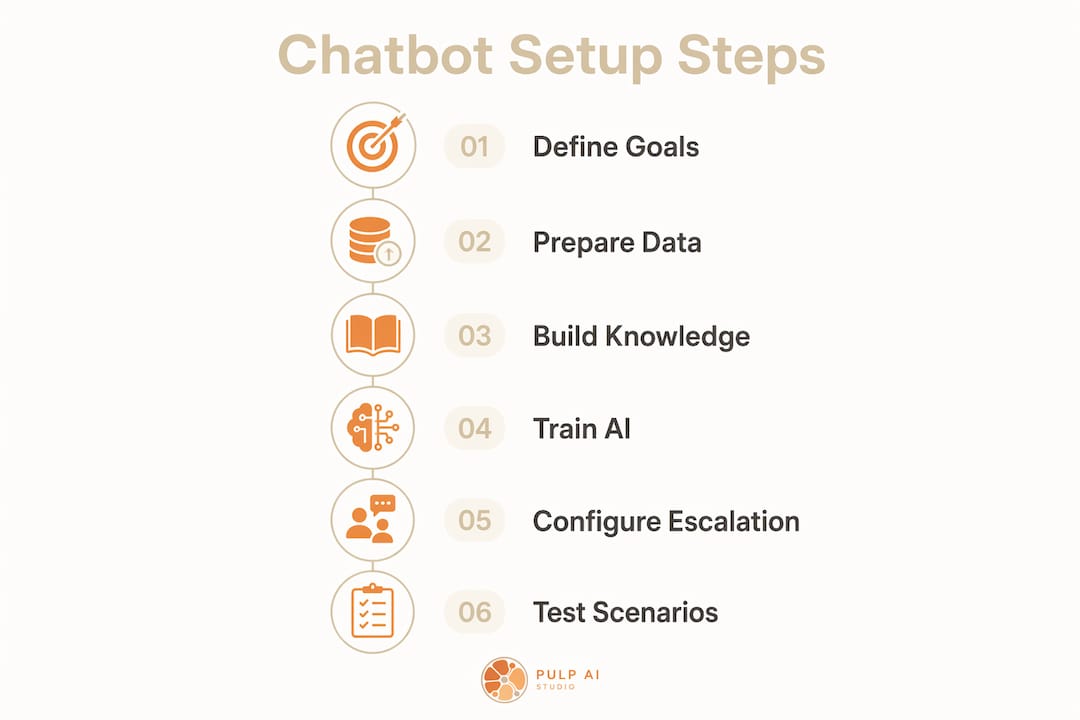
Starting with product recommendations and order tracking before scaling to other use cases is the most effective deployment approach. These two use cases cover the highest volume of retail support queries and deliver measurable ROI fast. Do not try to automate everything on day one.
§ 02 — Prepare your training data
Pull your 100 most recent support tickets. Identify the top 20 questions. Write clean question-and-answer pairs for each one. Use the exact phrasing your customers use, not your internal product names. If customers call your return window a “refund period,” train the bot on that phrase.
§ 03 — Build your knowledge base
Upload your product catalog, FAQ document, shipping policy, and return policy into your chosen platform. Botpress and Tidio both support document ingestion. Structure your knowledge base in logical categories: products, orders, returns, store hours, loyalty. A flat, unstructured knowledge base produces inconsistent answers.
§ 04 — Train the AI model on retail-specific data
Most no-code platforms use a fine-tuning or retrieval-augmented generation (RAG) approach. RAG means the bot searches your knowledge base in real time rather than memorizing static answers. This matters because your inventory changes. A bot trained on static data will confidently quote a price that changed last Tuesday.
§ 05 — Configure escalation rules
Routing conversations to live agents when AI confidence drops below your threshold keeps escalation rates under 30%. Set a confidence score threshold in your platform settings. When the bot scores below that threshold on a query, it transfers the conversation to a human agent with full context intact. Never let a low-confidence bot guess its way through a complaint.
§ 06 — Test with real scenarios
Run 20 to 30 test conversations covering your top use cases before going live. Include edge cases: out-of-stock items, partial order numbers, misspelled product names. Document every failure and retrain before launch.
Pro Tip: Build a “bot can’t help” fallback message that collects the customer’s contact info and routes to your team. A graceful failure converts better than a confused bot looping on the same answer.
How to integrate your chatbot with retail systems and deploy omnichannel
Integration is where most retail chatbot projects stall. The bot works in demo but fails in production because it has no live data. Here is how to wire it correctly.
Connecting to Shopify, Magento, and your POS
Shopify merchants can connect Gorgias or Tidio directly through the Shopify App Store with no custom code. Magento stores require API configuration but support the same core integrations. Your POS connection is the critical one. Deep integration with POS, OMS, and CRM is what separates high-performing retail chatbots from generic bots that frustrate customers. Without live POS data, your bot cannot confirm stock levels, apply in-store pricing, or validate loyalty points.
Connect your CRM to enable personalized responses. When a returning customer asks about their last order, the bot should pull that data automatically, not ask them to look it up themselves. Platforms like Botpress support CRM connections via REST API. Hiver integrates directly with Gmail-based support workflows for teams already running on Google Workspace.
Pro Tip: Demand API access before committing to any chatbot platform. A widget-only bot with no API layer cannot connect to your live systems. It is a FAQ page with a chat bubble, not an AI agent.
Omnichannel deployment across every touchpoint
Your customers do not stay on one channel. They browse on mobile, ask questions on Instagram, and check order status on your website. Your bot needs to follow them. Deploy across:
- Website chat widget: The baseline. Every retail site needs this.
- Mobile app: Use your platform’s SDK to embed the same bot logic.
- Social media: Facebook Messenger and Instagram DMs support chatbot integration via Meta’s API.
- In-store kiosks: Tablet-based kiosks running your bot handle product lookup and loyalty check-ins without staff involvement.
Maintaining conversation context across channels requires event-driven architecture. Tools like Apache Kafka or Google Pub/Sub synchronize cart and session data as shoppers move between touchpoints. This is a technical requirement, not a nice-to-have. Without it, a customer who adds items to their cart on mobile and then opens your website chat starts from zero. That breaks the experience.
You can learn more about the types of retail automation available before deciding which channels to prioritize.
AI chatbot compliance for retail: the rules before you launch
Retail chatbot compliance is not optional paperwork. Four rules cover most stores:
- Disclose the bot. California’s bot disclosure law requires telling customers they are talking to software, and it is good practice everywhere. A simple “You’re chatting with our AI assistant” line in the greeting covers it.
- Get SMS consent. If your bot texts customers, TCPA rules require documented opt-in before the first message. Our retail text message engagement checklist covers the consent flow in detail.
- Never take card numbers in chat. Route payment to your PCI-compliant checkout. A chatbot transcript is not a secure payment channel, and one stored card number in a chat log is a PCI violation.
- Honor privacy requests. CCPA and GDPR both treat chat transcripts as personal data. Set a retention window, and make sure a deletion request can actually purge the chat history, not just the CRM record.
Platform choice matters here: check that your vendor supports transcript retention controls and data processing agreements before you commit, not after your first audit.
How do you launch, monitor, and optimize after going live?
Retailers can launch a functional chatbot MVP using no-code platforms in 10–30 minutes, with full deployment taking 6–8 weeks and further refinement over 3–4 months. The launch is not the finish line. It is the starting point for optimization.
Metrics that tell you if it is working
Track these four numbers from week one:
- Average handling time: Your baseline target is a 35% reduction versus human-only support.
- Escalation rate: Keep this below 30%. Above that, your training data or confidence thresholds need adjustment.
- Conversion uplift: Measure sales completed through chatbot-assisted sessions versus unassisted sessions.
- Customer satisfaction score (CSAT): Collect post-chat ratings. A score below 4 out of 5 signals a knowledge gap.
Continuous improvement after launch
Chatbots treated as standalone tools fail. The ones that succeed are treated as team members with ongoing oversight. Assign one person on your team to review chatbot transcripts weekly. They should flag unanswered queries, update the knowledge base with new product information, and adjust escalation rules as patterns change.
New queries appear constantly. A seasonal promotion, a shipping delay, a new product line. Each one generates questions your bot has never seen. Update your knowledge base before customers hit a dead end.
Pro Tip: Set a monthly calendar reminder to audit the 10 most common escalations. Each escalation is a training opportunity. Fix those 10 queries and your escalation rate drops measurably within two weeks.
Common mistakes to avoid
Over-automation is the most common failure mode. Retailers who automate every interaction, including complaints and refund disputes, damage customer trust. Keep humans in the loop for high-stakes conversations. The bot handles volume. Your team handles relationships.
Neglecting real-time performance monitoring is the second mistake. A bot that worked perfectly at launch will degrade as your catalog changes and customer language evolves. Human-in-the-loop configurations for improving accuracy are not optional. They are the maintenance schedule for your AI employee.
Key takeaways
A retail AI chatbot succeeds when it connects to live systems, trains on real customer data, and receives ongoing human oversight from day one.
| Point | Details |
|---|---|
| Start with two use cases | Focus on order tracking and product recommendations before expanding to other automations. |
| Train on real ticket data | Audit your last 100 support tickets to build accurate, customer-language training pairs. |
| Integrate live systems | Connect POS, CRM, and OMS so the bot delivers accurate, personalized responses. |
| Set escalation thresholds | Route to live agents when confidence drops to keep escalation rates below 30%. |
| Monitor and update weekly | Assign a team member to review transcripts and refresh the knowledge base regularly. |
What I have learned from deploying retail chatbots across 300+ sites
Here is the uncomfortable truth about most retail chatbot projects: they fail in the first 90 days because the owner treats the bot like a set-and-forget appliance. You plug it in, it runs, and you move on. That is exactly backwards.
The retailers I have seen get real ROI from their bots share one habit. They review transcripts every single week for the first three months. Not because the bot is broken, but because customer language is unpredictable. Your customers will ask about “the blue one” instead of your SKU number. They will type “where’s my stuff” instead of “order status.” A bot trained on formal language fails on casual language, and most of your customers type casually.
The second thing I have learned is that integration depth determines everything. A bot connected to your live inventory and POS is a different product entirely from a bot running off a static FAQ document. The AI integration areas with the highest ROI in retail are always the ones tied to live transactional data. Order status, stock availability, loyalty points. Those are the queries that drive escalations when the bot gets them wrong, and they are the queries that build trust when the bot gets them right.
Start small. Two use cases, deep integration, weekly review. Prove the ROI in 60 days. Then scale. I have watched retailers try to automate 15 use cases on day one and end up with a bot that handles none of them well. The “AI employee” analogy holds here. You would not hire someone and assign them every job in the store on their first day. Give the bot a focused role, let it learn, and expand from there.
The retailers who treat their chatbot as a living part of the team, not a software purchase, are the ones still running it a year later with measurable results. The ones who do not are the ones who tell me “chatbots don’t work.” They work. The setup just requires more ongoing attention than most people expect.
— Adam
How Pulp AI Studio builds retail chatbots that are ready in weeks
If you want to skip the trial-and-error phase and get a chatbot that connects to your real systems from day one, Pulp AI Studio builds custom retail chatbots as a scoped, fixed-fee build, with an optional managed plan if you want us to keep it tuned. Every build includes integration with your existing POS, CRM, or ecommerce platform, plus a knowledge base trained on your actual product and support data. Deployment runs on a two-week sprint timeline. You get a fully functioning setup without months of back-and-forth. If you want to automate retail customer service without building it yourself, reach out for a free consult.
FAQ
What is a retail AI chatbot?
A retail AI chatbot is a conversational AI agent that automates customer interactions including order tracking, product recommendations, and FAQ responses across your store’s digital channels.
How do you train chatbots on retail product information?
Export your product catalog (SKU, title, variants, price, stock status, and specs) as structured CSV or JSON, then load it as the bot's knowledge base rather than pasting it into a prompt. Connect live fields like price and stock to your POS or ecommerce API so the bot reads current values at answer time instead of a stale snapshot. Add your real support history (past tickets, chat transcripts, and return threads) so the bot learns how your customers actually phrase things, then set a confidence threshold that routes anything unmatched to a human. Re-sync the catalog on every product change and review escalation transcripts weekly to catch gaps.
How long does it take to set up a retail chatbot?
No-code platforms allow an MVP launch in 10–30 minutes, with full deployment typically taking 6–8 weeks and ongoing refinement over 3–4 months.
Which platforms work best for Shopify stores?
Gorgias and Tidio integrate directly with Shopify through the App Store and require no custom code for basic retail chatbot setup.
Which retail chatbot is best for a small store?
For Shopify stores, Gorgias or Tidio is the fastest path. Multi-location or POS-heavy shops need a platform with native inventory integration. Owner-operators who want the bot tuned to their exact stock, hours, and voice are usually better served by a custom build they own than by a template subscription.
How do I keep my chatbot from frustrating customers?
Configure confidence score thresholds so the bot routes low-confidence queries to live agents, keeping your escalation rate below 30%.
How often should I update my chatbot’s knowledge base?
Update the knowledge base at least monthly, and assign a team member to review escalation transcripts weekly to catch new query patterns before they become recurring failures.
How do you use an AI chatbot for retail?
Start with two high-volume use cases, order tracking and product recommendations, connect the bot to your live POS and inventory data, and route low-confidence conversations to a human. Expand to returns, loyalty, and store-hours queries once the first two prove ROI.
What compliance rules apply to a retail chatbot?
AI chatbot compliance in retail comes down to four rules. Disclose that customers are talking to a bot, collect documented SMS opt-in before texting (TCPA), keep card numbers out of chat (PCI), and honor CCPA/GDPR deletion requests against your chat transcripts. Retain transcripts on a defined schedule rather than forever, and keep the opt-in record itself (timestamp, source, and wording) because that record, not the message, is what you have to produce if a TCPA claim lands.
Recommended
- Automate Retail Customer Service Replies in 2026 · Pulp AI Studio
- Retail Customer Service Automation Types Explained · Pulp AI Studio
- Retail Text Message Engagement Checklist for 2026 · Pulp AI Studio
- Local AI Agent on a Mini PC: A 24/7 Brain for Small Shops · Pulp AI Studio
- How AI Handles Clinic Inquiries: A 2026 Guide · Pulp AI Studio